
1. Introduction
The CHOYONG LC90 is a versatile multi-band smart radio designed for comprehensive audio reception. It combines traditional radio bands (FM, LW, MW, SW including SSB) with modern internet radio capabilities, offering access to a vast array of global content. This manual provides essential information for setting up, operating, maintaining, and troubleshooting your LC90 radio to ensure optimal performance and user experience.
2. Product Overview
2.1 Key Features
- 40K Internet Radio: Access over 40,000 internet radio stations worldwide via 2.4GHz WiFi or SIM card. Bookmark favorite stations and listen to millions of podcast episodes, including Spotify and Apple Podcast.
- Multi-Band Portable Radio: Receive traditional radio broadcasts on FM, LW, MW, and SW (SSB). Features adjustable reception bandwidth, signal strength (SIGNAL) and Signal-to-Noise Ratio (SNR) display, and external antenna connectivity.
- Voice Search via GPT: Utilize GPT and Google for fast and accurate voice search across approximately 40,000 radio stations, 10 million podcasts, and global music.
- Additional Functions: Includes TF card (MicroSD card) support, clock, alarm clock, timer playback, multi-language menu (Japanese not currently supported), key backlight, and a 5000mAh rechargeable battery.
- High-Quality Audio: Equipped with a sound unit featuring a mid-bass speaker, silk dome tweeter, and low-frequency diaphragm for excellent sound quality.
2.2 Components and Controls
Familiarize yourself with the radio's layout and controls.
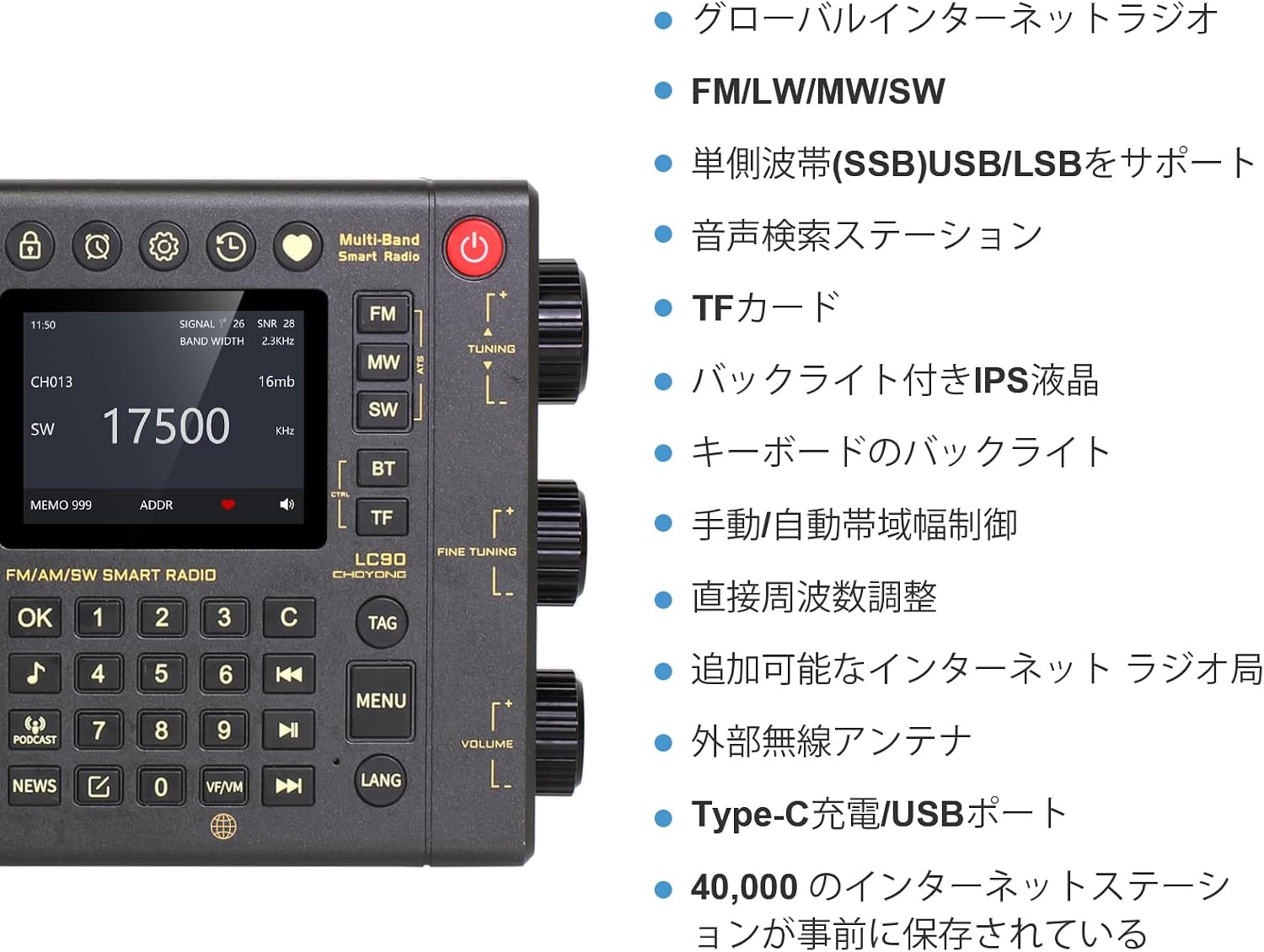
Figure 1: LC90 Multi-Band Smart Radio Front Panel with Key Features. This image displays the radio's front panel, highlighting controls such as tuning knobs, volume, menu buttons, and the IPS LCD screen showing frequency, signal strength, and other indicators. Key features like global internet radio, FM/LW/MW/SW, SSB support, voice search, TF card slot, IPS LCD with backlight, keyboard backlight, manual/auto bandwidth control, direct frequency adjustment, addable internet radio stations, external antenna port, and Type-C charging/USB port are listed.

Figure 2: LC90 Design Details and Features. This image showcases the radio's craftsmanship, emphasizing the 5000mAh battery, aluminum alloy knobs, backlit IPS LCD, and keyboard backlight for enhanced usability.
3. Setup
3.1 Initial Charging
Before first use, fully charge the internal 5000mAh rechargeable battery. Connect the radio to a power source using the provided Type-C USB cable. The charging indicator will show the charging status.
3.2 Inserting TF Card and SIM Card
The LC90 supports TF (MicroSD) cards up to 32GB for media playback. It also supports 4G SIM cards and eSIM for network connectivity.
- Locate the TF card slot and SIM card slot on the device.
- Carefully insert a TF card (32GB or less) into its designated slot until it clicks into place.
- For network access via cellular data, insert a 4G SIM card into the SIM card slot.

Figure 3: LC90 Networking Options. This image illustrates the various networking methods available, including 4G SIM card, 2.4G Wi-Fi, and eSIM, showing where to insert the SIM card.
3.3 Network Connection (Wi-Fi)
To access internet radio and podcasts, connect the LC90 to a 2.4GHz Wi-Fi network.
- Power on the radio.
- Navigate to the 'Settings' menu using the controls.
- Select 'Wi-Fi' and choose your desired 2.4GHz network from the list.
- Enter the Wi-Fi password if prompted.
- Once connected, the Wi-Fi icon will appear on the display.
4. Operating Instructions
4.1 Internet Radio and Podcasts
The LC90 provides access to over 40,000 internet radio stations and millions of podcast episodes.
- Ensure the radio is connected to the internet via Wi-Fi or SIM card.
- From the main menu, select 'Internet Radio' or 'Podcasts'.
- Browse stations by genre, location, or search for specific content.
- To bookmark a favorite station, press the designated 'Bookmark' button (refer to Figure 1).
- You can also add stations directly from the Choyong website by pushing them to your device.

Figure 4: Internet Radio Features. This image highlights the global internet radio capabilities, showing various station logos and the radio's interface for accessing 40,000+ stations and 10 million podcasts.
4.2 Multi-Band Radio (FM/LW/MW/SW)
To listen to traditional radio broadcasts:
- Select the desired band (FM, LW, MW, or SW) using the band selection buttons.
- Use the 'Tuning' knob for frequency adjustment. The 'Fine Tuning' knob allows for precise adjustments, especially for SSB reception.
- Extend the telescopic antenna for optimal reception. For improved SW reception, an external antenna can be connected to the dedicated port.
- The display shows signal strength (SIGNAL) and Signal-to-Noise Ratio (SNR) to help optimize reception.
- Adjust reception bandwidth manually or automatically as needed.

Figure 5: Multi-Band Radio Capabilities. This image details the traditional radio functions, including FM/LW/MW/SW bands, Single Side Band (SSB) support, ATS (Automatic Tuning System) & direct frequency tuning, manual/auto bandwidth control, and signal strength/SNR display.
4.3 Voice Search
Utilize the voice search feature for quick access to content.
- Press the 'Voice Search' button (refer to Figure 1).
- Speak your command clearly, for example, "Play VOA," "Chinese Music," "German Radio," etc.
- The radio will process your request using GPT and Google for fast and accurate results.

Figure 6: LC90 Voice Search Functionality. This image illustrates the voice search feature, showing a microphone icon and examples of voice commands for various music genres and radio stations.
4.4 Additional Functions
The LC90 includes several utility features:
- TF Card Playback: Insert a TF card with audio files to play music directly from the card.
- Clock & Alarm: Set the current time and configure alarm clocks for wake-up calls.
- Timer Playback: Use the timer function for scheduled playback or auto-off.
- Multi-Language Menu: The radio supports multiple languages for its menu interface. (Note: Japanese menu is not currently supported).
- Key Backlight: The keyboard features a backlight for visibility in low-light conditions.

Figure 7: Additional Functions and Ports. This image displays the side view of the radio, highlighting the external antenna socket, Type-C charging port, and 3.5mm earphone socket, along with a list of additional features like multi-language menu, Bluetooth/TF card, keyboard backlight, IPS LCD, and alarm.
5. Maintenance
5.1 Cleaning
To maintain the appearance and functionality of your LC90 radio:
- Wipe the exterior with a soft, dry cloth.
- Do not use abrasive cleaners, solvents, or strong chemicals, as these can damage the finish.
- Keep the display screen clean using a microfiber cloth.
5.2 Battery Care
The LC90 features a built-in rechargeable battery. To prolong battery life:
- Avoid fully discharging the battery frequently.
- Charge the radio regularly, even if not in constant use.
- Store the radio in a cool, dry place when not in use for extended periods.
5.3 Software Updates
It is recommended to keep your radio's software updated to the latest version for optimal performance and new features.
- Check the radio's version number in the 'Settings' menu under 'Version Information'.
- If an update is available, the LC90 supports Over-The-Air (OTA) upgrades. Follow the on-screen instructions to initiate the update.
- Important: Do not press any buttons during the upgrade process. The radio will automatically restart upon completion, which typically takes 1-2 minutes.
6. Troubleshooting
This section addresses common issues you might encounter with your CHOYONG LC90 radio.
6.1 Radio Does Not Turn On (Low Voltage)
If the radio fails to power on due to low battery voltage, follow these steps:
- Charge the radio for at least 3 hours to ensure sufficient power.
- Press and hold the power button for 30 seconds, then release it.
- Immediately after releasing, press and hold the power button again for 5 seconds.
6.2 Cannot Connect to Wi-Fi
If you experience difficulty connecting to a Wi-Fi network:
- Confirm that your Wi-Fi network is operating on the 2.4GHz band. The LC90 only supports 2.4GHz Wi-Fi.
- If your network is 2.4GHz, check your router settings, specifically the encryption protocol. Ensure it is set to WPA or WPA2, as the radio supports only these protocols.
- Restart the radio and your Wi-Fi router, then attempt to connect again.

Figure 8: LC90 Radio Overview for Troubleshooting. This image provides a general view of the LC90 radio, useful for identifying components during troubleshooting steps.
7. Specifications
Detailed technical specifications for the CHOYONG LC90 Multi-Band Smart Radio.

Figure 9: Detailed Product Specifications. This image presents a table summarizing the radio's technical specifications.
| Feature | Specification |
|---|---|
| Brand | CHOYONG |
| Model Number | 001 (LC90) |
| Color | Black |
| Item Weight | 640 grams |
| Product Dimensions (L x W x H) | 14 x 4 x 20 cm |
| Power Source | Battery Powered (Rechargeable) |
| Battery Type | 5000mAh, 2 Non-standard Batteries |
| Connectivity Technology | 2.4GHz Wi-Fi, Wi-Fi |
| Supported Wireless Frequencies | MULTI-BAND (FM, LW, MW, SW, SSB) |
| Tuner Type | AM/FM |
| Display Type | LCD |
| Included Components | Instruction Manual |
| Country of Origin | China |

Figure 10: LC90 Product Dimensions. This image provides a visual representation of the radio's length (20cm), width (4cm), and height (14cm).
8. Warranty and Support
8.1 Warranty Information
The CHOYONG LC90 Multi-Band Smart Radio comes with a 1-year warranty from the date of purchase. Please retain your proof of purchase for warranty claims. The warranty covers manufacturing defects and malfunctions under normal use conditions.
8.2 Customer Support
For additional support, technical assistance, or to search for more radio stations and podcasts, please visit the official Choyong website. You can often find FAQs, updated firmware, and contact information for customer service there.


