
Introduction
This manual provides comprehensive instructions for the N-Com Lithium Polymer Battery, model SPCOM00000038. This battery is designed as a replacement or spare part for compatible N-Com helmet communication systems. Please read this manual carefully before installation and use to ensure proper function and safety.
Important Safety Information
Failure to follow these safety instructions could result in fire, electric shock, injury, or damage to the battery or connected devices. Keep this manual for future reference.
- DO NOT INCINERATE: Do not expose the battery to fire or extreme heat.
- DO NOT DISASSEMBLE: Do not attempt to open, modify, or disassemble the battery. There are no user-serviceable parts inside.
- DO NOT SHORT-CIRCUIT: Avoid short-circuiting the battery terminals with any conductive materials.
- DO NOT EXPOSE TO HIGH TEMPERATURE: Do not expose the battery to temperatures exceeding 140°F (60°C).
- PROPER DISPOSAL: Dispose of the battery responsibly according to local regulations. Do not dispose of with household waste.
- Keep the battery out of reach of children.
- If the battery shows signs of damage, swelling, or leakage, discontinue use immediately and dispose of it properly.
Product Overview
The N-Com Lithium Polymer Battery (SPCOM00000038) is a compact power source designed for specific N-Com communication systems. It features a standard connector for easy integration.


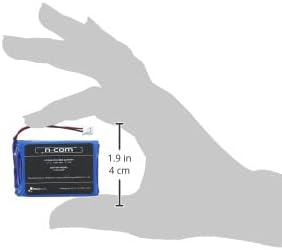
Setup and Installation
This battery is intended for replacement in compatible N-Com helmet communication systems. Refer to your specific N-Com system's manual for detailed instructions on accessing the battery compartment.
- Preparation: Ensure your N-Com system is powered off and disconnected from any charging source.
- Access Battery Compartment: Carefully open the battery compartment of your N-Com system. This usually involves removing a cover or panel, often located within the helmet.
- Disconnect Old Battery: Gently disconnect the existing battery by pulling the connector. Do not pull on the wires.
- Insert New Battery: Place the new N-Com Lithium Polymer Battery into the compartment, ensuring it fits snugly.
- Connect New Battery: Align the new battery's connector with the system's port and push firmly until it clicks into place. Ensure the polarity is correct (red wire to positive, black wire to negative, if visible).
- Secure Compartment: Close and secure the battery compartment cover.
- Initial Charge: It is recommended to fully charge the new battery before its first use.
Operating Instructions
Charging the Battery
To charge the N-Com Lithium Polymer Battery, connect your N-Com system to its original or a compatible charger. The charging process is managed by the N-Com system's internal circuitry.
- Use only chargers specified for your N-Com communication system.
- Do not overcharge the battery. Disconnect the charger once the system indicates a full charge.
- Avoid charging in extreme temperatures. Optimal charging temperature is typically between 0°C and 45°C (32°F and 113°F).
General Use
Once installed and charged, the battery powers your N-Com communication system. Refer to your N-Com system's user manual for specific operating instructions related to its functions (e.g., pairing, intercom, phone calls).
Maintenance
Proper maintenance extends the life of your battery.
- Storage: If storing the battery for an extended period, ensure it is charged to approximately 50-70% and stored in a cool, dry place away from direct sunlight and extreme temperatures.
- Cleaning: Keep the battery and its contacts clean and dry. Use a soft, dry cloth to wipe away any dust or debris.
- Avoid Physical Damage: Protect the battery from drops, impacts, and punctures.
Troubleshooting
If you experience issues with your N-Com battery, consider the following common solutions:
| Problem | Possible Cause / Solution |
|---|---|
| Battery not charging. |
|
| Short battery life. |
|
| System not powering on after battery installation. |
|
Specifications
| Attribute | Detail |
|---|---|
| Brand | Nolan |
| Model | SPCOM00000038 |
| Battery Type | Lithium Polymer |
| Voltage | 3.7 V |
| Capacity | 1000 mAh |
| Energy | 3.7 Wh |
| Item Weight | 2.46 ounces |
| Package Dimensions | 7.36 x 4.21 x 1.73 inches |
| Manufacturer Part Number | SPCOM00000038 |
| Date First Available | January 4, 2022 |
Disposal
This product contains a lithium polymer battery and should not be disposed of with general household waste. Please follow your local regulations for the recycling of electronic waste and batteries. Proper disposal helps prevent potential harm to the environment and human health.
Look for local recycling centers or designated collection points for batteries.
Warranty and Support
For warranty information and technical support regarding your N-Com Lithium Polymer Battery or N-Com communication system, please refer to the documentation provided with your original N-Com product or visit the official Nolan/N-Com website. Contact their customer service for assistance with product issues or inquiries.
Official Nolan Website: www.nolan-helmets.com


