
1. Introduction
This manual provides essential information for the safe and efficient operation of your Xunzel INLI300U 300W 12V USB Modified Sine Wave Power Inverter. This device converts 12V DC battery power into 230V AC household power and includes a 5V USB output for charging mobile devices. It delivers up to 300W of continuous AC power and can handle peak loads of up to 600W for 0.5 seconds.
Please read these instructions thoroughly before installation and use to ensure proper function and to prevent damage to the inverter or connected devices.
2. Safety Instructions
- Read all instructions: Before operating the inverter, read and understand all safety precautions and operating instructions.
- Ventilation: Ensure adequate ventilation around the inverter. Do not block ventilation openings.
- Avoid moisture: Do not expose the inverter to rain, water, or excessive moisture.
- Proper grounding: Ensure the inverter is properly grounded according to local electrical codes.
- Battery safety: Work in a well-ventilated area when connecting to batteries. Batteries can produce explosive gases.
- Overload protection: Do not exceed the inverter's rated power output (300W continuous, 600W peak). Overloading can damage the inverter and connected devices.
- Children and pets: Keep the inverter out of reach of children and pets.
- Qualified personnel: All electrical work should be performed by qualified personnel.
- Modified Sine Wave: This inverter produces a modified sine wave output. Some sensitive electronic devices may not operate correctly or may be damaged by this waveform. Consult your device's manual if unsure.
3. Package Contents
Verify that all items are present in your package:
- Xunzel INLI300U 300W Power Inverter
- DC Battery Connection Cables (with clamps)
- Instruction Manual (this document)
4. Product Features and Components
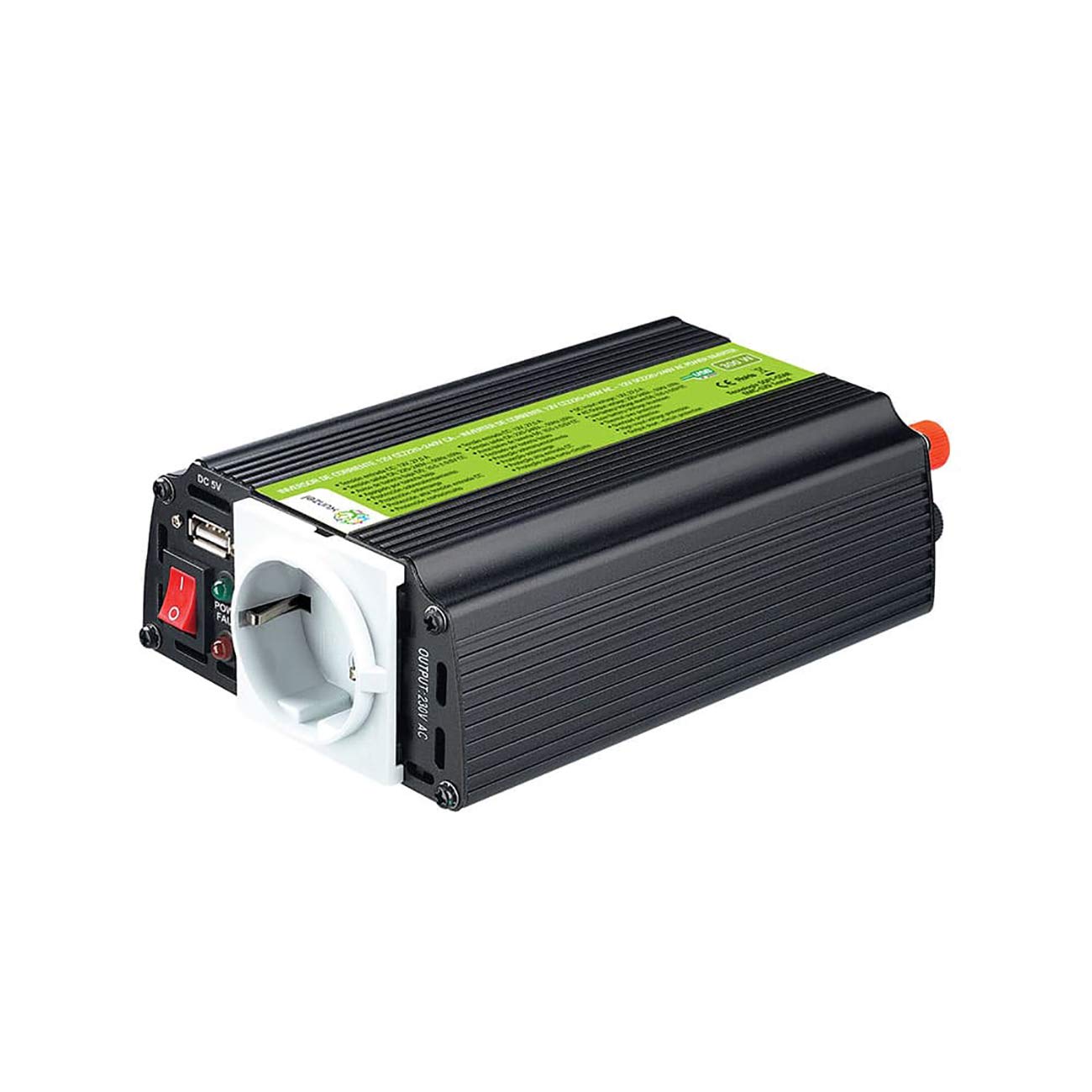
Figure 1: Xunzel INLI300U 300W Inverter with included accessories. The image shows the black inverter unit, red and black battery clamps with cables, and a spare fuse.
Familiarize yourself with the main components of your inverter:
- AC Output Socket: Standard European 230V AC socket for connecting appliances.
- USB Output (DC 5V): For charging USB-powered devices.
- Power Switch (ON/OFF): Controls the inverter's power.
- Power/Fault Indicator LEDs: Indicates operational status (Power) or error conditions (Fault).
- DC Input Terminals: Red (+) and Black (-) terminals for connecting to a 12V DC battery.
- Cooling Fins: Integrated into the casing for heat dissipation.
- Battery Connection Cables: Supplied with alligator clamps for easy connection to a 12V battery.
- Fuse: Provides overcurrent protection. A spare fuse is typically included.
5. Setup and Installation
- Choose a suitable location: Place the inverter in a dry, well-ventilated area, away from direct sunlight, heat sources, and flammable materials. Ensure there is enough space around the unit for proper airflow.
- Prepare the battery: Ensure your 12V DC battery is fully charged and in good condition.
- Connect to the battery:
- Ensure the inverter's power switch is in the "OFF" position.
- Connect the red (+) battery clamp cable to the red (+) terminal on the inverter.
- Connect the black (-) battery clamp cable to the black (-) terminal on the inverter.
- Connect the red (+) battery clamp to the positive (+) terminal of your 12V battery.
- Connect the black (-) battery clamp to the negative (-) terminal of your 12V battery.
Important: Always connect the inverter to the battery before turning it on. Ensure connections are secure to prevent arcing and poor performance.
- Initial check: After connecting, double-check all connections for polarity and tightness.
6. Operating Instructions
- Turn on the inverter: Flip the power switch on the inverter to the "ON" position. The "Power" indicator LED should illuminate, indicating the inverter is operational.
- Connect AC devices: Plug your 230V AC appliance into the AC output socket on the inverter. Ensure the total power consumption of all connected AC devices does not exceed 300W continuously or 600W peak.
- Connect USB devices: Plug your USB-powered device into the 5V USB output port for charging.
- Monitor usage: Pay attention to the inverter's performance and any warning indicators. If the "Fault" LED illuminates, refer to the Troubleshooting section.
- Turn off the inverter: When you are finished using the inverter, first disconnect all appliances, then flip the power switch to the "OFF" position. Finally, disconnect the inverter from the battery.
Note on Modified Sine Wave: This inverter produces a modified sine wave. While suitable for most resistive loads (e.g., incandescent lights, heaters) and many electronic devices (e.g., phone chargers, laptops), it may not be ideal for sensitive electronics, motors, or devices with active power factor correction. Always check the compatibility of your device with modified sine wave power.
7. Maintenance
- Cleaning: Keep the inverter clean and free from dust and debris. Use a dry cloth to wipe the exterior. Do not use liquid cleaners.
- Ventilation: Regularly check that the ventilation openings are not blocked.
- Connections: Periodically inspect battery connections for corrosion or looseness. Clean terminals as needed.
- Fuse Replacement: The inverter contains an internal fuse for protection. If the inverter stops working and the troubleshooting steps do not resolve the issue, the fuse may need replacement. This should only be performed by qualified personnel. Ensure to replace with a fuse of the exact same type and rating.
- Storage: When not in use for extended periods, disconnect the inverter from the battery and store it in a cool, dry place.
8. Troubleshooting
| Problem | Possible Cause | Solution |
|---|---|---|
| No output voltage, Power LED OFF |
|
|
| No output voltage, Fault LED ON |
|
|
| Connected device not working correctly |
|
|
9. Specifications
| Feature | Detail |
|---|---|
| Model Number | INLI300U |
| Continuous Power Output | 300 Watts |
| Peak Power Output | 600 Watts (0.5 seconds) |
| Input Voltage | 12V DC |
| AC Output Voltage | 230V AC (Modified Sine Wave) |
| USB Output | 5V DC |
| Included Components | Inverter, Battery Cables |
| Manufacturer | XUNZEL |
10. Warranty and Support
Information regarding specific warranty terms and availability of spare parts for this product is not provided in the product details. For support or warranty inquiries, please contact your retailer or the manufacturer directly.
Software updates are not applicable or information is unavailable for this product.


