
Makita HP1630
Makita HP1630 Impact Drill User Manual
Model: HP1630
1. Introduction
This manual provides essential instructions for the safe operation, maintenance, and care of your Makita HP1630 Impact Drill. Please read this manual thoroughly before using the tool to ensure proper and safe operation. Keep this manual accessible for future reference.

Image 1: The Makita HP1630 Impact Drill. This image displays the complete drill unit, highlighting its compact design and ergonomic grip.
2. General Safety Instructions
WARNING: Read all safety warnings, instructions, illustrations, and specifications provided with this power tool. Failure to follow all instructions listed below may result in electric shock, fire, and/or serious injury.
2.1 Work Area Safety
- Keep work area clean and well lit. Cluttered or dark areas invite accidents.
- Do not operate power tools in explosive atmospheres, such as in the presence of flammable liquids, gases, or dust. Power tools create sparks which may ignite the dust or fumes.
- Keep children and bystanders away while operating a power tool. Distractions can cause you to lose control.
2.2 Electrical Safety
- Power tool plugs must match the outlet. Never modify the plug in any way.
- Avoid body contact with earthed or grounded surfaces, such as pipes, radiators, ranges, and refrigerators. There is an increased risk of electric shock if your body is earthed or grounded.
- Do not expose power tools to rain or wet conditions. Water entering a power tool will increase the risk of electric shock.
2.3 Personal Safety
- Always wear eye protection. Use safety glasses, goggles, or a face shield.
- Wear hearing protection when operating impact drills.
- Dress properly. Do not wear loose clothing or jewelry. Keep your hair and clothing away from moving parts.
- Stay alert, watch what you are doing, and use common sense when operating a power tool.
3. Package Contents
Verify that all items listed below are included in your package:
- Makita HP1630 Impact Drill Unit
- Chuck Key
- Side Grip
4. Product Features
The Makita HP1630 Impact Drill is designed for efficient drilling in various materials. Key features include:
- High Power 710W Motor: Provides robust performance for demanding tasks.
- Ergonomically Designed Handle: Features a rubberized soft grip for enhanced comfort and control during operation.
- Sturdy Cylinder-shaped Motor Housing: Ensures durability and stability.
- Double Insulation: For increased user safety.
- Variable Speed Control: Allows adjustment of drilling speed to match the material and application.
- Dual-Operation Mode: Offers both rotation-only and hammering with rotation modes for versatility.

Image 2: Diagram illustrating key features of the Makita HP1630 Impact Drill, including the sturdy aluminum gear housing, dual-operation mode selector, 710W continuous rating input, variable speed control switch with F/R change lever, and rubberized soft grip.
5. Setup
5.1 Attaching the Side Grip
- Loosen the side grip by turning it counter-clockwise.
- Slide the side grip onto the front of the drill housing.
- Adjust the grip to a comfortable position for your drilling task.
- Tighten the side grip by turning it clockwise until secure.
5.2 Installing/Removing Drill Bits
- Ensure the drill is unplugged from the power source before changing bits.
- Insert the chuck key into one of the holes on the chuck.
- Turn the chuck key counter-clockwise to open the chuck jaws.
- Insert the drill bit fully into the chuck.
- Turn the chuck key clockwise to tighten the chuck jaws securely around the drill bit. Ensure the bit is centered.
- Remove the chuck key immediately after tightening.
- To remove a bit, reverse the tightening process.
6. Operating Instructions
6.1 Powering On/Off
- To start the drill, press the trigger switch.
- To stop, release the trigger switch.
- For continuous operation, press the trigger switch and then push in the lock button. To release, press the trigger switch again.
6.2 Variable Speed Control
The drill features a variable speed trigger. The drilling speed increases as you press the trigger further. This allows for precise control depending on the material and application.
6.3 Forward/Reverse Rotation
A lever located above the trigger switch controls the direction of rotation:
- Push the lever to the left for forward (clockwise) rotation.
- Push the lever to the right for reverse (counter-clockwise) rotation.
- Always ensure the drill has come to a complete stop before changing the rotation direction.
6.4 Drilling Mode Selection (Rotation Only / Hammering with Rotation)
The mode selector switch is located on the top of the drill housing:
- For drilling in wood, metal, or plastic, set the switch to the rotation only symbol (drill bit icon).
- For drilling in masonry or concrete, set the switch to the hammering with rotation symbol (hammer and drill bit icon).
- Ensure the drill is switched off before changing the drilling mode.
7. Maintenance
Regular maintenance ensures optimal performance and extends the life of your tool.
7.1 Cleaning
- Always unplug the tool before performing any cleaning or maintenance.
- Clean the tool's ventilation openings regularly to prevent overheating. Use a soft brush or compressed air.
- Wipe the exterior of the tool with a soft, damp cloth. Do not use harsh chemicals or abrasive cleaners.
7.2 Carbon Brushes
The motor employs carbon brushes. When they are worn, the motor will automatically stop. Replace both carbon brushes at the same time. Contact a Makita authorized service center for brush replacement.
7.3 Storage
Store the drill in a clean, dry place, out of reach of children and away from direct sunlight or extreme temperatures.
8. Troubleshooting
| Problem | Possible Cause | Solution |
|---|---|---|
| Drill does not start. | No power supply. Faulty power cord/plug. Worn carbon brushes. | Check power outlet and connections. Inspect cord for damage; replace if necessary. Contact service center for brush replacement. |
| Loss of power during operation. | Overload. Worn carbon brushes. | Reduce pressure on the drill. Contact service center for brush replacement. |
| Excessive vibration or noise. | Loose drill bit. Damaged internal components. | Ensure drill bit is securely tightened. Discontinue use and contact a service center. |
If the problem persists after attempting these solutions, please contact an authorized Makita service center.
9. Specifications
| Specification | Value |
|---|---|
| Model | HP1630 |
| Continuous Rating Input | 710W |
| Voltage | 220 Volts |
| Maximum Chuck Size | 0.62 Inches (16mm) |
| Drilling Capacity (Concrete) | 16mm (5/8") |
| Drilling Capacity (Steel) | 13mm (1/2") |
| Drilling Capacity (Wood) | 30mm (1-3/16") |
| Impacts per Minute (ipm) | 0-48,000 |
| No Load Speed (rpm) | 0-3,200 |
| Dimensions (L x W x H) | 296 x 75 x 204 mm (11-5/8" x 2-15/16" x 8") |
| Item Weight | 2.1 kg (2100 Grams) |
| Power Source | Corded Electric |
| Special Feature | Variable Speed |
| Country of Origin | Japan |
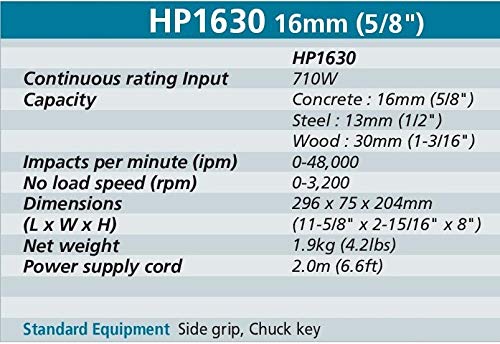
Image 3: A detailed table outlining the technical specifications of the Makita HP1630 Impact Drill, including continuous rating input, drilling capacities for various materials, impacts per minute, no-load speed, dimensions, and net weight.
10. Warranty and Support
10.1 Warranty Information
Makita power tools are subject to rigorous inspection and testing before leaving the factory. This product is covered by Makita's standard warranty against defects in materials and workmanship. Please refer to the warranty card included with your product for specific terms and conditions, or visit the official Makita website.
An optional 1-year extended warranty may be available for purchase. Please check with your retailer for details.
10.2 Customer Support
For technical assistance, service, or spare parts, please contact an authorized Makita service center.
Manufacturer: Makita, Tools Centre
Packer: MAKITA POWER TOOLS INDIA PVT LTD, Unit II, Sy. No.93/3 93/4, Koralur Village, Kasaba Hobli, Hoskote Taluk, Bangalore – 560 067, India.
Phone: +91-80-2205-8200
Email: sales@makita.in
Importer: Kaymo Fastener Company, S2, Laxmi Woollen Mill Estate, Shakti Mill Lane, Off. Dr. E.Moses, Rd, Mahalaxmi, Mumbai-400 011, India.
Phone: 022-661-52966
When contacting support, please have your product model (HP1630) and serial number (if applicable) ready.
Related Documents - HP1630
 |
Makita HP1630/HP1631 Hammer Drill Instruction Manual Comprehensive instruction manual for the Makita HP1630 and HP1631 Hammer Drill, covering safety, operation, assembly, maintenance, and warranty information. |
 |
Makita NHP1030 (MJ) 3/8" Hammer Drill Parts Breakdown and Service Information This document provides a comprehensive parts list, wiring diagram, and service change information for the Makita NHP1030 (MJ) 3/8-inch variable speed reversing hammer drill. It details component part numbers, descriptions, and quantities, along with specific updates for drill chucks, keys, spindles, helical gears, and woodruff keys, aiding in maintenance and repair. |
 |
Makita HR2470 Rotary Hammer Instruction Manual Comprehensive instruction manual for the Makita HR2470 series rotary hammer, detailing specifications, safety warnings, operation, maintenance, and optional accessories. Includes guidance for various drilling and chiseling tasks. |
 |
Makita M8700 Rotary Hammer Instruction Manual - Safety, Operation, and Specifications Comprehensive instruction manual for the Makita M8700 Rotary Hammer. Includes detailed specifications, safety warnings, operational guidance, assembly instructions, and maintenance procedures for safe and effective use. |
 |
Makita DDF487 Cordless Driver Drill User Manual Comprehensive user manual for the Makita DDF487 cordless driver drill. Includes safety instructions, operation guidelines, maintenance tips, and technical specifications. |
 |
Makita HP0300 Hammer Driver Drill Instruction Manual This manual provides essential information for the safe and effective operation, maintenance, and troubleshooting of the Makita HP0300 Hammer Driver Drill. Learn about its specifications, intended use, and features. |
Ask a question about this manual
Ask about setup, troubleshooting, compatibility, parts, safety, or missing instructions. Manuals+ will review the question and use this page’s manual context to help answer it.