
Introduction
The DROK-300043 Digital Multimeter USB 2.0 is a multifunctional electrical tester designed to measure voltage, current, and power for USB devices. It features a dual USB port design and an LED display, offering 7 different measurement modes for comprehensive analysis of charging performance and power consumption.

Figure 1: DROK-300043 Digital Multimeter USB 2.0 device overview.
Key Features
- 7-Mode USB Monitor: Measures voltage (DC 3.20~30.0V), current (0.00~3.00A, max 10A for short periods), capacitance, and power. One button operation for mode switching.
- Multifunctionality: Supports capacitance checking, capacitance clear, over-voltage and under-voltage alarms, over-current, and short-circuit alarms.
- Dual USB Output:
- Output I: For device charging and data transfer. Charging current is determined by compatibility. Displays voltage and current simultaneously.
- Output II: For device charging only. Features a built-in intelligent charging control IC for optimal and safe current matching. Suitable for both original and non-original chargers.
- Dual Color LED Display: Red and blue bright LED display for clear monitoring of charge voltage and current.
- Wide Compatibility: Suitable for most mobile phones, power banks, tablet PCs, and other USB devices, including BC1.2, YT/D1591-2009, and non-BC1.2 devices (e.g., iPad, iPhone, Samsung Galaxy).
Specifications
| Parameter | Value |
|---|---|
| Input Voltage Range | DC 3.20 - 15.0V |
| Voltage Resolution | 0.01V (when voltage is less than or equal to 10V) |
| Measuring Current Range | 0.00 - 3.00A (10A maximum, not for prolonged use at 10A) |
| Current Resolution | 0.01A |
| Capacitance Measurement | 0-99999 mAh |
| Power Testing | 0.00 - 9.99 - 99.9W |
| Over-voltage Alarm | Voltage digital point flashes quickly when voltage >/= 5.6V |
| Lacking-voltage Alarm | (Details not specified in source, general alarm function) |
| Over-current Alarm | Current digital point flashes quickly when current >/= 3A |
| Short-circuit Alarm | Current digital point flashes quickly |
| Item Dimensions (L x W x H) | 8.9 x 7.9 x 3 cm |
| Item Weight | 0.01 Ounces |
| Minimum Operating Voltage | 3.2 Volts |
| Upper Temperature Rating | 65 Degrees Celsius |
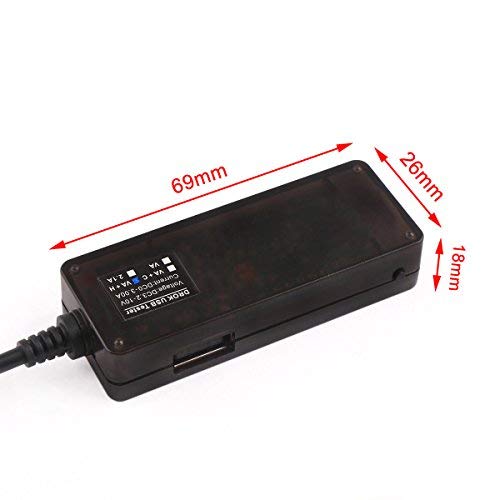
Figure 2: Physical dimensions of the DROK-300043 Digital Multimeter.
Setup
- Identify Ports: The DROK-300043 features a male USB-A input connector and two female USB-A output ports (Output I and Output II).
- Connect Power Source: Insert the male USB-A connector of the multimeter into a USB power source (e.g., wall charger, power bank, computer USB port).
- Connect Device(s):
- For charging and data transfer, connect your device's USB cable to Output I.
- For charging only, connect your device's USB cable to Output II.
- Power On: The device will automatically power on and display readings once both the power source and a device are connected.
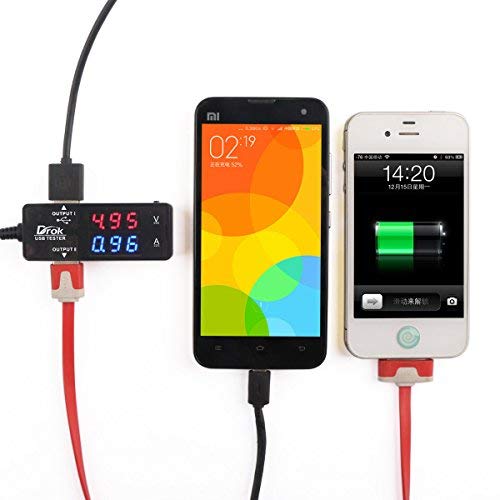
Figure 3: The multimeter connected to a power source and two mobile devices for simultaneous monitoring.
Operating Instructions
The DROK-300043 features a single button for cycling through its 7 display modes. The LED display will show various parameters depending on the selected mode.

Figure 4: Close-up view of the mode selection button and display area.
- Power On: As described in the Setup section, the device powers on automatically when connected to a power source and a load.
- Cycle Modes: Press the small button located on the side of the device to cycle through the 7 different display modes. Each press will switch to the next mode. The modes typically include:
- Voltage (V) and Amperage (A)
- Capacitance (mAh)
- Power (W)
- Combinations of these parameters (e.g., VA+C, VA+P, C+P, VA+C+P)
- Interpreting Alarms:
- Over-voltage: If the voltage exceeds 5.6V, the voltage reading will flash rapidly.
- Over-current: If the current exceeds 3A, the current reading will flash rapidly.
- Short-circuit: The current reading will flash rapidly.
- Clearing Capacitance Data: To clear the accumulated capacitance (mAh) data, press and hold the button for approximately 3 seconds while in a capacitance display mode.
- QC 2.0 Charging (Output I): Output I supports Quick Charge 2.0 at 9V and 12V. When utilizing QC 2.0 charging through Output I, ensure no device is connected to Output II to prevent potential conflicts or improper charging.
- Data Transfer (Output I): When using Output I, ensure your cable supports data transfer if you intend to use it for that purpose. The multimeter will not interfere with data signals.
Maintenance
- Cleaning: Use a soft, dry cloth to clean the device. Do not use liquid cleaners or solvents.
- Storage: Store the multimeter in a cool, dry place away from direct sunlight and extreme temperatures.
- Handling: Avoid dropping the device or subjecting it to strong impacts, as this may damage internal components or the display.
Troubleshooting
- Device does not power on or display readings:
- Ensure both a power source and a device (load) are connected to the multimeter. The multimeter requires a complete circuit to activate.
- Check the power source and the connected device to ensure they are functioning correctly.
- Verify that the USB connections are secure and free from debris.
- Readings are inconsistent or incorrect:
- Ensure the connected cables are in good condition and rated for the expected current/voltage.
- Avoid exceeding the maximum current rating of 3A for prolonged periods (though it can handle up to 10A briefly).
- Test with different power sources and devices to isolate the issue.
- Alarm (flashing display) is active:
- Identify which parameter is flashing (voltage or current).
- If voltage is flashing, it indicates an over-voltage condition (above 5.6V). Disconnect immediately if this is unexpected for your device.
- If current is flashing, it indicates an over-current (above 3A) or short-circuit condition. Check for faulty cables or devices drawing excessive current.
Warranty and Support
DROK offers a 100% risk-free satisfaction guarantee for this product. For any issues or support inquiries, please refer to the contact information provided with your purchase or visit the official DROK website for assistance.