
1. Introduction
The MASTECH MS6818 Cable Detector is a professional instrument designed for locating and tracing cables, wires, and conduits in various installations. It is an essential tool for electricians, technicians, and DIY enthusiasts for identifying open or shorted circuits, tracing hidden wiring, and locating fuses or circuit breakers without damaging walls or floors. This manual provides detailed instructions for the safe and effective use of your MS6818 Cable Detector.
2. Safety Information
Always adhere to the following safety precautions to prevent personal injury or damage to the device:
- Do not use the device on live circuits exceeding the specified voltage rating (300V CAT III).
- Ensure proper insulation and avoid direct contact with electrical conductors.
- Before testing, always verify that the circuit is de-energized if direct contact is required.
- Do not operate the device in wet conditions or explosive atmospheres.
- If the device shows signs of damage, do not use it.
- Only use specified battery types and ensure correct polarity.
3. Product Overview
The MASTECH MS6818 system consists of two main units: the Transmitter and the Receiver.
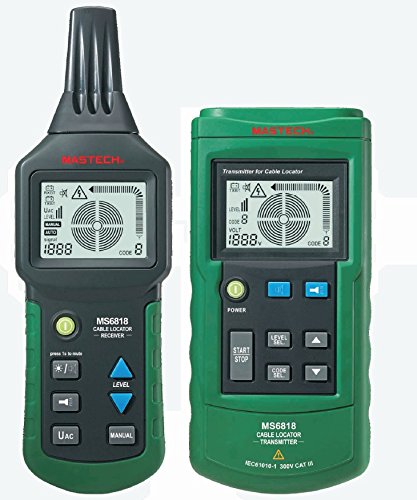
Figure 3.1: MASTECH MS6818 Cable Locator System. The image displays the two main components: the MS6818 Cable Locator Receiver (left) and the MS6818 Cable Locator Transmitter (right). Both units are green and black, featuring LCD screens and control buttons. The receiver is designed for handheld use, while the transmitter is a larger, stationary unit.
3.1. Transmitter (MS6818 Cable Locator Transmitter)
- Power Button: Turns the transmitter on/off.
- Start/Stop Button: Initiates or stops the signal transmission.
- Level Select Buttons (Up/Down): Adjusts the signal transmission level.
- Code Select Buttons (Up/Down): Selects the transmission code for distinguishing multiple signals.
- LCD Display: Shows signal level, code, and voltage.
3.2. Receiver (MS6818 Cable Locator Receiver)
- Power Button: Turns the receiver on/off.
- Level Buttons (Up/Down): Adjusts receiver sensitivity.
- Manual/Auto Button: Switches between manual and automatic sensitivity modes.
- UAc Button: Likely for AC voltage detection mode.
- LCD Display: Shows signal strength, code, and battery status.
4. Setup
4.1. Battery Installation
Both the Transmitter and Receiver units require batteries for operation. Refer to the battery compartment on each unit for the correct battery type and polarity. Typically, these devices use standard alkaline batteries (e.g., 9V or AA batteries). Ensure batteries are inserted correctly before closing the compartment.
4.2. Connecting the Transmitter
The transmitter must be connected to the circuit or cable you wish to trace. Depending on the application, use the appropriate connection cables (e.g., alligator clips for direct connection, test leads for outlets, or an inductive clamp for non-contact tracing). Ensure a secure connection to the target cable and a good ground connection if required for the specific tracing method.
5. Operating Instructions
5.1. Basic Cable Tracing
- Connect the Transmitter to the cable or circuit to be traced. Ensure the circuit is de-energized if making a direct connection.
- Turn on the Transmitter using the Power button. Select an appropriate signal level using the Level Select buttons.
- Press the Start button on the Transmitter to begin signal transmission.
- Turn on the Receiver. Adjust the sensitivity (Level buttons) or switch to Auto mode if available.
- Move the Receiver along the suspected path of the cable. The display will show signal strength, and an audible tone will indicate proximity to the cable. The signal strength will be highest directly over the cable.
- Once the cable is located, you can follow its path by observing the signal strength on the Receiver's display.
5.2. Locating Fuses and Circuit Breakers
To locate a specific fuse or circuit breaker:
- Connect the Transmitter to an outlet or light fixture on the circuit you want to identify.
- Turn on the Transmitter and start signal transmission.
- At the fuse box or circuit breaker panel, slowly scan each fuse/breaker with the Receiver.
- The Receiver will indicate the strongest signal directly over the correct fuse or breaker.
5.3. Detecting Metal
The device can also be used for basic metal detection. Turn on the Receiver and scan the area. A change in the signal or tone may indicate the presence of metal objects.
6. Maintenance
- Cleaning: Use a soft, dry cloth to clean the device. Do not use abrasive cleaners or solvents.
- Battery Replacement: Replace batteries promptly when the low battery indicator appears on the display. Remove batteries if the device will not be used for an extended period to prevent leakage.
- Storage: Store the device in a cool, dry place, away from direct sunlight and extreme temperatures.
7. Troubleshooting
| Problem | Possible Cause | Solution |
|---|---|---|
| Device does not turn on. | Dead or incorrectly installed batteries. | Check battery polarity and replace batteries. |
| No signal detected by Receiver. | Transmitter not powered on, not transmitting, or improperly connected. Receiver sensitivity too low. | Ensure Transmitter is on and transmitting. Check connections. Increase Receiver sensitivity. |
| Constant tone or signal everywhere (Receiver). | Receiver sensitivity too high. Interference from other electrical sources. | Decrease Receiver sensitivity. Move away from strong electrical fields. Ensure proper grounding of the transmitter if applicable. |
| Inaccurate or weak readings. | Low battery. Signal level on Transmitter too low. Complex wiring environment. | Replace batteries. Increase Transmitter signal level. Try different tracing methods or adjust position. |
8. Specifications
| Feature | Detail |
|---|---|
| Manufacturer | MASTECH |
| Model Number | MS6818 |
| Brand | ONETAK (as listed by seller) / MASTECH (product brand) |
| Power Source | Battery Powered |
| Style | Digital |
| Color | Green and Black |
| Package Dimensions | 28.2 x 20.2 x 8.6 cm; 1.48 kilograms |
| UPC | 799695348695 |
| Safety Rating | IEC 61010-1 300V CAT III |
9. Warranty and Support
This product is covered by a standard manufacturer's warranty against defects in materials and workmanship. For specific warranty terms, please refer to the documentation included with your purchase or contact the retailer. For technical support or service inquiries, please contact the manufacturer or your point of purchase.


