
Introduction
Thank you for choosing the MARATHON Atomic Travel Alarm Clock. This compact and versatile clock is designed for convenience and accuracy, featuring automatic time synchronization, an auto night light, and indoor temperature display. Please read this manual carefully to ensure proper operation and to fully utilize all features of your new clock.

Front view of the MARATHON Atomic Travel Alarm Clock, displaying time, date, and temperature.
Package Contents
- MARATHON Atomic Travel Alarm Clock (Model: CL030036WH)
- 1 x AAA Battery
- Instruction Manual (this document)
Setup
1. Battery Installation
Locate the battery compartment on the back of the clock. Open the compartment cover and insert one AAA battery, ensuring the correct polarity (+/-) as indicated inside the compartment. Close the cover securely.
The main product image illustrates the clock's design, with the battery compartment located on the rear.
2. Initial Setup and Atomic Time Synchronization
Upon battery insertion, the clock will automatically attempt to synchronize with the atomic time signal (WWVB). This process may take several minutes to a few hours, depending on your location and signal strength. Place the clock near a window for optimal reception. The atomic signal icon (often a tower or wave symbol) on the display will flash during synchronization and become solid once successful.
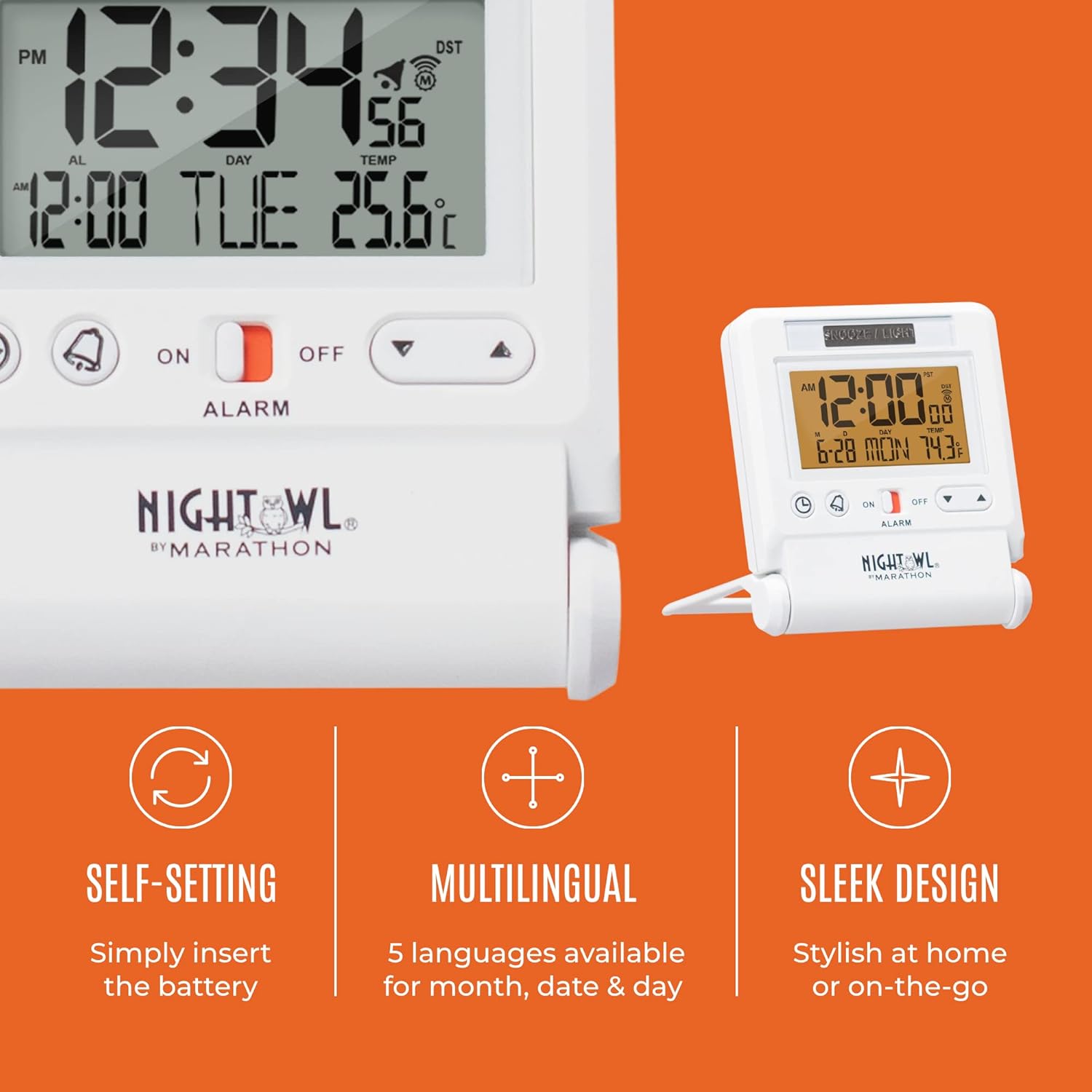
The clock display indicates self-setting functionality, which includes atomic time synchronization.
If the clock does not synchronize automatically within 24 hours, you may need to manually set the time zone or position the clock in a different location for better signal reception.
Operating Instructions
1. Setting Time and Date (Manual)
In case atomic synchronization is not available or desired, you can manually set the time and date. Refer to the buttons on the clock's front or side. Typically, a "SET" or "MODE" button allows you to cycle through settings (hour, minute, year, month, day), and "+"/"-" or "UP"/"DOWN" buttons adjust the values. Press "SET" or "MODE" again to confirm each setting.

The dynamic display shows current time, calendar information, and temperature.
2. Alarm Function
To set the alarm, press the "ALARM SET" button. The alarm time will flash. Use the adjustment buttons to set the desired alarm hour and minute. Press "ALARM SET" again to confirm. To activate or deactivate the alarm, use the dedicated ON/OFF switch, usually located near the alarm set button. The alarm icon will appear on the display when active.
For snooze, press the large "SNOOZE/LIGHT" bar at the top of the clock when the alarm sounds. The alarm will pause for approximately 5-8 minutes before sounding again.
3. Auto Night Light
The clock features an automatic night light that illuminates the display in low-light conditions. This feature is controlled by a light sensor. Ensure the sensor (often a small clear window) is not obstructed for optimal performance. There may be a switch (e.g., OFF/AUTO) in the battery compartment to disable this feature if not desired, especially to conserve battery life during travel.

The clock is shown on a nightstand, demonstrating its compact size and the subtle illumination provided by the auto night light.
4. Temperature Display
The clock displays indoor temperature. To switch between Celsius (°C) and Fahrenheit (°F), locate the dedicated °C/°F button, usually on the back or side of the unit.
5. Time Zone Selection
To adjust the time zone, press the "TIME ZONE" button (or similar, often labeled "ZONE" or "TZ"). Repeatedly press the button to cycle through the available time zones (e.g., PST, MST, CST, EST, AST, NST). The clock will automatically adjust the time once the correct zone is selected.
Maintenance
1. Battery Replacement
When the display becomes dim or the clock stops functioning, it's time to replace the AAA battery. Follow the battery installation steps outlined in the "Setup" section. Dispose of used batteries responsibly according to local regulations.
2. Cleaning
Wipe the clock with a soft, dry cloth. Do not use abrasive cleaners or solvents, as they may damage the display or casing. Avoid submerging the clock in water.
Troubleshooting
- Clock not synchronizing with atomic signal:
- Ensure the clock is placed near a window, away from electronic devices that may cause interference.
- Try repositioning the clock, especially facing towards Fort Collins, Colorado (where the WWVB signal originates).
- Verify battery is fresh and correctly installed.
- Display is dim or blank:
- Replace the battery with a new AAA battery.
- Check if the auto night light feature is enabled and if the ambient light is sufficient for the display to be visible.
- Alarm not sounding:
- Ensure the alarm is activated using the ON/OFF switch. The alarm icon should be visible on the display.
- Verify the alarm time is set correctly (AM/PM).
- Incorrect temperature reading:
- Ensure the clock is not exposed to direct sunlight or heat sources, which can affect the sensor.
- Check if the temperature unit (°C/°F) is set to your preference.
Specifications
| Brand | MARATHON |
| Model Number | CL030036WH |
| Color | White |
| Display Type | Digital |
| Special Features | Temperature Display, Alarm, Auto Night Light, Atomic Time Synchronization |
| Product Dimensions | 2.75"W x 3.25"H |
| Power Source | Battery Powered (1 x AAA included) |
| Item Weight | 0.17 Pounds (2.72 ounces) |
| Mounting Type | Tabletop |
| Operation Mode | Atomic |
Warranty and Support
For warranty information, technical support, or further assistance, please refer to the official MARATHON website or contact their customer service. Keep your purchase receipt as proof of purchase.
A detailed User Manual (PDF) is also available for download: Download PDF Manual
About the Brand
MARATHON has a rich history dating back to 1939, manufacturing precision timing instruments. The company prides itself on producing high-quality, durable products, originally for military purposes and now available to the public.
Official video from MARATHON, detailing the brand's 80-year history and commitment to quality and precision in watchmaking.


