
SENCOR 40024648
Sencor SKS 5400 Kitchen Scale User Manual
Model: SKS 5400 (40024648)
Brand: SENCOR
1. Introduction
Thank you for choosing the Sencor SKS 5400 Kitchen Scale. This ultra-slim digital kitchen scale is designed for precise and hygienic food weighing, featuring a durable stainless steel surface and an easy-to-read LCD display. Please read this manual thoroughly before use to ensure proper operation and maintenance.
Key features include:
- Ultra-slim design (only 14 mm high)
- Stainless steel surface for easy and hygienic maintenance
- Special surface treatment to prevent fingerprints
- Large LCD display (57 x 27 mm) with inverted blue backlight
- Weighs up to 5 kg with 1 g sensitivity
- Tare function for zeroing container weight
- Incremental re-weighing function
- Option to select measurement units (g/ml)
- Low battery and overload indicators
- Automatic shut-off after 60 seconds of inactivity
2. Safety Instructions
To ensure safe operation and prolong the life of your Sencor SKS 5400 Kitchen Scale, please observe the following safety precautions:
- Do not immerse the scale in water or any other liquid.
- Do not place the scale near heat sources or in direct sunlight.
- Avoid dropping the scale or subjecting it to strong impacts.
- Do not exceed the maximum weighing capacity of 5 kg. Overloading can damage the scale.
- Use the scale on a flat, stable, and level surface to ensure accurate readings.
- Keep out of reach of children.
- If the scale is not used for a long period, remove the batteries to prevent leakage.
- Do not attempt to disassemble or repair the scale yourself. Contact authorized service for assistance.
3. Package Contents
Upon unpacking, please ensure all items are present and in good condition:
- Sencor SKS 5400 Kitchen Scale
- 2x 3V Lithium Battery (CR 2032)
- User Manual (this document)
4. Setup
4.1 Battery Installation
- Locate the battery compartment on the underside of the scale.
- Open the battery compartment cover.
- Insert the two 3V Lithium CR 2032 batteries, ensuring the correct polarity (+/-) as indicated inside the compartment.
- Close the battery compartment cover securely.
4.2 Placement
Place the kitchen scale on a hard, flat, and stable surface. Uneven surfaces can affect weighing accuracy.
5. Operating Instructions
5.1 Power On/Off
To turn on the scale, press the ON/OFF/TARE button. The display will show "8888" and then "0g" (or the last used unit) when ready for use. The scale will automatically turn off after 60 seconds of inactivity to conserve battery life.
5.2 Weighing Ingredients
- Ensure the scale is on a flat surface and powered on, displaying "0g".
- Gently place the item to be weighed directly onto the stainless steel platform.
- The weight will be displayed on the LCD screen.
5.3 Tare Function (Zeroing)
The tare function allows you to weigh multiple ingredients in the same container or to subtract the weight of a container.
- Place an empty container on the scale. The display will show its weight.
- Press the ON/OFF/TARE button. The display will reset to "0g".
- Add the first ingredient to the container. Its weight will be displayed.
- To add another ingredient, press the ON/OFF/TARE button again to zero the display.
- Add the next ingredient. Repeat as needed.
5.4 Unit Selection (g/ml)
To switch between grams (g) and milliliters (ml), press the UNIT button located on the scale. The current unit will be indicated on the display.
6. Maintenance and Cleaning
The Sencor SKS 5400 Kitchen Scale is designed for easy maintenance thanks to its stainless steel surface and special anti-fingerprint treatment.
- Wipe the scale surface with a soft, damp cloth. For stubborn stains, a mild detergent can be used.
- Do not use abrasive cleaners, harsh chemicals, or scouring pads, as these can damage the surface.
- Do not immerse the scale in water or place it under running water.
- Ensure the scale is completely dry before storing or using again.
- Store the scale in a cool, dry place.
7. Troubleshooting
| Problem | Possible Cause | Solution |
|---|---|---|
| "Lo" or "Err" on display | Low battery indicator. | Replace the batteries (2x CR 2032). |
| "O-Ld" or "EEEE" on display | Overload indicator. The weight on the scale exceeds 5 kg. | Remove the item immediately. Do not exceed the maximum capacity of 5 kg. |
| Inaccurate readings | Scale not on a flat, stable surface; batteries low; scale dirty; external vibrations. | Ensure scale is on a flat, stable surface. Replace batteries. Clean the scale. Avoid vibrations during weighing. |
| Scale does not turn on | Batteries incorrectly installed or depleted. | Check battery polarity. Replace batteries if necessary. |
8. Specifications
| Model Number | SKS 5400 (40024648) |
| Weighing Capacity | Up to 5 kg (11 lbs) |
| Accuracy | 1 g (0.002 lbs) |
| Units of Measurement | g (grams), ml (milliliters) |
| Display | Large LCD with inverted blue backlight (57 x 27 mm) |
| Material | Stainless Steel (surface), Alloy Steel (internal components) |
| Power Source | 2x 3V Lithium Batteries (CR 2032) - included |
| Dimensions (L x W x H) | 20.09 x 20.09 x 1.4 cm (7.91 x 7.91 x 0.55 inches) |
| Weight | 0.47 kg (1.04 lbs) |
| Automatic Shut-off | After 60 seconds of inactivity |
9. Product Images

Image 1: Top-down view of the Sencor SKS 5400 Kitchen Scale. The image highlights the sleek stainless steel weighing surface and the central blue backlit LCD display, showing a reading of "36". The "UNIT" and "ON/OFF/TARE" buttons are visible on either side of the display.
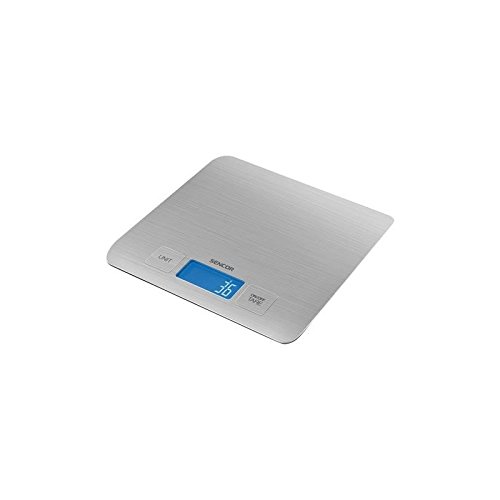
Image 2: Angled view of the Sencor SKS 5400 Kitchen Scale. This perspective emphasizes the ultra-slim design of the scale. The stainless steel platform is prominent, along with the blue backlit LCD display showing a numerical reading and the "UNIT" and "ON/OFF/TARE" buttons.
10. Warranty and Support
10.1 Warranty Information
The Sencor SKS 5400 Kitchen Scale comes with a 2-year warranty from the date of purchase. This warranty covers defects in materials and workmanship under normal use. It does not cover damage resulting from misuse, accident, unauthorized modification, or failure to follow the instructions in this manual.
10.2 Customer Support
For technical assistance, warranty claims, or general inquiries, please contact Sencor customer support. Please have your model number (SKS 5400 or 40024648) and proof of purchase ready when contacting support.
You can find contact information on the official Sencor website or through your local distributor.
Please note: Information regarding spare parts availability is not provided.
Related documents40024648


Ask a question about this manual
Ask about setup, troubleshooting, compatibility, parts, safety, or missing instructions. Manuals+ will review the question and use this page’s manual context to help answer it.