
1. Introduction
This manual provides essential instructions for the safe and efficient operation of your QFX CS-27BTWH Portable Bluetooth Speaker. This device allows for wireless audio streaming via Bluetooth and wired connection through its AUX-in port. Please read this manual thoroughly before use and retain it for future reference.

2. Package Contents
Ensure all items are present in the package:
- QFX CS-27BTWH Portable Bluetooth Speaker
- USB to 3.5mm Charging Cable
3. Product Features
- Portable Bluetooth speaker with AUX-In functionality
- Stream music and manage calls wirelessly from Bluetooth-enabled devices
- Compatible with PCs, CD players, and MP3/MP4 players via AUX-in
- Built-in rechargeable Lithium battery for portable use
4. Controls and Indicators
Familiarize yourself with the speaker's ports and indicators:
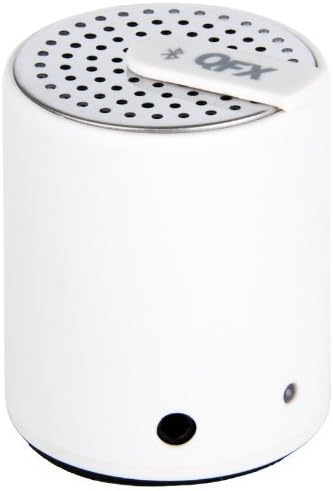
- Power Button: Typically located on the top or side. Press and hold to power on/off.
- 3.5mm AUX-in Port: Used for wired audio connection and for charging with the provided USB to 3.5mm cable.
- LED Indicator Light: Displays the speaker's status (e.g., charging, Bluetooth pairing mode, connected).
5. Setup
5.1. Charging the Speaker
- Connect the small end of the included USB to 3.5mm charging cable to the speaker's 3.5mm port.
- Connect the USB-A end of the cable to a USB power source (e.g., computer USB port, USB wall adapter).
- The LED indicator light will illuminate to show charging status. It will typically change color or turn off when fully charged.
5.2. Powering On/Off
- To power on, press and hold the Power button until the LED indicator light illuminates and an audible tone is heard.
- To power off, press and hold the Power button again until the LED indicator light turns off and an audible tone is heard.
6. Operating Instructions
6.1. Bluetooth Pairing
- Ensure the speaker is powered on and within close proximity to your Bluetooth device (e.g., smartphone, tablet).
- The speaker will automatically enter Bluetooth pairing mode, indicated by a flashing LED light.
- On your Bluetooth device, go to the Bluetooth settings and search for available devices.
- Select "CS-27BTWH" from the list of devices.
- Once paired, the LED indicator light will typically become solid, and an audible confirmation will be heard.
6.2. AUX-In Connection
- Connect one end of a 3.5mm audio cable (not included) to the AUX-in port on the speaker.
- Connect the other end of the 3.5mm audio cable to the headphone jack or audio output port of your audio device.
- The speaker will automatically switch to AUX-in mode. Adjust volume on both the speaker and your connected device.
7. Maintenance
- Clean the speaker with a soft, dry cloth. Do not use abrasive cleaners or solvents.
- Avoid exposing the speaker to extreme temperatures, direct sunlight, or moisture.
- Store the speaker in a cool, dry place when not in use for extended periods.
8. Troubleshooting
| Problem | Possible Solution |
|---|---|
| Speaker does not power on | Ensure the battery is charged. Connect the speaker to a power source using the charging cable. |
| Cannot pair via Bluetooth | Ensure the speaker is in pairing mode (flashing LED). Turn off and on Bluetooth on your device. Move closer to the speaker. |
| No sound from speaker | Check volume levels on both the speaker and the connected device. Ensure the correct input mode (Bluetooth or AUX-in) is selected. |
| Poor audio quality | For Bluetooth, reduce distance between devices or remove obstacles. For AUX-in, check cable connection and try a different cable. |
9. Specifications
| Specification | Detail |
|---|---|
| Model Number | CS-27BTWH |
| Brand | QFX |
| Speaker Type | Personal, Portable |
| Connectivity Technology | Bluetooth, 3.5mm AUX-in |
| Power Source | Battery Powered (1 Lithium Ion battery included) |
| Speaker Maximum Output Power | 3 Watts |
| Impedance | 1 Ohm |
| Color | White |
| Product Dimensions | 2.5 x 2 x 4 inches |
| Item Weight | 0.353 ounces |
| UPC | 606540022597 |
10. Warranty and Support
This QFX product comes with a Limited Warranty. For specific warranty terms and conditions, please refer to the documentation included with your purchase or visit the official QFX website.
For technical support or customer service inquiries, please visit the QFX website or contact their customer support department. You can find more information at: QFX Official Store
11. Important Safety Information
WARNING: This product may contain chemicals known to the State of California to cause cancer and reproductive harm. For more information, please visit www.P65Warnings.ca.gov. QFX requests that this information be provided to any retailer selling this product, requiring them to display the internet warning as set forth above. QFX cannot be held responsible for any Proposition 65 action based on the failure to provide an internet warning.


