
Introduction
Thank you for choosing MTX Audio THUNDER52 5.25-inch 2-Way Coaxial Speakers. These speakers are engineered to deliver exceptional full-range sound reproduction, with a particular focus on robust low-frequency response. This manual provides essential information for the proper installation, operation, and maintenance of your new speakers, ensuring optimal performance and longevity.

Figure 1: MTX Audio THUNDER52 5.25-inch 2-Way Coaxial Speakers (Set of 2)
Product Features
- Full-Range Sound: Designed for comprehensive audio reproduction across the frequency spectrum.
- Enhanced Bass: Optimized for superior low-frequency performance, reducing the need for a separate subwoofer.
- Durable Construction: Features a robust design for long-lasting performance in various vehicle environments.
- Coaxial Design: Integrates tweeter and woofer for a compact and efficient speaker solution.
- 4 Ohm Impedance: Standard impedance for compatibility with most car audio systems.
- 75 Watts Max Output Power: Capable of handling significant power for clear and dynamic sound.
What's in the Box
- One pair of MTX Audio THUNDER52 5.25-inch 2-Way Coaxial Speakers
Specifications
| Feature | Specification |
|---|---|
| Model Name | THUNDER52 |
| Speaker Type | Coaxial |
| Speaker Size | 5.25 Inches |
| Woofer Diameter | 5.25 Inches |
| Audio Driver Type | Dynamic Driver |
| Impedance | 4 Ohm |
| Speaker Maximum Output Power | 75 Watts |
| Surround Sound Channel Configuration | 2.0 |
| Connectivity Technology | Coaxial |
| Mounting Type | Door Mount |
| Product Dimensions | 5.1"D x 5.1"W x 2.73"H |
| Item Weight | 0.32 ounces (approx. 9.07 g) |
| Country Of Origin | China |
| UPC | 715442171330 |
Setup and Installation
Proper installation is crucial for optimal speaker performance. It is recommended that installation be performed by a qualified professional. If you choose to install the speakers yourself, please follow these general guidelines:
- Preparation: Ensure your vehicle's audio system is turned off and the battery is disconnected before beginning installation. Verify that the speaker mounting location in your vehicle is compatible with the 5.25-inch size and mounting depth of the THUNDER52 speakers.
- Removal of Old Speakers: Carefully remove any existing speakers from the desired mounting locations. Disconnect the old speaker wires.
- Wiring: Connect the provided speaker wires to the terminals on the back of the THUNDER52 speakers. Ensure correct polarity (positive to positive, negative to negative) to prevent phase issues. Refer to your vehicle's wiring diagram for specific connections.
- Mounting: Place the THUNDER52 speakers into the mounting holes. Secure them using appropriate screws. Do not overtighten.
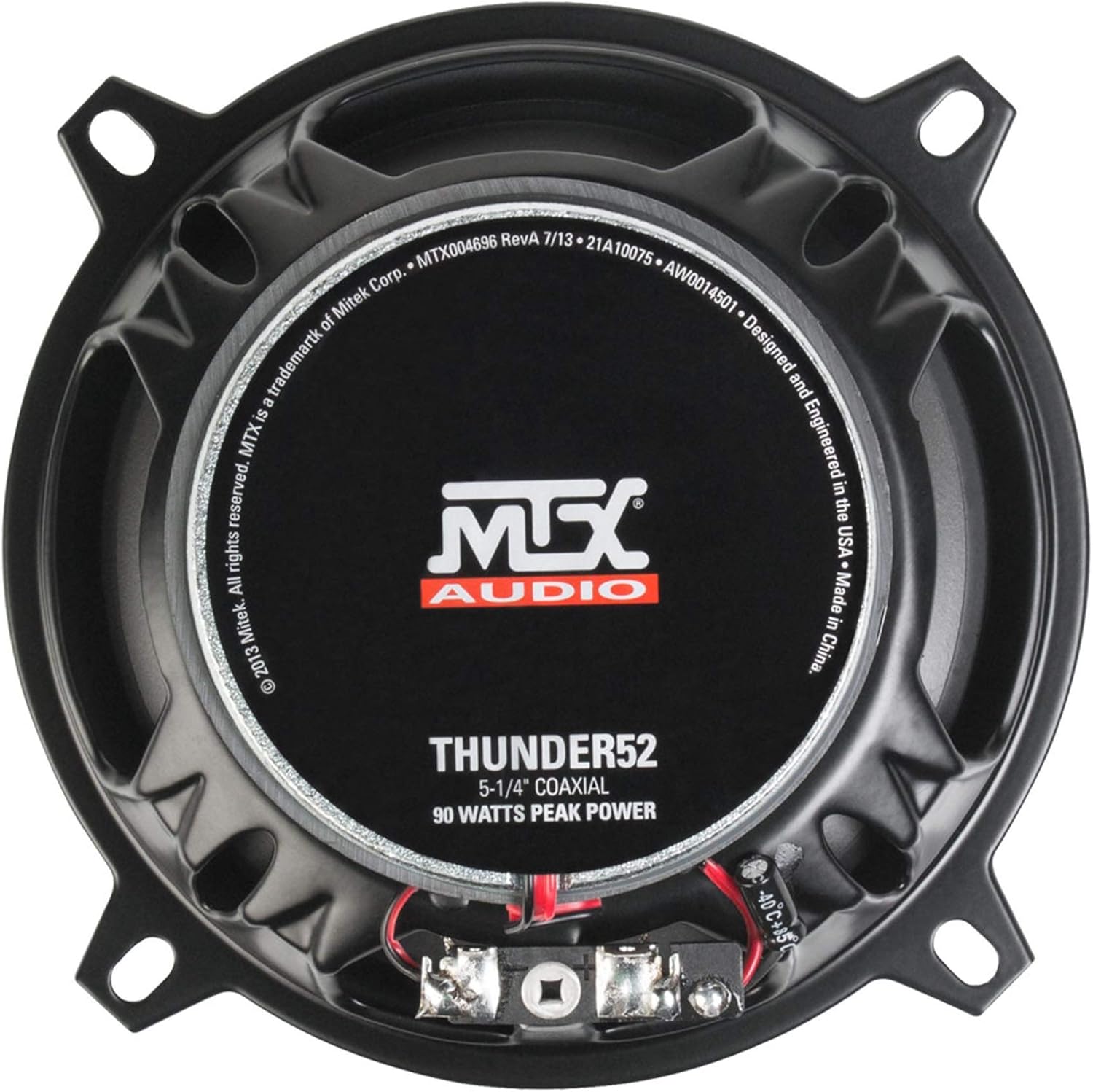
Figure 2: Rear view of THUNDER52 speaker with wiring terminals

Figure 3: Side profile of THUNDER52 speaker
Operating Instructions
Once installed, reconnect your vehicle's battery and turn on your audio system. Start with the volume at a low level and gradually increase it to your desired listening level. Adjust your head unit's equalizer and balance settings to fine-tune the sound to your preference. Avoid excessively high volume levels for prolonged periods to prevent potential hearing damage and speaker damage.
Maintenance
To ensure the longevity and performance of your MTX Audio THUNDER52 speakers, follow these maintenance tips:
- Cleaning: Use a soft, dry cloth to gently wipe the speaker grilles and cones. Avoid using harsh chemicals or abrasive cleaners.
- Inspection: Periodically check the speaker mounting screws to ensure they are secure. Inspect the speaker surrounds for any signs of wear or damage.
- Environmental Protection: While designed for durability, avoid exposing speakers to extreme moisture or direct sunlight for extended periods.
Troubleshooting
If you experience issues with your speakers, try these basic troubleshooting steps:
- No Sound: Check all wiring connections for tightness and correct polarity. Ensure your head unit is powered on and functioning correctly.
- Distorted Sound: Reduce the volume level. Check for loose connections or damaged speaker cones. Ensure your amplifier (if used) is not overdriving the speakers.
- Uneven Sound: Adjust the balance and fader settings on your head unit. Check wiring for individual speakers.
If problems persist, consult a professional car audio technician.
Warranty and Support
MTX Audio THUNDER52 speakers come with a Limited Warranty. Please refer to the warranty card included with your product for specific terms and conditions. For technical assistance or warranty claims, please contact MTX Audio customer support through their official website or the contact information provided in your product packaging.


