
Nuwave 20343
Nuwave Pro Infrared Oven User Manual
Model: 20343
1. Introduction
The NuWave Oven Pro is an innovative cooking appliance designed to cook food efficiently using a patented 3-Way cooking method: Infrared, Conduction, and Convection. This manual provides essential information for the safe and effective operation, maintenance, and troubleshooting of your NuWave Pro Infrared Oven.
The NuWave Oven cooks food up to 50% faster than a conventional oven through its patented 3-Way cooking method: Infrared-Conduction-Convection; INFRARED radiant heat penetrates food from the inside out leaving food moist and flavorful. CONDUCTION applies heat directly to the food enhancing browning, roasting and flavor. CONVECTION circulates heat evenly around food for faster cooking and even browning. The NuWave Oven Pro is powered by a 1,500 Watt Sheath Heater that can last up to 30 years without service. One key benefit of the NuWave Oven for todays busy consumer is the ability to cook from frozen to finished without the time consuming process of defrosting. Other key benefits are that while the NuWave Oven cooks food, it seals in a way that will not heat up the kitchen and emits no smoke or odors, thus eliminating wasted energy.
2. Important Safety Instructions
- Read all instructions before using the appliance.
- Do not touch hot surfaces. Use handles or knobs.
- To protect against electrical shock, do not immerse cord, plugs, or heating unit in water or other liquid.
- Close supervision is necessary when any appliance is used by or near children.
- Unplug from outlet when not in use and before cleaning. Allow to cool before putting on or taking off parts.
- Do not operate any appliance with a damaged cord or plug or after the appliance malfunctions or has been damaged in any manner.
- The use of accessory attachments not recommended by the appliance manufacturer may cause injuries.
- Do not use outdoors.
- Do not let cord hang over edge of table or counter, or touch hot surfaces.
- Do not place on or near a hot gas or electric burner, or in a heated oven.
- Extreme caution must be used when moving an appliance containing hot oil or other hot liquids.
- Always attach plug to appliance first, then plug cord into the wall outlet. To disconnect, turn any control to "off", then remove plug from wall outlet.
- Do not use appliance for other than intended use.
3. Product Components
Your NuWave Pro Infrared Oven comes with several key components to enhance your cooking experience:
- Instructional DVD Cookbook, Cooking Guide, Recipe Cards
- Stainless Steel Pizza Flipper
- Stainless Steel Pizza Server
- Pizza Liner
- Bamboo Cutting Board

Figure 3.1: Top view of the Nuwave Pro Infrared Oven, showing the control panel with numerical buttons and function keys.
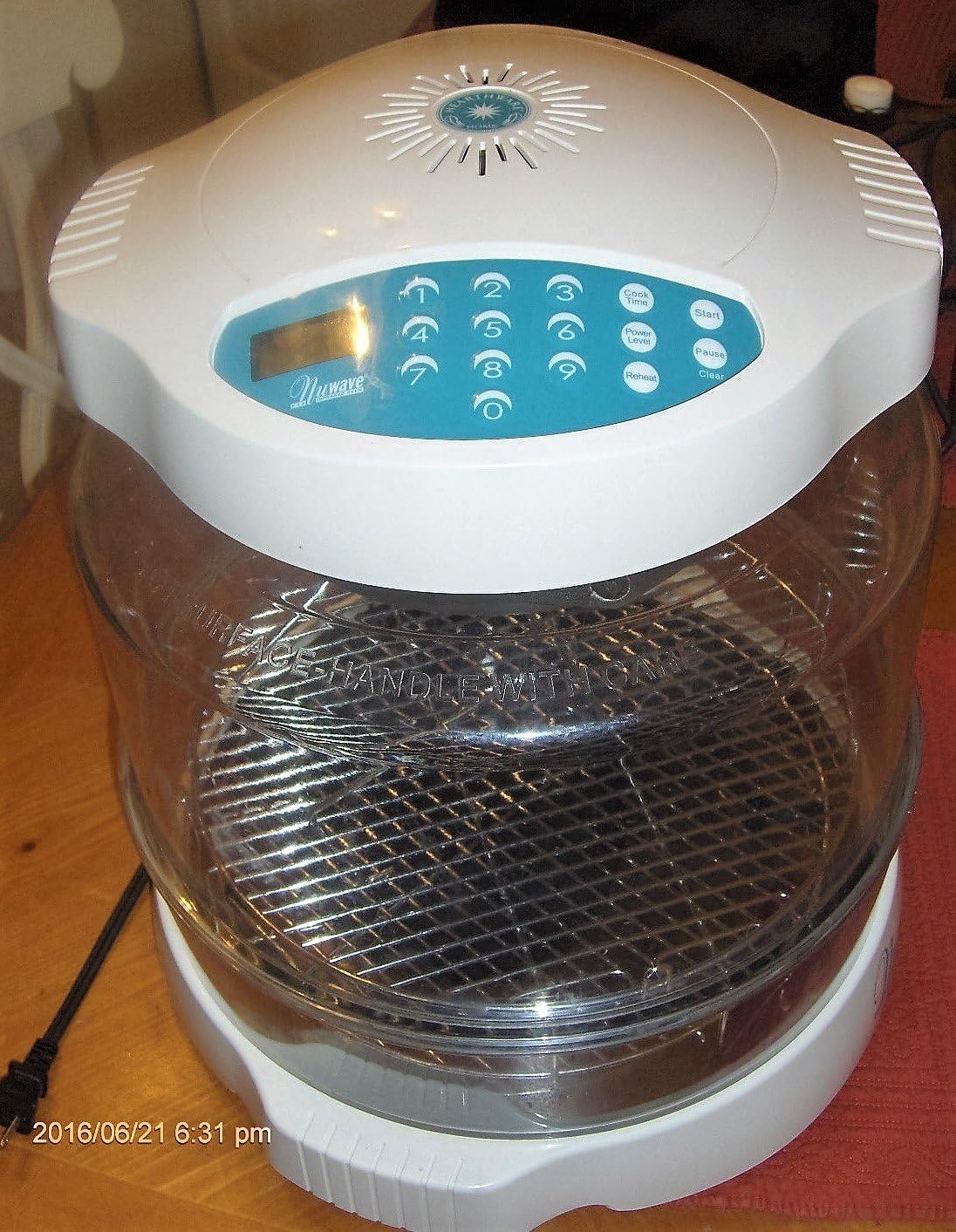
Figure 3.2: The Nuwave Pro Infrared Oven assembled, featuring its clear dome and internal cooking rack, ready for use.
4. Setup
- Unpack all components and remove any packaging materials.
- Place the base unit on a stable, heat-resistant surface.
- Insert the cooking rack into the base.
- Place the clear dome securely onto the base.
- Position the Power Head (top unit with controls) onto the dome, ensuring it sits flush.
- Plug the power cord into a grounded electrical outlet.
5. Operating Instructions
The NuWave Pro Infrared Oven features an intuitive control panel for easy operation.
5.1 Control Panel Overview
- Numerical Keypad (0-9): Used to input cooking time and power levels.
- Cook Time Button: Press to set the desired cooking duration.
- Power Level Button: Press to adjust the cooking power.
- Reheat Button: For reheating pre-cooked food.
- Start Button: Initiates the cooking cycle.
- Pause Button: Temporarily stops the cooking cycle.
- Clear Button: Clears current settings or stops the cooking cycle.
- Digital Display: Shows time, power level, and other indicators.
5.2 Basic Cooking Steps
- Place food on the cooking rack inside the oven.
- Ensure the dome and Power Head are properly seated.
- Press the Cook Time button.
- Use the numerical keypad to enter the desired cooking time in minutes.
- (Optional) Press the Power Level button and use the keypad to adjust the power level if needed.
- Press the Start button to begin cooking.
- To pause cooking, press the Pause button. Press Start again to resume.
- To cancel cooking, press the Clear button.
6. Maintenance and Cleaning
Regular cleaning and maintenance will ensure the longevity and optimal performance of your NuWave Oven.
- Always unplug the oven and allow it to cool completely before cleaning.
- The dome, cooking rack, and base can be washed with warm, soapy water or placed in a dishwasher.
- Wipe the Power Head (top unit) with a damp cloth. Do not immerse the Power Head in water or any other liquid.
- Ensure all parts are thoroughly dry before reassembling or storing the oven.
- Do not use abrasive cleaners or scouring pads, as they may damage surfaces.
7. Troubleshooting
| Problem | Possible Cause | Solution |
|---|---|---|
| Oven does not turn on. | Not plugged in; power outage; faulty outlet. | Check power cord connection; verify power supply; try a different outlet. |
| Food not cooking evenly. | Improper food placement; incorrect cooking time/power level. | Ensure food is centered on the rack; adjust cooking time or power level as per recipe. |
| Dome appears to be cracking. | Normal wear and tear; excessive heat stress. | Ensure proper ventilation; avoid extreme temperature changes. Contact customer support for replacement options if necessary. |
| Oven emits smoke or unusual odors. | Food residue; initial burn-off; malfunction. | Clean the oven thoroughly. If new, a slight odor is normal for first use. If persistent or excessive, unplug immediately and contact customer support. |
8. Specifications
- Product Dimensions: 15.5 x 15.5 x 13.5 inches
- Item Weight: 1 pounds
- Model Number: 20343
- Manufacturer: Hearthware Home Products
- Power: 1,500 Watt Sheath Heater
- Cooking Method: Infrared-Conduction-Convection
9. Warranty and Support
For warranty information, product support, or to inquire about replacement parts, please contact Nuwave customer service directly. Refer to the product packaging or the official Nuwave website for the most current contact details.
Manufacturer: Hearthware Home Products
Return Policy: 30-day refund/replacement policy (as per Amazon listing, subject to seller terms).
For additional resources, you may visit the official Nuwave Store on Amazon.
Related documents20343


Ask a question about this manual
Ask about setup, troubleshooting, compatibility, parts, safety, or missing instructions. Manuals+ will review the question and use this page’s manual context to help answer it.