
Introduction
This instruction manual provides comprehensive guidance for the proper use and care of your Olympus Pearlcorder S721 MicroCassette Recorder. Please read this manual thoroughly before operating the device to ensure optimal performance and longevity. Keep this manual for future reference.
Setup
1. Unpacking the Device
Carefully remove all components from the packaging. Ensure all items are present before discarding packaging materials. The standard package includes the Olympus Pearlcorder S721 recorder, an instruction manual, and a microcassette.

Figure 1: Contents of the Olympus Pearlcorder S721 package, including the recorder, manual, and a microcassette.

Figure 2: Retail packaging for the Olympus Pearlcorder S721.
2. Battery Installation
The Pearlcorder S721 requires batteries for operation. Locate the battery compartment on the underside of the device. Slide the battery compartment cover open, insert the required batteries (typically two AA batteries, not included) according to the polarity indicators (+/-), and then close the cover securely.

Figure 3: Underside of the recorder, indicating the battery compartment.
3. Microcassette Insertion
To insert a microcassette, open the cassette compartment cover. Gently place the microcassette into the compartment with the tape side facing the recording head. Ensure it is seated correctly, then close the compartment cover until it clicks into place.
Operating Instructions
1. Controls Overview
Familiarize yourself with the various controls on your Pearlcorder S721. Key controls include the Record, Play, Stop/Eject, Fast Forward (FWD), and Rewind (REV) buttons, as well as the volume and speed switches.
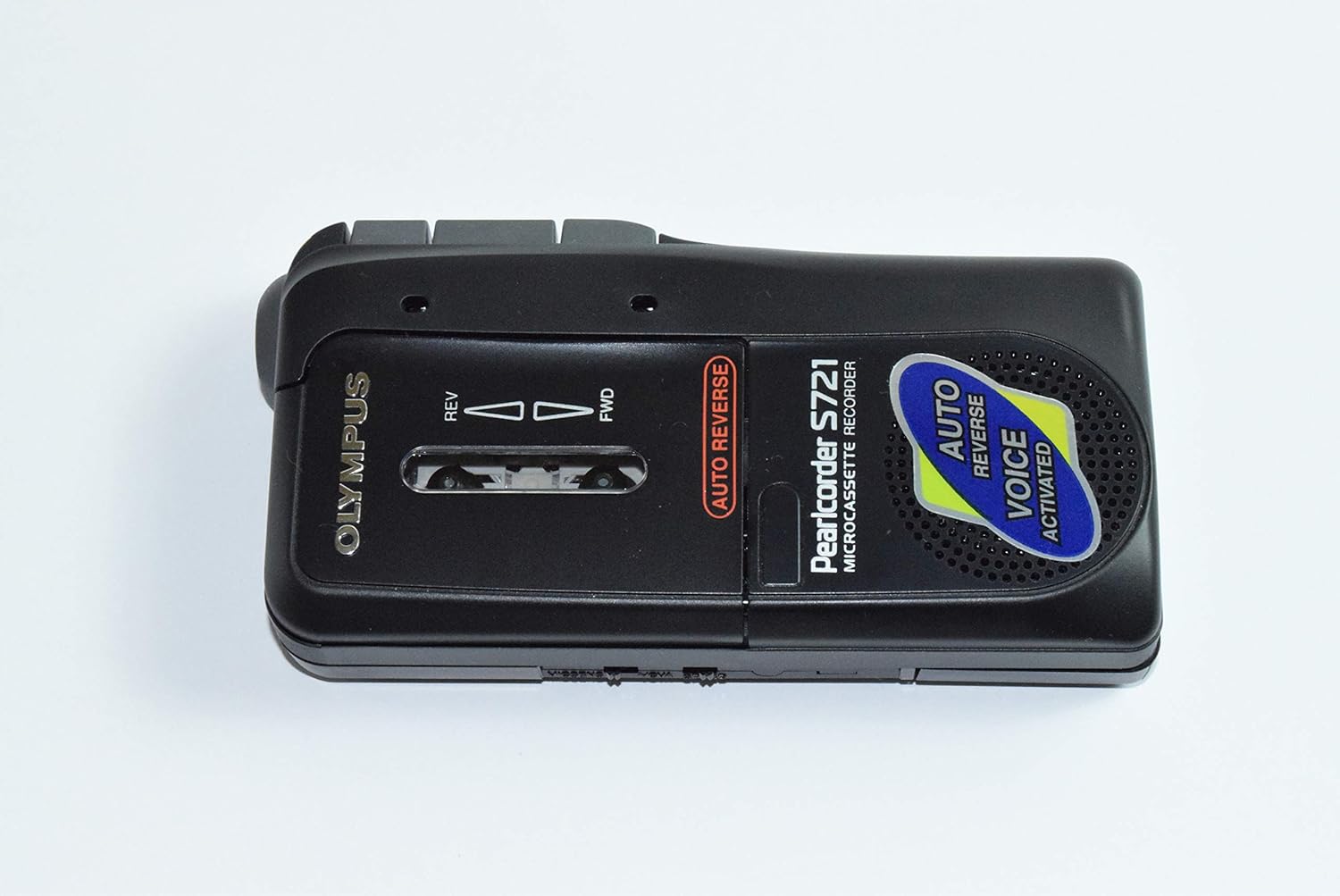
Figure 4: Top view of the recorder, highlighting the cassette window and indicators.

Figure 5: Side view of the recorder, showing the main control buttons.
- Record Button: Initiates recording.
- Play Button: Starts playback of recorded audio.
- Stop/Eject Button: Stops current operation and ejects the microcassette when pressed fully.
- Fast Forward (FWD): Advances the tape quickly.
- Rewind (REV): Rewinds the tape quickly.
- Speed Switch: Selects between two recording/playback speeds (e.g., 1.2 cm/s or 2.4 cm/s) to optimize recording time or quality.
- Volume Control: Adjusts playback volume.
- Built-in Microphone: For direct audio capture.
- Built-in Speaker: For audio playback.
2. Recording
- Ensure a microcassette with sufficient recording time is inserted.
- Select the desired recording speed using the speed switch.
- Press the Record button. The recorder will begin recording audio through its built-in microphone.
- To pause recording, slide the PAUSE switch (if available). To resume, release the PAUSE switch.
- To stop recording, press the Stop/Eject button.
Voice Activated Recording (VOX): If your model features Voice Activated Recording, activate this function to automatically start recording when sound is detected and pause when silence occurs, conserving tape and battery life.
3. Playback
- Ensure a recorded microcassette is inserted.
- Press the Play button. Audio will play through the built-in speaker or connected earphone.
- Adjust the volume using the volume control.
- To stop playback, press the Stop/Eject button.
4. Fast Play Mode
The Fast Play mode allows for approximately 25% faster playback, useful for quickly reviewing recorded content or locating specific passages. Activate this mode via the dedicated switch or button (refer to specific model markings).
5. Cue/Review Function
While playing, press and hold the Fast Forward (FWD) button for Cue or the Rewind (REV) button for Review. This allows you to listen to the audio at an accelerated speed, making it easier to find specific sections without fully stopping playback.
6. Auto Reverse
The Auto Reverse feature provides uninterrupted recording and playback by automatically switching tape direction when the end of a side is reached. This eliminates the need to manually flip the microcassette.
7. Auto Shut-off
To conserve battery power and prevent tape damage, the recorder automatically shuts off when the tape reaches its end during recording or playback, or if the batteries are depleted.
8. Quick Review
After recording, the Quick Review function allows you to immediately listen to the last few seconds of what was just recorded, ensuring the recording quality and content are satisfactory.
9. External Jack
An external jack (typically 3.5mm) is provided for connecting an earphone, allowing for private listening.
Maintenance
- Cleaning: Use a soft, dry cloth to clean the exterior of the recorder. Do not use liquid cleaners or solvents. Periodically clean the tape heads and pinch roller with a specialized tape head cleaning kit to ensure optimal audio quality.
- Battery Care: Remove batteries if the recorder will not be used for an extended period to prevent leakage.
- Storage: Store the recorder in a cool, dry place, away from direct sunlight, extreme temperatures, and dust.
- Microcassettes: Store microcassettes in their cases to protect them from dust and physical damage.
Troubleshooting
| Problem | Possible Cause | Solution |
|---|---|---|
| Recorder does not turn on. | Dead or incorrectly installed batteries. | Replace batteries with new ones, ensuring correct polarity. |
| Poor recording or playback quality. | Dirty tape heads or pinch roller; worn-out microcassette. | Clean tape heads and pinch roller. Try a new microcassette. |
| Tape does not move. | Tape jammed; batteries low; auto shut-off activated. | Check for tape jams. Replace batteries. Ensure tape is not at its end. |
| No sound during playback. | Volume too low; earphone connected; faulty speaker. | Increase volume. Disconnect earphone. Test with earphone if speaker is suspected faulty. |
Specifications
| Feature | Detail |
|---|---|
| Brand | Olympus |
| Model | S721 |
| Tape Speed | 2-speed (e.g., 1.2 cm/s, 2.4 cm/s) |
| Recording Time | Up to 3 hours on a 90-minute microcassette (at slower speed) |
| Microphone | Built-in |
| Speaker | Built-in dynamic speaker |
| Features | Auto Reverse, Fast Play Mode, Cue/Review, Auto Shut-off, Quick Review, Voice Activated Recording (VOX) |
| Power Source | Batteries (e.g., 2 x AA, not included) |
| External Jack | Earphone jack (3.5mm) |
| Dimensions | Approximately 12.95 x 6.35 x 4.57 cm |
| Weight | Approximately 1.36 kg |
Warranty and Support
For warranty information and technical support, please refer to the documentation included with your product or visit the official Olympus website. Keep your purchase receipt as proof of purchase for any warranty claims.
For further assistance, contact Olympus customer service through their official channels.
