
Badland Winches 61297
2500 lb. Electric ATV/Utility Winch
User Manual
Model: 61297 | Brand: Badland Winches
Introduction
This manual provides essential information for the safe and effective operation, installation, and maintenance of your 2500 lb. Electric ATV/Utility Winch. Designed for ATV and utility applications, this winch features a permanent magnet motor, single-stage planetary gear system, automatic load-holding brake, and wireless remote control for versatile and reliable performance. Please read this manual thoroughly before installation or operation to ensure proper use and to prevent injury or damage.
Safety Information
Always prioritize safety when operating the winch. Failure to follow these instructions can result in serious injury or property damage.
- Read All Instructions: Understand all warnings and operating procedures before using the winch.
- Wear Protective Gear: Always wear heavy-duty gloves and eye protection when handling wire rope or operating the winch.
- Never Exceed Rated Capacity: Do not attempt to pull loads heavier than the winch's rated capacity (2500 lbs).
- Maintain Safe Distance: Keep hands, clothing, and hair clear of the wire rope, hook, and fairlead during operation. Stand clear of the winch and cable during winching operations.
- Inspect Before Use: Before each use, inspect the wire rope, hook, and all connections for wear, damage, or corrosion. Do not use if damaged.
- Secure Vehicle: Ensure the vehicle or ATV is securely braked and stable before beginning any winching operation.
- Avoid Shock Loads: Do not use the winch to jerk or snatch loads. Apply power smoothly.
- Do Not Use for Lifting: This winch is designed for pulling, not for overhead lifting or supporting human weight.
- Battery Safety: Disconnect the battery before performing any electrical work on the winch. Ensure proper ventilation when working near batteries.
- Wireless Remote Safety: Keep the wireless remote control away from children and store it safely when not in use to prevent accidental activation.
Components Overview
Familiarize yourself with the main components of your winch system.

Figure 1: Winch Unit. This image shows the main winch unit, featuring the motor housing on the left, the wire rope spooled around the drum, and the roller fairlead with the hook attached. The "2500 BADLAND" logo is visible on the motor housing.

Figure 2: Wireless Remote Control. A close-up view of the black wireless remote control. It features three buttons: "On/Off" in the center, "Extend" (for unwinding the cable) at the top, and "Retract" (for winding the cable) at the bottom. A small keyring clip is attached.
- Winch Motor: Provides the power to pull the load.
- Winch Drum: The cylinder around which the wire rope is wound.
- Wire Rope: The cable used for pulling.
- Hook: Attached to the end of the wire rope for securing to the load or anchor point.
- Roller Fairlead: Guides the wire rope onto the drum evenly and reduces wear.
- Wireless Remote Control: Allows for safe operation from a distance (up to 20 ft.).
- Control Box/Solenoid: Houses the electrical components that control the winch motor.
- Battery Cables: Connect the winch to the vehicle's 12V battery.
Installation and Setup
Proper installation is crucial for the safe and efficient operation of your winch. If you are unsure about any step, consult a qualified technician.
- Choose Mounting Location: Select a sturdy, flat surface on your ATV or utility vehicle capable of supporting the winch and its maximum pulling force. Ensure the mounting location allows for proper wire rope alignment with the fairlead.
- Mounting the Winch:
- Align the winch with the pre-drilled holes on your mounting plate or bumper.
- Secure the winch using appropriate high-strength bolts, washers, and nuts. Refer to the specifications for the mounting bolt pattern.
- Ensure all fasteners are tightened securely.
- Electrical Connections:
- WARNING: Disconnect the vehicle's battery ground cable before making any electrical connections.
- Connect the winch motor cables to the control box/solenoid according to the wiring diagram provided with your winch (if applicable).
- Connect the main power cables from the control box/solenoid to the vehicle's 12V battery. The red cable connects to the positive (+) terminal, and the black cable connects to the negative (-) terminal. Ensure connections are clean and tight.
- Reconnect the vehicle's battery ground cable.
- Test Operation: After installation, perform a brief test of the winch. With the vehicle running, extend and retract the wire rope a few feet using the remote control to ensure proper function.
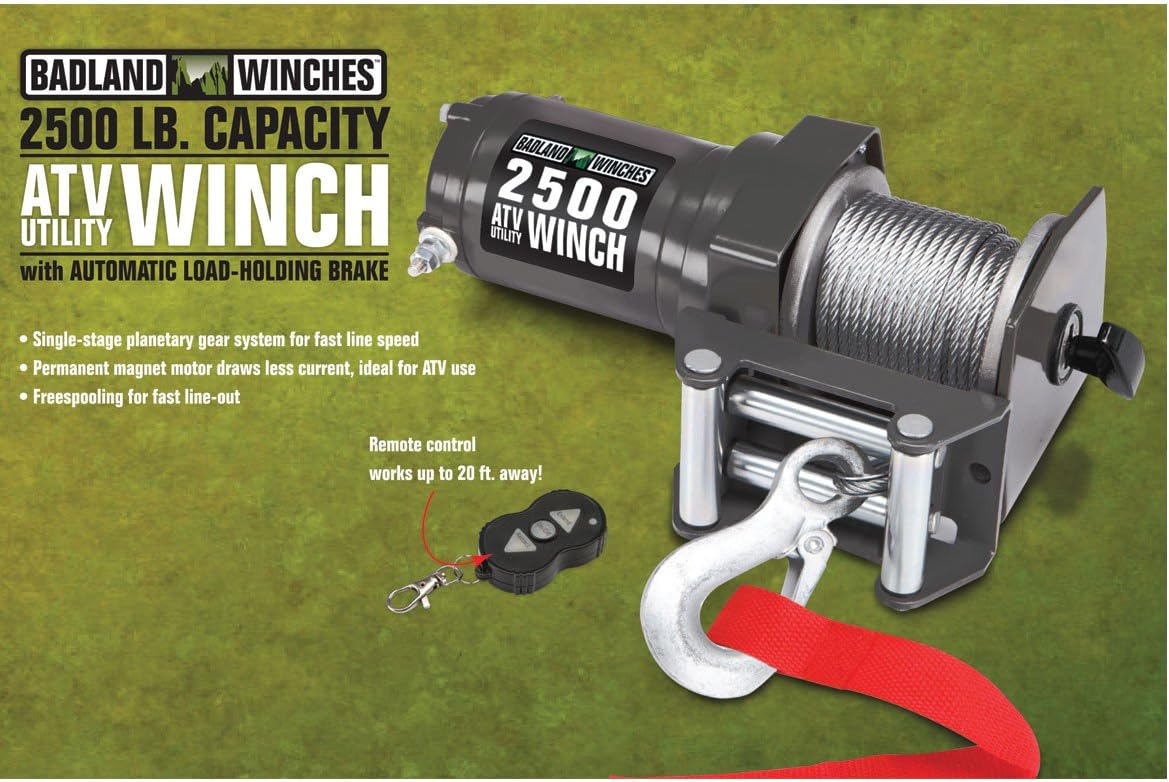
Figure 3: Winch Features and Remote. This image illustrates the winch unit along with its wireless remote control. Key features highlighted include the single-stage planetary gear system for fast line speed, permanent magnet motor for lower current draw, and freespooling for quick line-out. The remote control is shown with a note indicating it works up to 20 ft. away.
Operating Instructions
Follow these steps for safe and effective winch operation.
- Prepare for Winching:
- Ensure the vehicle is securely braked and stable.
- Unspool enough wire rope to reach your anchor point. Use the free spooling clutch (if equipped) for faster line-out.
- Attach the hook securely to a suitable anchor point (e.g., tree saver strap around a tree, D-ring shackle on another vehicle). Never wrap the wire rope directly around an object and hook it back onto itself, as this can damage the rope.
- Ensure the wire rope is not kinked or twisted.
- Engage Clutch: If you used free spooling, engage the clutch to lock the drum.
- Operate the Winch:
- Stand at a safe distance, clear of the wire rope and the path of the load.
- Use the wireless remote control. Press the "On/Off" button to activate the remote.
- Press the "Retract" button to begin winding the wire rope and pulling the load.
- Press the "Extend" button to unwind the wire rope.
- Operate the winch in short bursts to prevent overheating. Allow the motor to cool between pulls.
- Monitor the wire rope as it spools onto the drum, ensuring it winds evenly.
- After Winching:
- Once the operation is complete, release the remote button.
- Carefully disconnect the hook from the anchor point.
- Rewind the wire rope neatly onto the drum under a light load (e.g., by pulling on the hook) to ensure even spooling.
- Store the remote control in a safe place.
Maintenance
Regular maintenance will extend the life of your winch and ensure its reliable operation.
- Wire Rope Inspection: Regularly inspect the wire rope for frayed strands, kinks, crushing, or corrosion. Replace the wire rope if any damage is found.
- Electrical Connections: Check all electrical connections periodically for corrosion, looseness, or damage. Clean and tighten as necessary.
- Lubrication: Consult the manufacturer's guidelines for any recommended lubrication points. Generally, the gear train is sealed and requires no user maintenance.
- Cleaning: Keep the winch clean and free of dirt, mud, and debris. Use a damp cloth to wipe down the exterior.
- Storage: When not in use, store the winch in a dry, protected area to prevent exposure to harsh weather conditions.
Troubleshooting
If you encounter issues with your winch, refer to the following common problems and solutions.
| Problem | Possible Cause | Solution |
|---|---|---|
| Winch does not operate. | No power to winch; Loose electrical connections; Dead remote battery; Overload protection activated. | Check vehicle battery voltage; Inspect and tighten all electrical connections; Replace remote battery; Allow winch motor to cool down. |
| Winch operates slowly or with reduced power. | Low battery voltage; Undersized wiring; Overheating; Excessive load. | Charge vehicle battery; Ensure correct gauge wiring is used; Allow winch to cool; Reduce load or use a snatch block to double the line. |
| Wire rope spools unevenly. | No tension on wire rope during rewind; Damaged fairlead. | Rewind wire rope under a light load; Inspect and replace fairlead if damaged. |
| Remote control not responding. | Dead remote battery; Remote out of range; Interference. | Replace remote battery; Move closer to the winch; Check for sources of radio interference. |
Specifications
Technical specifications for the 2500 lb. Electric ATV/Utility Winch, Model 61297.

Figure 4: Detailed Specifications. This image provides a comprehensive overview of the winch's specifications, including power specifications (line pull, line speed, amp draw), layer data (line pull, cable capacity), and general specifications such as mounting bolt pattern, overall dimensions, IP rating, gear ratio, and drum diameter.
| Feature | Detail |
|---|---|
| Model Number | 61297 |
| Rated Line Pull | 2500 lbs. (single line) |
| Motor | Permanent Magnet |
| Voltage | 12 Volts DC |
| Gear System | Single-stage Planetary |
| Gear Ratio | 153:1 |
| Braking Action | Automatic Load-Holding Brake |
| Wire Rope | 5/32 in. x 50 ft. aircraft grade wire rope |
| Fairlead | Roller Fairlead (5/32 in. x 2-7/8 in. x 1-3/4 in.) |
| Wireless Remote Range | Up to 20 ft. |
| Overall Dimensions | 4-1/2 in. L x 3.93 in. W x 11-1/8 in. H (286mm x 99mm x 108mm) |
| Mounting Bolt Pattern | 2.0 in. x 2.9 in. (50.8mm x 73.7mm) |
| IP Rating | IP65 (Resistant to normal water jets) |
| Item Weight | 6.96 kg |
Warranty and Support
For warranty information or technical support, please refer to the documentation included with your purchase or contact the manufacturer directly. Keep your purchase receipt as proof of purchase.
Manufacturer: Badland Winches
Place of Business: Costa Mesa, CA 92627, US
Related documents61297


Ask a question about this manual
Ask about setup, troubleshooting, compatibility, parts, safety, or missing instructions. Manuals+ will review the question and use this page’s manual context to help answer it.