
Optelec Powermag 3.5X/10D
Contents
Optelec Powermag 3.5X/10D LED Magnifier User Manual
Model: Powermag 3.5X/10D
Introduction
Thank you for choosing the Optelec Powermag 3.5X/10D LED Magnifier. This high-quality, lightweight, and scratch-resistant magnifying lens is designed to provide a sharply defined image, while its integrated lighting ensures evenly dispensed clear white light for high contrast and brightness in various environments. This manual provides essential information for the proper setup, operation, and maintenance of your device.
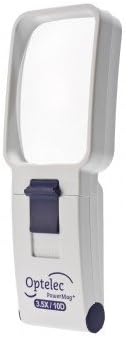
Image: The Optelec Powermag 3.5X/10D LED Magnifier, showcasing its compact and ergonomic design with the lens and integrated light source.
Package Contents
Please ensure all items are present in the package:
- Optelec Powermag 3.5X/10D LED Magnifier
- 2 x AAA Batteries (pre-installed or included separately)
- User Manual (this document)
Setup
Battery Installation
Your Powermag magnifier requires 2 AAA batteries for the LED illumination. The batteries are included with your purchase.
- Locate the battery compartment cover on the back or side of the magnifier.
- Gently slide or unclip the cover to open the compartment.
- Insert the 2 AAA batteries, ensuring the positive (+) and negative (-) ends align correctly with the indicators inside the compartment.
- Replace the battery compartment cover, ensuring it clicks securely into place.
Note: Always use fresh batteries for optimal performance. If the magnifier will not be used for an extended period, remove the batteries to prevent leakage.
Operating Instructions
Turning On/Off the LED Light
The Powermag magnifier features an integrated LED light for enhanced visibility.
- To turn on the LED light, locate the power switch, typically a sliding or push button, on the side or front of the magnifier.
- Slide or press the switch to the "ON" position. The LED light will illuminate.
- To turn off the LED light, slide or press the switch back to the "OFF" position.
Using the Magnifier
Hold the magnifier approximately 1-2 inches (2.5-5 cm) above the object or text you wish to magnify. Adjust the distance slightly until the image appears clear and in focus. The integrated LED light will provide optimal illumination for reading or inspecting details.
Maintenance
Cleaning the Lens
The Powermag lens is scratch-resistant, but proper cleaning will ensure its longevity and clarity.
- Gently wipe the lens with a soft, lint-free cloth, such as a microfiber cloth.
- For stubborn smudges, slightly dampen the cloth with a small amount of lens cleaning solution or water. Avoid harsh chemicals or abrasive materials.
- Do not immerse the magnifier in water or any other liquid.
Storage
Store your magnifier in a clean, dry place away from direct sunlight and extreme temperatures. Keeping it in a protective pouch (if available) can help prevent dust and scratches.
Troubleshooting
| Problem | Possible Cause | Solution |
|---|---|---|
| LED light does not turn on. |
|
|
| Image is blurry or distorted. |
|
|
Specifications
| Model: | Powermag 3.5X/10D |
| Magnification: | 3.5X (10 Diopter) |
| Light Source: | Integrated LED |
| Lens Material: | Acrylic or Resin |
| Power Source: | 2 x AAA Batteries (included) |
| Color: | White |
| Item Weight: | 0.23 Kilograms (approx. 8.15 ounces) |
| Dimensions (approx.): | 10.75 x 7.87 x 1.93 inches (Package Dimensions) |
| Manufacturer: | Optelec |
| Country of Origin: | Netherlands |
Warranty and Support
For warranty information and customer support, please refer to the documentation provided with your purchase or visit the official Optelec website. Keep your proof of purchase for any warranty claims.
Manufacturer: Optelec
ASIN: B00IU0OQTI
For further assistance, you may contact Optelec customer service through their official channels.
Documents and downloads
Ask a question about this manual
Ask about setup, troubleshooting, compatibility, parts, safety, or missing instructions. Manuals+ will review the question and use this page’s manual context to help answer it.