Introduction
This manual provides instructions for the proper installation and use of the Workman C529C Chrome CB Radio Mounting Bracket. This bracket is designed to securely mount compatible CB radios, specifically the Cobra 29 series, in various locations within a vehicle or other suitable environment. Please read these instructions thoroughly before proceeding with installation.
Safety Information
- Ensure the mounting surface is stable and capable of supporting the weight of the CB radio and bracket.
- Use appropriate tools for installation. Wear safety glasses to protect your eyes from debris.
- Avoid mounting the bracket in locations that obstruct driver visibility or interfere with vehicle controls and safety features (e.g., airbags).
- When drilling, be aware of any electrical wiring, fuel lines, or other critical components behind the mounting surface.
- Tighten all screws securely to prevent vibration and detachment during operation.
Package Contents
Verify that all items are present in the package:
- 1x Workman C529C Chrome CB Radio Mounting Bracket
- 2x Self-piercing mounting screws (approximately 3/4 inch)
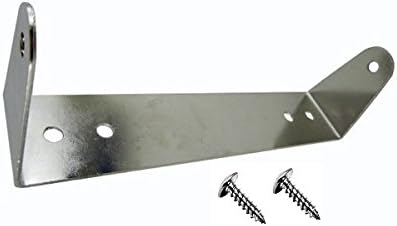
Image: The Workman C529C Chrome CB Radio Mounting Bracket, a silver L-shaped metal bracket, is shown alongside two self-piercing screws. The bracket features multiple pre-drilled holes for attachment.
Setup and Installation
Follow these steps to install your Workman C529C mounting bracket:
- Select Mounting Location: Choose a flat, sturdy surface for mounting the bracket. Ensure there is sufficient space for the CB radio and that it will not interfere with vehicle operation or safety. The bracket measures approximately 7-1/4 inches wide.
- Mark Pilot Holes: Position the bracket on the chosen surface. Use a pencil or marker to mark the locations for the two mounting screws through the pre-drilled holes on the bracket's base.
- Drill Pilot Holes (Optional, Recommended): For optimal installation and to prevent damage to the mounting surface, it is recommended to drill small pilot holes at the marked locations. Use a drill bit slightly smaller than the diameter of the mounting screws.
- Attach Bracket: Align the bracket with the pilot holes (if drilled) or marked locations. Insert the provided self-piercing screws into the holes and securely fasten the bracket to the mounting surface using a screwdriver or drill. Do not overtighten.
- Mount CB Radio: Once the bracket is securely installed, align your Cobra 29 series CB radio with the bracket's side holes. Use the screws provided with your CB radio (not included with this bracket) to attach the radio to the bracket. Ensure the radio is firmly secured.
- Verify Stability: Gently test the installed CB radio and bracket to ensure they are stable and do not wobble. Adjust screw tightness if necessary.
Functionality and Compatibility
The Workman C529C bracket is designed to provide a stable and secure mounting solution for Cobra 29 series CB radios. Its chrome-plated finish offers durability and a clean aesthetic. The bracket's dimensions are specifically tailored for compatibility with the Cobra 29 model, ensuring a proper fit.
Maintenance
- Cleaning: Wipe the chrome surface with a soft, damp cloth to remove dust and fingerprints. Avoid abrasive cleaners or harsh chemicals that could damage the finish.
- Inspection: Periodically check all mounting screws for tightness. Vibrations during vehicle operation can sometimes loosen fasteners.
- Corrosion: While chrome-plated, prolonged exposure to moisture or harsh environments can lead to corrosion. Inspect for any signs of rust and address them promptly.
Troubleshooting
- Bracket does not fit my radio: This bracket is specifically designed for Cobra 29 series CB radios. Verify your radio model. The bracket width is 7-1/4 inches.
- Screws are not holding: Ensure the mounting surface is appropriate for the self-piercing screws. If the surface is too soft or too hard, consider using different fasteners suitable for that material, or reinforce the mounting area.
- Bracket is loose after installation: Re-tighten all mounting screws. If the issue persists, inspect the mounting surface for damage or instability.
Specifications
| Feature | Detail |
|---|---|
| Brand | Workman |
| Model Number | C529C |
| Material | Chrome Plated Metal |
| Compatibility | Cobra 29 Series CB Radios |
| Bracket Width | 7-1/4 inches (approx. 18.4 cm) |
| Included Screws | 2x Self-piercing, 3/4 inch (approx. 1.9 cm) |
| Item Dimensions (LxWxH) | 7.5 x 3 x 2 inches (approx. 19.05 x 7.62 x 5.08 cm) |
| Package Weight | 0.2 Pounds (approx. 90.7 grams) |
| UPC | 714833137627 |
Warranty and Support
For warranty information, technical support, or inquiries regarding the Workman C529C Chrome CB Radio Mounting Bracket, please contact Workman directly through their official website or customer service channels. Keep your purchase receipt as proof of purchase.


