
Introduction
This manual provides essential instructions for setting up, operating, maintaining, and troubleshooting your LG A380 flip phone. Please read this guide thoroughly to ensure proper use and to maximize the features of your device.
Device Overview
The LG A380 is a compact flip phone designed for reliable communication. It features a 2.4-inch display, a 1.3-megapixel camera, and includes functionalities like Text to Speech and Senior Mode for enhanced accessibility.
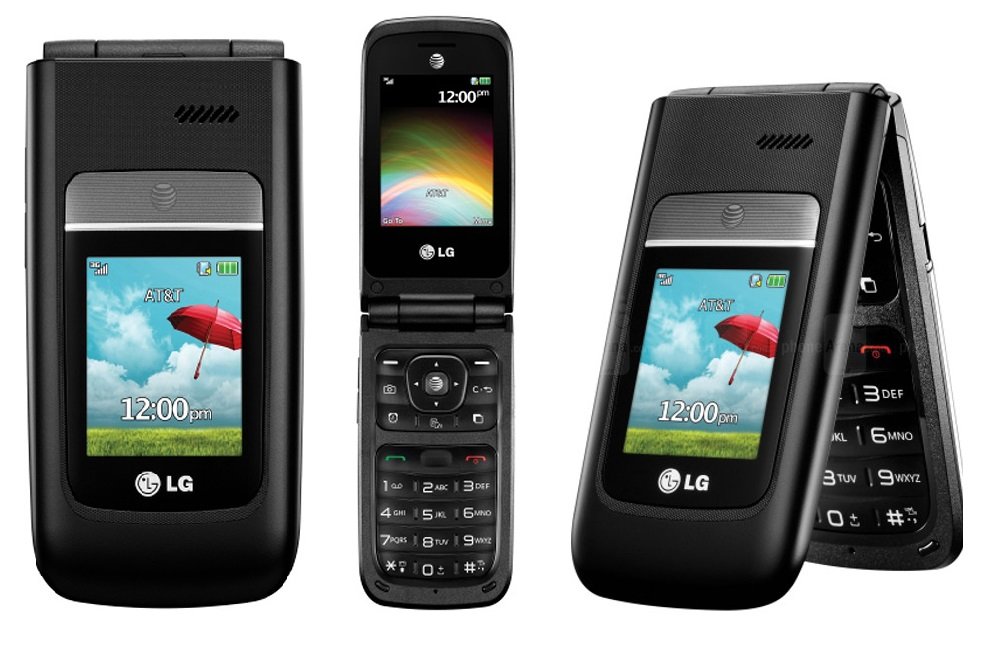
Figure 1: LG A380 Flip Phone (Closed View)
This image displays the LG A380 flip phone in its closed position. The external screen shows the AT&T network, 3G signal strength, battery level, and the current time as 12:00 pm. A graphical background of a blue sky with clouds, green grass, and a red umbrella is visible on the screen. The LG logo is present below the screen.
Setup
1. Battery Installation
- Carefully remove the back cover of the phone.
- Align the battery contacts with the terminals inside the phone.
- Gently press the battery into place until it clicks.
- Replace the back cover, ensuring it is securely fastened.
2. SIM Card Installation
- With the battery removed, locate the SIM card slot.
- Insert your SIM card with the gold contacts facing down and the cut corner aligned with the slot.
- Push the SIM card gently until it locks into position.
- Reinstall the battery and back cover.
3. Initial Power On
Press and hold the Power/End Call button until the LG logo appears on the screen. Follow any on-screen prompts to complete the initial setup.
Operating Instructions
Making and Receiving Calls
- To Make a Call: Open the phone, dial the number using the keypad, and press the Send button.
- To Answer a Call: Open the phone or press the Send button when the phone rings.
- To End a Call: Close the phone or press the End Call button.
Sending Text Messages
- From the main menu, navigate to Messages.
- Select Create New Message.
- Enter the recipient's phone number or select from your contacts.
- Type your message using the keypad.
- Press Send.
Using the Camera
The LG A380 is equipped with a 1.3-megapixel camera for capturing photos and videos.
- From the main menu, select Camera.
- Frame your shot using the display.
- Press the dedicated camera button or the OK button to take a picture.
- To record video, switch to video mode within the camera application and press Record.
Accessibility Features
- Text to Speech: This feature reads out text on the screen, such as messages or menu options, to assist users with visual impairments. Activate it through the Settings > Accessibility menu.
- Senior Mode: Designed for ease of use, Senior Mode simplifies the interface with larger fonts and icons, and direct access to frequently used functions. Enable it via Settings > Senior Mode.
Maintenance
Battery Care
- Use only LG-approved chargers and batteries.
- Avoid exposing the battery to extreme temperatures.
- Do not puncture or damage the battery.
- For optimal battery life, avoid frequent full discharges and charges.
Cleaning Your Device
Gently wipe the phone's exterior with a soft, lint-free cloth. Avoid using harsh chemicals or abrasive materials, which can damage the screen or casing.
Software Updates
Periodically check for software updates through the phone's settings menu to ensure optimal performance and access to the latest features. Consult your service provider for specific instructions on updating your device.
Troubleshooting
- Phone Not Turning On: Ensure the battery is properly installed and charged. Connect the charger and wait a few minutes before attempting to power on again.
- Poor Call Quality: Check your signal strength. Move to an area with better reception. Ensure the earpiece and microphone are not obstructed.
- Battery Drains Quickly: Reduce screen brightness, close unused applications, and limit background data usage. Consider replacing an old battery if issues persist.
- Cannot Send/Receive Messages: Verify your messaging settings and ensure you have an active service plan. Check for sufficient storage space on the phone.
- Camera Not Working: Restart the phone. Ensure there is enough storage space for photos/videos. If the issue persists, a factory reset might be necessary (back up data first).
Specifications
| Feature | Detail |
|---|---|
| Model Name | A380 |
| Brand | LG |
| Display | 2.4 Inches |
| Resolution | 320 x 240 |
| Camera | 1.3-MP |
| Operating System | Android |
| CPU Speed | 230 MHz |
| Cellular Technology | 3G |
| Connectivity Technology | Wi-Fi |
| Wireless Network Technology | UMTS |
| Product Dimensions | 2.05 x 0.67 x 4.02 inches |
| Item Weight | 3.56 ounces |
| Battery | 1 A battery required (included) |
| Color | Black |
| Features | Text to Speech, Senior Mode |
Warranty and Support
For warranty information, please refer to the documentation included with your purchase or visit the official LG website. If you require further assistance or technical support, please contact LG customer service or your service provider.
You can find more information and support resources on the LG Support Website.
Important Safety Information
WARNING: This product contains a chemical known to the State of California to cause cancer, birth defects or other reproductive harm. Please handle with care and dispose of responsibly.
Always follow basic safety precautions when using your phone to reduce the risk of fire, electric shock, and injury to persons. Read all safety and operating instructions before using your phone.