
ProForm 69500
ProForm PERFORMANCE 1450 Treadmill Walking Belt User Manual
Comprehensive guide for installation, operation, and maintenance of your replacement treadmill walking belt.
Introduction
This manual provides detailed instructions for the installation, operation, and maintenance of the ProForm PERFORMANCE 1450 Treadmill Walking Belt. This replacement belt is designed to restore optimal performance to your ProForm PERFORMANCE 1450 treadmill (Model PFTL145114). Please read all instructions carefully before proceeding with installation or use to ensure safety and proper function.
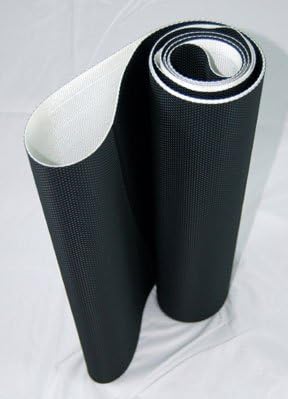
Image: A new ProForm treadmill walking belt, rolled up, showcasing its black textured surface and white underside. This belt is a direct replacement for the ProForm PERFORMANCE 1450 treadmill.
Setup and Installation
Replacing a treadmill walking belt requires careful attention. It is recommended to have assistance if possible. Ensure the treadmill is unplugged from the power source before beginning any installation.
Tools Required:
- Allen wrench set (typically 6mm or 8mm for treadmill adjustments)
- Phillips head screwdriver
- Flat head screwdriver
- Pliers (optional)
- Silicone lubricant (specifically for treadmill belts)
Installation Steps:
- Disconnect Power: Unplug the treadmill from the wall outlet.
- Remove Motor Hood: Use a Phillips head screwdriver to remove the screws securing the motor hood. Carefully lift and set aside the hood.
- Loosen Rear Roller Bolts: Locate the two bolts at the rear of the treadmill deck that adjust the tension of the walking belt. Use an Allen wrench to loosen these bolts, turning them counter-clockwise until the belt is loose enough to be removed.
- Remove Old Belt: Carefully slide the old walking belt off the front and rear rollers. This may require lifting the deck slightly.
- Clean Deck: Thoroughly clean the treadmill deck surface to remove any dust, debris, or old lubricant residue. A clean deck ensures proper adhesion and reduces friction for the new belt.
- Install New Belt: Slide the new ProForm walking belt onto the deck, ensuring it is centered on the rollers. The textured side should face up.
- Center and Tension Belt:
- Hand-tighten the rear roller bolts until the belt is snug but not overly tight.
- Plug in the treadmill and start it at a very low speed (e.g., 1-2 mph).
- Observe the belt's tracking. If it drifts to one side, turn the corresponding rear roller bolt clockwise in quarter-turn increments until the belt centers. If it drifts to the other side, turn the opposite bolt clockwise.
- Adjust tension until the belt does not slip when walked on, but is not so tight that it strains the motor. A good test is to lift the belt in the center; you should be able to lift it approximately 2-3 inches from the deck.
- Lubricate Belt: Apply silicone lubricant between the belt and the deck as per the treadmill manufacturer's instructions. This is crucial for reducing friction and extending belt life.
- Replace Motor Hood: Secure the motor hood back in place with the screws.
- Test Operation: Walk on the treadmill at various speeds to ensure smooth operation and proper belt tracking.
Operating Instructions
After installing the new walking belt, it is important to perform initial calibration and observe its behavior during the first few uses.
- Initial Break-in: Operate the treadmill at a moderate speed (e.g., 3-4 mph) for 10-15 minutes without a user. This helps the belt settle and ensures proper lubrication distribution.
- Belt Tracking Check: During the first few uses, periodically check the belt's alignment. If it begins to drift, make small, quarter-turn adjustments to the rear roller bolts as described in the installation section.
- Listen for Unusual Noises: Pay attention to any new squeaking, grinding, or rubbing sounds, which could indicate improper tension or alignment.
- Smoothness of Movement: The belt should move smoothly and consistently without jerking or hesitation.
Maintenance
Regular maintenance is essential to prolong the life of your new walking belt and ensure safe operation of your treadmill.
- Lubrication: The walking belt and deck require periodic lubrication to reduce friction. Refer to your treadmill's original user manual for the recommended lubrication schedule (typically every 3-6 months or after a certain number of hours of use). Use only 100% silicone lubricant specifically designed for treadmills.
- Cleaning:
- Wipe down the top surface of the belt with a damp cloth after each use to remove sweat and debris.
- Periodically clean under the belt and the deck surface. Unplug the treadmill, loosen the belt slightly, and use a vacuum cleaner or damp cloth to remove dust and dirt.
- Belt Tension: Check the belt tension regularly. If the belt slips during use or feels too loose, adjust the rear roller bolts to increase tension. If it feels too tight, loosen them slightly. Over-tightening can damage the motor and belt.
- Belt Tracking: Monitor the belt's tracking. If it consistently drifts to one side, adjust the corresponding rear roller bolt to re-center it.
- Deck Condition: Inspect the treadmill deck for any signs of wear or damage. A worn deck can prematurely wear out the walking belt.
Troubleshooting
This section addresses common issues you might encounter with your new walking belt.
| Problem | Possible Cause | Solution |
|---|---|---|
| Belt slips during use. | Belt too loose; insufficient lubrication. | Adjust belt tension (tighten rear roller bolts); apply silicone lubricant. |
| Belt drifts to one side. | Uneven tension; treadmill not level. | Adjust belt tracking (tighten bolt on side belt drifts towards); ensure treadmill is on a level surface. |
| Squeaking or rubbing noise. | Lack of lubrication; belt rubbing against frame; worn rollers. | Lubricate belt; re-center belt; inspect rollers for wear. |
| Belt feels sticky or rough. | Insufficient lubrication; dirty deck. | Clean deck and apply lubricant. |
If you encounter issues not listed here or if solutions do not resolve the problem, please contact ProForm customer support.
Specifications
Key specifications for the ProForm PERFORMANCE 1450 Treadmill Walking Belt (Replacement Part).
| Attribute | Detail |
|---|---|
| Product Type | Treadmill Walking Belt (Replacement) |
| Brand | ProForm |
| Compatible Treadmill Model | ProForm PERFORMANCE 1450 (PFTL145114) |
| Part Number (Belt) | 69500 |
| ASIN | B00IO7NL0M |
| First Available Date | February 26, 2014 |
Warranty and Support
For specific warranty information regarding your ProForm PERFORMANCE 1450 Treadmill Walking Belt, please refer to the original purchase documentation or contact ProForm directly. Warranty terms typically cover manufacturing defects.
For technical assistance, replacement parts, or further inquiries, please visit the official ProForm support website or contact their customer service department. You can often find support resources, FAQs, and contact information on the ProForm Store on Amazon or their official brand website.
Related documents69500


Ask a question about this manual
Ask about setup, troubleshooting, compatibility, parts, safety, or missing instructions. Manuals+ will review the question and use this page’s manual context to help answer it.