
JVC KDR449

JVC KD-R449EED Car CD/USB Receiver
Instruction Manual
1. Introduction
This manual provides essential instructions for the safe and efficient operation of your JVC KD-R449EED Car CD/USB Receiver. Please read this manual thoroughly before installation and use to ensure proper functionality and to prevent damage. Keep this manual accessible for future reference.
2. Safety Information
- Do not operate the unit in a manner that distracts you from driving. Always prioritize road safety.
- Ensure proper installation to prevent electrical shock or fire. Consult a professional for installation if you are unsure.
- Do not disassemble or modify the unit. This may cause malfunction or injury.
- Avoid exposing the unit to moisture or extreme temperatures.
- Use only specified power supply voltage (12V DC, negative ground).
3. Package Contents
Verify that all items are present in the package:
- JVC KD-R449EED Main Unit
- Wiring Harness
- Remote Control (RM-RK52U)
- Mounting Hardware (Screws, Mounting Sleeve)
- Instruction Manual (This document)

Figure 3.1: JVC KD-R449EED unit and included remote control.
4. Setup and Installation
4.1. Installation Precautions
- This unit is designed for 1 DIN installation slots.
- Disconnect the vehicle's negative battery terminal before starting installation to prevent short circuits.
- Ensure all connections are secure and properly insulated.
- Avoid installing the unit where it will be exposed to direct sunlight, excessive heat, or moisture.
- If you are not confident with electrical wiring, seek professional installation.
4.2. Wiring Connections
Refer to the wiring diagram provided with the unit for specific connections. General connections include:
- Yellow Wire: Constant 12V (Battery)
- Red Wire: Switched 12V (Ignition/Accessory)
- Black Wire: Ground
- Blue Wire: Power Antenna / Amplifier Remote Turn-On
- Speaker Wires: Connect to vehicle speakers (e.g., White/White-Black for Front Left, Gray/Gray-Black for Front Right, Green/Green-Black for Rear Left, Purple/Purple-Black for Rear Right). Ensure correct polarity.

Figure 4.1: Front panel of the JVC KD-R449EED unit, showing controls and display.
5. Operating Instructions
5.1. Basic Operations
- Power On/Off: Press the SOURCE button to turn the unit on. Press and hold the SOURCE button to turn it off.
- Volume Control: Rotate the large central knob to adjust the volume.
- Source Selection: Press the SOURCE button repeatedly to cycle through available sources (CD, USB, Tuner, AUX).
- Menu/Settings: Press the MENU button to access audio settings and system options. Use the volume knob to navigate and press it to confirm.
5.2. CD/USB Playback
- CD Playback: Insert a CD into the disc slot. The unit will automatically switch to CD source and begin playback. Supports CD, CD-R, and CD-RW discs.
- USB Playback: Connect a USB storage device (e.g., flash drive) to the USB port. The unit will switch to USB source and begin playing compatible audio files (MP3/WMA).
- Track Navigation: Use the << and >> buttons to skip tracks.
- Play/Pause: Press the PLAY/PAUSE button (often integrated with the volume knob press or a dedicated button) to pause or resume playback.
5.3. Radio Operations
- Band Selection: In Tuner mode, press the BAND button to switch between FM and AM bands.
- Manual Tuning: Use the << and >> buttons for fine-tuning.
- Seek Tuning: Press and hold the << or >> buttons to automatically seek the next strong station.
- Preset Stations: Store your favorite stations by tuning to the desired frequency, then pressing and holding one of the numbered preset buttons (1-6). To recall, simply press the corresponding preset button.
5.4. Audio Settings
Access audio settings via the MENU button. Common settings include:
- Equalizer (EQ): Adjust bass, treble, and other frequency bands, or select from preset EQ curves.
- Balance/Fader: Adjust the sound distribution between left/right and front/rear speakers.
- Loudness: Enhances bass and treble at low volumes.
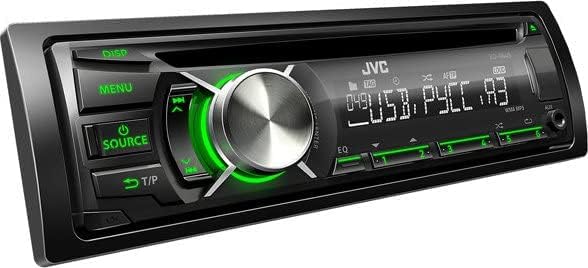
Figure 5.1: JVC KD-R449EED unit displaying green button illumination.
6. Maintenance
- Cleaning the Unit: Wipe the front panel with a soft, dry cloth. Do not use abrasive cleaners or solvents.
- CD Slot: Avoid inserting foreign objects into the CD slot. If a disc gets stuck, refer to the troubleshooting section or contact support.
- USB Port: Keep the USB port free from dust and debris.
7. Troubleshooting
| Problem | Possible Cause | Solution |
|---|---|---|
| No power | Blown fuse; incorrect wiring; loose connection. | Check vehicle fuse and unit fuse; verify wiring connections (Yellow, Red, Black wires). |
| No sound | Volume too low; Mute activated; incorrect speaker wiring; amplifier not turning on. | Increase volume; check Mute status; verify speaker connections; check amplifier remote wire. |
| CD/USB error | Dirty or scratched disc; incompatible USB format; damaged USB device. | Clean disc; try a different disc/USB device; ensure USB is formatted to FAT32. |
| Poor radio reception | Antenna not connected; damaged antenna; weak signal area. | Check antenna connection; replace antenna if damaged; try tuning in a different location. |
8. Specifications
| Model Name | KD-R449EED |
| Brand | JVC |
| Power Output | Minimum: 4 x 20 Watts RMS; Maximum: 4 x 50 Watts Peak |
| Supported Media | CD, CD-R, CD-RW, USB devices |
| Audio Formats | MP3, WMA |
| Tuner Type | Digital Tuner (VHF + FM / AM) |
| Connectivity | USB |
| Installation Size | 1 DIN |
| Item Weight | 1.2 Kilograms (1200 Grams) |
9. Warranty and Support
For warranty information, please refer to the warranty card included with your product or visit the official JVC website. For technical support or service inquiries, please contact JVC customer service in your region. Keep your purchase receipt as proof of purchase.
Official JVC Website: www.jvc.com
Related documentsKDR449


Ask a question about this manual
Ask about setup, troubleshooting, compatibility, parts, safety, or missing instructions. Manuals+ will review the question and use this page’s manual context to help answer it.