1. Product Overview
The Fujitsu PARALLEL Port Option CENTRONIX (ROHS), model S26361-F2814-V8, is a specialized spare part designed to provide a Centronics parallel port interface. This component is typically used in server systems or industrial computing environments requiring legacy parallel connectivity for peripherals such as printers or specialized equipment. It adheres to RoHS (Restriction of Hazardous Substances) directives, ensuring compliance with environmental standards.

Figure 1: Top-down view of the Fujitsu S26361-F2814-V8 Parallel Port Option card. This image displays the overall layout of the circuit board, including various integrated circuits, capacitors, and the main connector interface.
2. Safety Information
Please read and understand all safety instructions before handling or installing this component. Failure to do so may result in injury, damage to the product, or damage to the host system.
- Always disconnect power from the host system before installation or removal.
- Handle the component by its edges to avoid touching sensitive electronic parts.
- Use appropriate anti-static precautions (e.g., anti-static wrist strap) to prevent electrostatic discharge (ESD) damage.
- Ensure proper ventilation in the host system to prevent overheating.
- This product is designed for professional installation. If you are unsure about any step, consult a qualified technician.
3. Setup and Installation
This section outlines the general steps for installing the Fujitsu Parallel Port Option. Specific installation procedures may vary depending on the host system (e.g., server model, motherboard). Refer to your host system's documentation for detailed instructions on installing expansion cards.
- Preparation:
- Power down the host system completely and unplug all power cables.
- Open the system chassis according to the manufacturer's instructions.
- Ground yourself using an anti-static wrist strap connected to a grounded metal surface.
- Locate an Available Slot:
Identify an appropriate expansion slot on the motherboard. This card typically uses a PCI or similar legacy slot, though the exact interface should be confirmed by inspecting the card's connector and your system's motherboard.

Figure 2: Side view of the Fujitsu S26361-F2814-V8 card, highlighting the edge connector designed to interface with the motherboard's expansion slot and the metal mounting bracket.
- Install the Card:
- Carefully align the card's edge connector with the chosen expansion slot.
- Apply even, firm pressure to seat the card fully into the slot. Ensure the metal mounting bracket aligns with the chassis opening.
- Secure the card with the retaining screw or clip provided by your system chassis.
- Close and Power On:
- Close the system chassis.
- Reconnect all power cables and peripherals.
- Power on the host system.
- Driver Installation (if necessary):
Upon system boot, the operating system may automatically detect and install drivers for the parallel port. If not, you may need to manually install drivers provided by Fujitsu or your system manufacturer. Consult your system's documentation or Fujitsu's support website for driver availability.
4. Operating the Parallel Port
Once installed and recognized by the operating system, the parallel port functions as a standard Centronics interface. Its operation is primarily managed by the operating system and the software applications that utilize it.
- Connecting Peripherals: Connect your parallel port device (e.g., printer, scanner, dongle) to the Centronics connector on the card's external bracket. Ensure the connection is secure.
- Software Configuration: Configure your application software or operating system settings to use the newly installed parallel port (often designated as LPT1 or similar). Refer to your peripheral's or software's documentation for specific configuration steps.
- Data Transfer: The parallel port facilitates parallel data transfer, meaning multiple bits of data are sent simultaneously. This is typically used for high-speed data output to devices like printers.
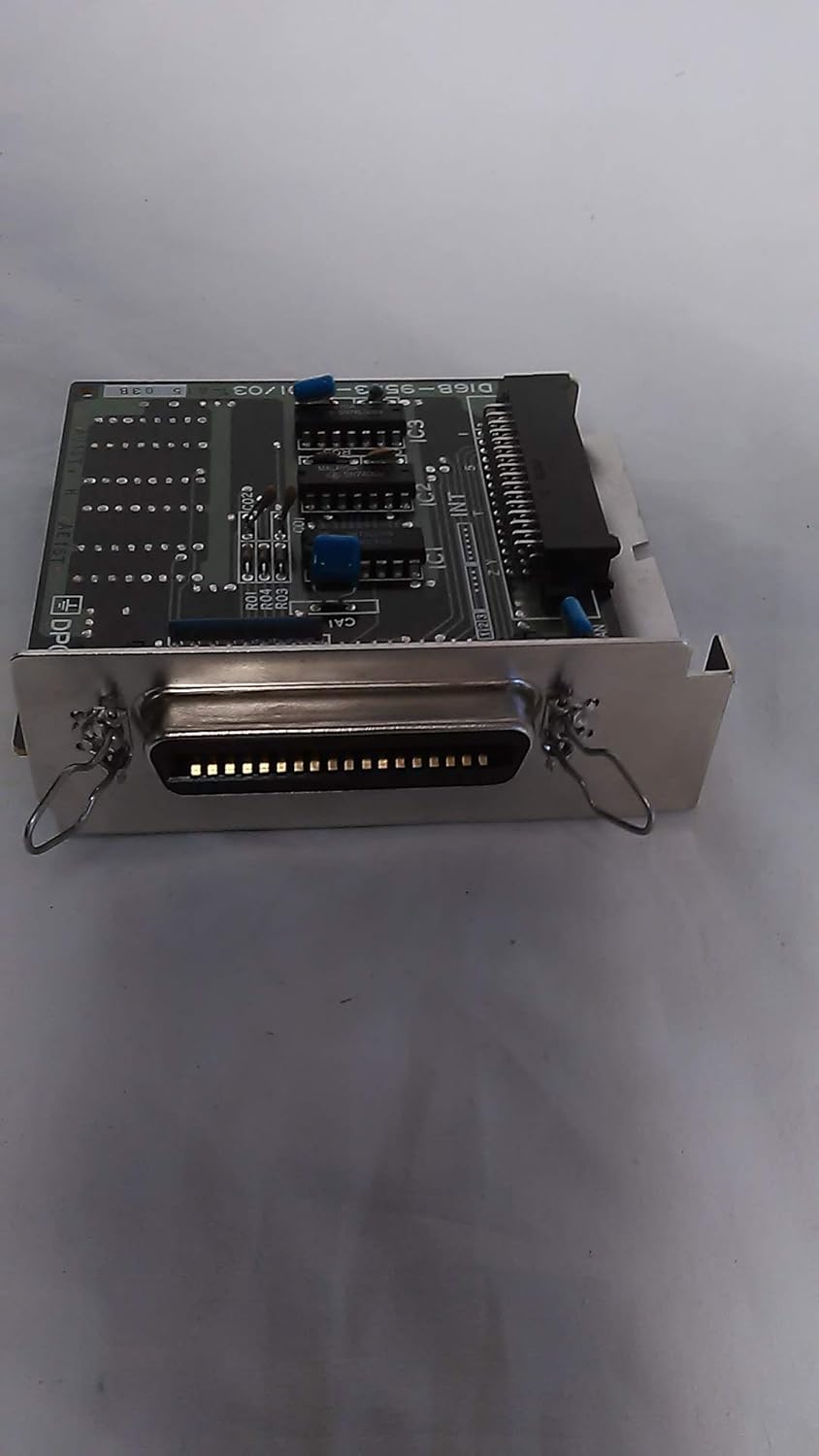
Figure 3: Close-up view of the Centronics parallel port connector on the Fujitsu S26361-F2814-V8 card. This is the external interface for connecting compatible peripherals.
5. Maintenance
The Fujitsu Parallel Port Option is a passive electronic component and requires minimal maintenance. However, periodic checks can help ensure its longevity and reliable operation.
- Dust Removal: Periodically inspect the inside of the host system for dust accumulation. Use compressed air to gently remove dust from the card and surrounding components. Ensure the system is powered off and unplugged before cleaning.
- Connection Check: Ensure all cable connections to the parallel port are secure and free from damage.
- Environmental Conditions: Operate the host system within recommended temperature and humidity ranges to prevent component degradation.
6. Troubleshooting
If you encounter issues with the Fujitsu Parallel Port Option, consider the following troubleshooting steps:
- No Detection by OS:
- Verify the card is fully seated in its expansion slot.
- Check the system's BIOS/UEFI settings to ensure the parallel port is enabled (if applicable).
- Try installing the card in a different compatible expansion slot.
- Ensure necessary drivers are installed.
- Peripheral Not Responding:
- Confirm the peripheral is powered on and functioning correctly.
- Check the parallel cable for damage and ensure it is securely connected at both ends.
- Verify that the software or operating system is configured to use the correct parallel port.
- System Instability:
- Ensure the card is properly installed and secured.
- Check for any conflicts with other hardware components in Device Manager (Windows) or equivalent system tools.
If problems persist, consult the host system's documentation or contact Fujitsu support.
7. Specifications
| Feature | Description |
|---|---|
| Model Number | S26361-F2814-V8 |
| Part Type | Parallel Port Option / Spare Part |
| Interface | Centronics Parallel Port |
| Compliance | RoHS Compliant |
| ASIN | B00INC9G2A |
| Manufacturer | Fujitsu |
8. Warranty Information
Specific warranty terms for the Fujitsu PARALLEL Port Option CENTRONIX (ROHS), model S26361-F2814-V8, are typically provided at the point of purchase or through Fujitsu's official channels. As this is a spare part, its warranty may be tied to the system it is installed in or subject to specific spare part warranty policies. Please retain your proof of purchase.
For detailed warranty information, please refer to:
- The documentation included with your original system or purchase.
- Fujitsu's official website or customer support portal.
9. Support and Contact
For technical assistance, driver downloads, or further inquiries regarding the Fujitsu PARALLEL Port Option CENTRONIX (ROHS), model S26361-F2814-V8, please contact Fujitsu customer support.
Fujitsu Official Website: www.fujitsu.com (Please navigate to the support section for your region)
When contacting support, please have the model number (S26361-F2814-V8) and ASIN (B00INC9G2A) readily available.


