
1. Product Overview
The YONGNUO YN622N-TX i-TTL Wireless Flash Controller is designed to serve as a master control unit for YN622N (II) i-TTL and Remote Manual transceivers. It provides an enhanced user interface with an LCD screen and multiple buttons for quick operation, simplifying the control of multiple flash units.
This controller supports mixed use of three groups (A/B/C) of flashes in i-TTL, Manual, or Super Sync flash modes. It allows for individual adjustment of exposure compensation or flash output for each group, as well as setting different focal lengths (zoom) for the three flash groups. The wireless control range extends up to 100 meters, utilizing seven wireless channels and three groups (A/B/C). An integrated AF-assist beam emitter aids in low-light focusing. The device also supports USB firmware upgrades for future compatibility and feature enhancements.

Figure 1: YONGNUO YN622N-TX i-TTL Wireless Flash Controller, top-down view.
2. Setup Guide
2.1. Battery Installation
- Locate the battery compartment cover on the underside of the YN622N-TX unit.
- Slide the cover open in the direction indicated by the arrow.
- Insert two (2) AA batteries, ensuring correct polarity (+/-) as marked inside the compartment.
- Close the battery compartment cover securely.
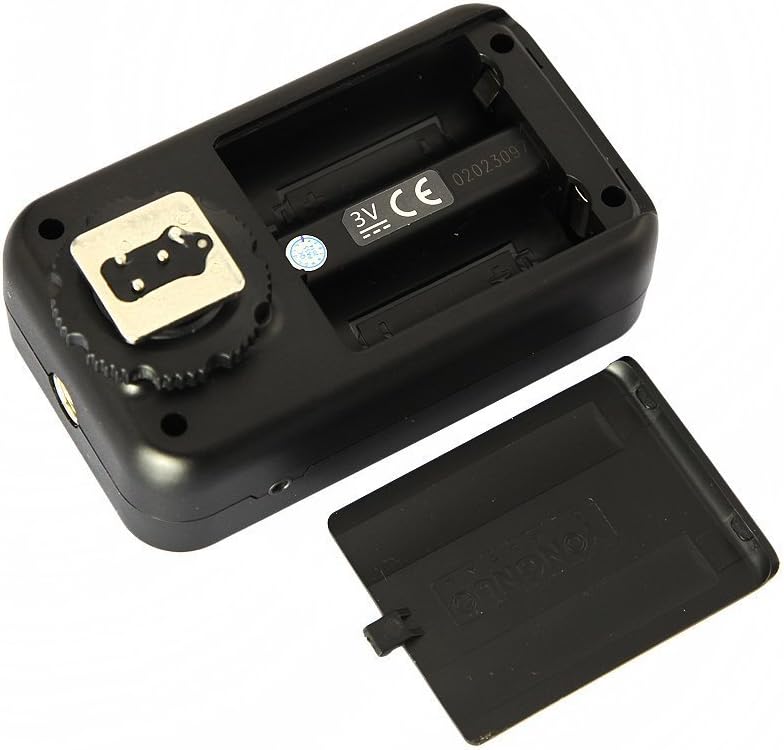
Figure 2: Open battery compartment for AA battery installation.
2.2. Mounting on Camera
- Ensure the camera and YN622N-TX are powered off.
- Slide the YN622N-TX's hot shoe mount into your Nikon DSLR camera's hot shoe.
- Tighten the locking ring on the YN622N-TX until it is securely fastened to the camera's hot shoe. Ensure the unit is properly seated to establish electrical contact.

Figure 3: YN622N-TX unit with its hot shoe mount.
2.3. Connecting Shutter Release Cables
The YN622N-TX includes LS-2.5/N1 and LS-2.5/N3 shutter connecting cables for remote shutter release functionality. Connect the appropriate cable to the 2.5mm port on the YN622N-TX and the corresponding port on your Nikon camera.

Figure 4: YN622N-TX with LS-2.5/N1 and LS-2.5/N3 shutter connecting cables.
3. Operating Instructions
3.1. Powering On/Off
Press and hold the ON button to power the unit on or off. The LCD screen will illuminate upon power-on.
3.2. LCD Display and Controls
The YN622N-TX features an LCD screen for clear display of settings and multiple buttons for quick adjustments. The main control buttons include:
- GROUP: Selects flash groups (A, B, C).
- MODE: Cycles through flash modes (i-TTL, Manual, Super Sync).
- AF/SS ZOOM/CH: Multi-function button for AF-assist, Super Sync timing, Zoom, and Channel selection.
- TEST: Triggers a test flash.
- CLEAR: Resets certain settings.
- Directional Pad: Navigates menus and adjusts values.

Figure 5: Side view of the YN622N-TX showing the USB port and control layout.
3.3. Flash Mode Selection and Adjustment
The YN622N-TX supports i-TTL, Manual Flash, and Super Sync modes. Press the MODE button to cycle through these options. Use the directional pad to adjust settings within each mode.
- i-TTL Mode: Automatic flash exposure. Adjust exposure compensation (FEC) for individual groups using the directional pad after selecting the group with the GROUP button.
- Manual Flash Mode: Manually set flash output for each group. Select the group and use the directional pad to adjust power levels.
- Super Sync (SS) Mode: Allows for higher X-sync speeds than the camera typically permits, especially useful with studio strobes. Adjust SS time delay using the AF/SS ZOOM/CH button and directional pad.
3.4. Group and Channel Management
The controller supports 7 wireless channels and 3 groups (A, B, C). Use the GROUP button to select the desired group for adjustments. To change the wireless channel, press and hold the AF/SS ZOOM/CH button, then use the directional pad.
3.5. Zoom Control
The focal length (zoom) of the A/B/C flash groups can be adjusted separately. Press the AF/SS ZOOM/CH button briefly to enter zoom adjustment mode, then use the directional pad to set the desired focal length for the selected group.
3.6. Shutter Sync Functions
The YN622N-TX supports various shutter sync modes:
- First Curtain Sync
- Second Curtain Sync
- FP High-Speed Sync (up to 1/8000s)
These settings are typically controlled via your camera's flash menu or directly on the YN622N-TX depending on the specific function.
3.7. Additional Functions
- AF Focus Assist Light: The built-in AF-assist beam emitter can be enabled or disabled.
- Exposure Compensation (FEC): Adjust flash exposure for balanced lighting.
- Flash Value Lock (FVL): Locks the flash exposure value.
- Simulate (Modeling) Flash: Emits a continuous light for previewing lighting.
- Red-Eye Reduction Flash: Fires pre-flashes to reduce red-eye effect.
- Auto Flash Zooming: Automatically adjusts flash zoom to match lens focal length.
- PC Port Sync: The flash sync signal can be input or output through the PC port for wired connections.
- Standard Hot Shoe Trigger: Supports basic flash triggering (max sync speed 1/250s) on standard hot shoe cameras (non-Nikon body).

Figure 6: Top view of the YN622N-TX, highlighting the PC sync port.

Figure 7: Front view of the YN622N-TX, showing the AF-assist beam emitter.
3.8. Firmware Upgrade
The YN622N-TX supports firmware upgrades via its USB interface. Connect the unit to a computer using a compatible USB cable and follow the instructions provided on the YONGNUO official website for the upgrade process.
4. Maintenance
- Cleaning: Use a soft, dry cloth to clean the exterior of the unit. Avoid using harsh chemicals or abrasive materials. For the hot shoe contacts, use a clean, dry cotton swab.
- Storage: When not in use for extended periods, remove the AA batteries to prevent leakage and store the unit in a cool, dry place away from direct sunlight and extreme temperatures.
- Battery Replacement: Replace batteries when the low battery indicator appears on the LCD screen or when performance degrades. Always use fresh, high-quality AA batteries.
- Avoid Moisture: The YN622N-TX is not water-resistant. Avoid exposure to rain, splashes, or high humidity.
5. Troubleshooting
| Problem | Possible Cause | Solution |
|---|---|---|
| Unit does not power on. | Dead or incorrectly installed batteries. | Check battery polarity. Replace with fresh AA batteries. |
| Flashes not triggering wirelessly. | Incorrect channel/group settings; YN622N transceivers not powered on or out of range; hot shoe connection issues. | Ensure YN622N-TX and YN622N transceivers are on the same channel and group. Verify transceivers are powered on and within 100m range. Re-seat the YN622N-TX on the camera hot shoe. |
| Inconsistent flash exposure (i-TTL). | Flash exposure compensation (FEC) incorrectly set; ambient light conditions. | Check FEC settings on the YN622N-TX. Ensure camera settings are appropriate for i-TTL. |
| Super Sync (SS) mode results in black bars. | Incorrect SS time delay setting. | Adjust the Super Sync time delay (SS timing) on the YN622N-TX. Start with automatic (AU) or fine-tune manually. Ensure camera is in Auto FP mode if necessary. Note that SS timing may reset upon power cycle. |
| AF-assist light not functioning. | AF-assist feature disabled; insufficient low-light conditions. | Enable the AF-assist beam emitter in the YN622N-TX settings. Ensure camera is set to use external AF-assist. |
| Firmware update failure. | Incorrect firmware file; unstable USB connection; outdated driver. | Download the correct firmware from YONGNUO's official website. Ensure a stable USB connection. Try a different USB port or cable. |
6. Specifications
| Feature | Detail |
|---|---|
| Model Name | YN622N-TX |
| Brand | YONGNUO |
| Compatible Mountings | Nikon |
| Compatible Devices | Nikon DSLR Cameras (D70, D70S, D80, D90, D200, D300S, D600, D700, D800, D3000, D3100, D3200, D5000, D5100, D5200, D5300, D7000, D7100) |
| Connectivity Technology | Wireless (Radio Frequency) |
| Wireless Channels | 7 |
| Flash Groups | 3 (A, B, C) |
| Exposure Control Type | i-TTL, Manual |
| Flash Sync Speed | Up to 1/8000s (FP High-Speed Sync) |
| Power Source | 2 x AA batteries |
| Battery Life (Average) | 10 Hours |
| Weight | 0.4 Pounds (approx. 181g) |
| Color | Black |
| Special Features | LCD screen, AF-assist beam, USB firmware upgrade, Super Sync (SS) time delay adjustment, FVL, Modeling Flash, Red-Eye Reduction. |
7. Warranty and Support
7.1. Warranty Information
Specific warranty terms and duration may vary by region and retailer. Please refer to the warranty card included with your product or contact your point of purchase for detailed warranty information. Retain your proof of purchase for any warranty claims.
7.2. Customer Support
For technical assistance, troubleshooting, or inquiries regarding your YONGNUO YN622N-TX, please visit the official YONGNUO website or contact their customer support channels. The product includes a manual in both Chinese and English for reference.
Official YONGNUO Store: YONGNUO Store on Amazon