Introduction
This manual provides essential information for the installation, operation, and maintenance of your Hewlett Packard CRW-4832AS CD-RW Drive. Please read these instructions carefully before using the device to ensure proper functionality and longevity.
1. Setup and Installation
1.1 System Requirements
- IDE controller
- IDE cable
- Available 5.25-inch drive bay
- Available 4-pin power connector
- Compatible burning software
- Blank recordable media (CD-R, CD-RW)
1.2 Installation Steps
- Prepare your computer: Power off your computer and disconnect all cables. Open the computer case according to your computer's manufacturer instructions.
- Install the drive: Slide the CRW-4832AS drive into an available 5.25-inch drive bay. Secure it with screws on both sides.
- Connect cables:
- Connect one end of the IDE cable to the IDE interface on the drive and the other end to an available IDE controller on your motherboard.
- Connect the 4-pin power connector from your power supply to the corresponding port on the drive.
- If desired, connect the digital or analog audio cable from the drive to your sound card.
- Set jumpers: Configure the device jumpers on the rear panel for Master, Slave, or Cable Select settings, depending on your system's configuration. Refer to your motherboard manual for guidance.
- Close and power on: Close the computer case, reconnect all cables, and power on your computer. The operating system should detect the new drive.
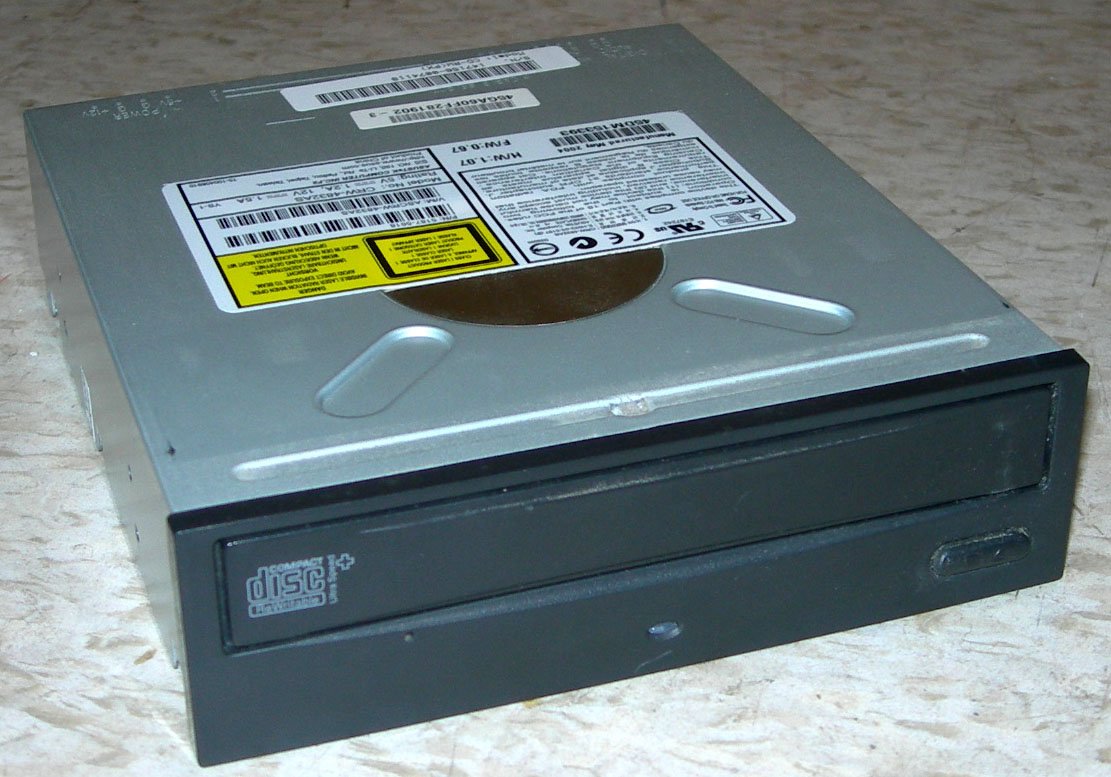
Figure 1: Hewlett Packard CRW-4832AS CD-RW Drive. This image shows the front bezel of a typical internal CD-RW drive, featuring the disc tray, eject button, and activity LED.
2. Operating Instructions
2.1 Basic Operation
The CRW-4832AS drive supports various CD functions:
- Write Speed: Up to 48x for CD-R media.
- Rewrite Speed: Up to 24x for CD-RW media.
- Read Speed: Up to 48x for CD-ROM/CD-R/CD-RW media.
2.2 Front Panel Features
- Busy LED: Illuminates when the drive is active (reading, writing, or rewriting).
- Emergency Eject Hole: Used to manually eject the disc tray in case of power failure or drive malfunction. Insert a straightened paperclip into the hole to open the tray.
- Stop / Eject Button: Press to open or close the disc tray. During disc playback, a single press may stop playback.
2.3 Rear Panel Features
- Digital Audio Connector: For digital audio output to a sound card.
- Analog Audio Connector: For analog audio output to a sound card.
- Device Jumpers: Configures the drive as Master, Slave, or Cable Select on the IDE bus.
- IDE Interface: Connects to the IDE cable from the motherboard.
- 4-pin Power Connector: Connects to the power supply unit.
3. Maintenance
3.1 Cleaning the Drive
To maintain optimal performance, keep the drive and discs clean:
- Use a soft, dry, lint-free cloth to wipe the exterior of the drive.
- Avoid using liquid cleaners or solvents, as they can damage the drive's components.
- For cleaning the lens, use a specialized CD/DVD lens cleaning disc sparingly, following its instructions.
3.2 Disc Care
- Handle discs by their edges to avoid fingerprints on the recording surface.
- Store discs in protective cases away from direct sunlight, heat, and humidity.
- Do not bend or scratch discs.
4. Troubleshooting
If you encounter issues with your CRW-4832AS drive, try the following solutions:
- Drive not detected: Ensure all power and IDE cables are securely connected. Verify jumper settings (Master/Slave/Cable Select) are correct. Check your computer's BIOS settings to confirm the IDE controller is enabled.
- Disc not reading/writing: Ensure the disc is clean and free of scratches. Try a different disc to rule out media issues. Verify that your burning software is correctly installed and configured.
- Disc tray not opening: Check if the drive has power. If not, use the emergency eject hole with a straightened paperclip.
- Slow performance: Close unnecessary applications. Ensure your system meets the minimum requirements for the software you are using.
5. Specifications
| Feature | Specification |
|---|---|
| Model | CRW-4832AS |
| Manufacturer | Hewlett Packard |
| Interface | IDE/ATAPI |
| Write Speed (CD-R) | 48x |
| Rewrite Speed (CD-RW) | 24x |
| Read Speed (CD-ROM) | 48x (Note: Product specifications list 'Optical Storage Read Speed: 8x', which may refer to a specific mode or minimum performance. The drive is generally rated for 48x CD-ROM read speed.) |
| Buffer Size | 2 MB |
| Dimensions (L x W x H) | 48"L x 24"W x 48"H (Note: These dimensions appear to be incorrect for an internal optical drive and may be a data entry error. Standard internal drives are typically 5.75"W x 1.63"H x 7.87"D.) |
| UPC | 102645742403 |
| Regulatory Approvals | FCC, CE, C-Tick, BSMI, cULus, MIC |
6. Warranty and Support
For warranty information and technical support, please refer to the documentation included with your purchase or contact Hewlett Packard customer service directly. Keep your proof of purchase for warranty claims.


