
Introduction
Thank you for choosing the SoundBot SB510 HD Water Resistant Bluetooth Shower Speaker. This manual provides essential information for setting up, operating, and maintaining your speaker to ensure optimal performance and longevity. Designed for convenience and durability, this speaker allows you to enjoy your favorite audio content in various environments, including the shower, without concern for water exposure.
Key features include:
- Water Resistant Design: Built to withstand steam, splashes, and humidity, ideal for bathroom use.
- Hands-Free Calling: Integrated microphone and control buttons for answering and ending calls.
- Portable and Lightweight: Compact design for easy transport and use on the go.
- Extended Playtime: Up to 6 hours of continuous audio playback on a single charge.
- Stable Bluetooth Connection: Reliable streaming up to 33 feet from your device.
- Easy-to-Use Controls: Tactile buttons designed for operation even with wet hands.

The SoundBot SB510 HD speaker, showcasing its water-resistant design.
What's in the Box
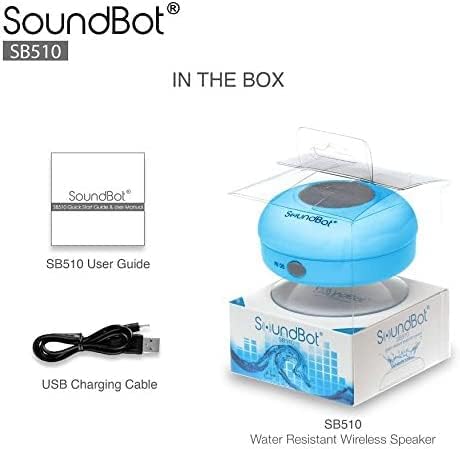
Your SoundBot SB510 HD package includes the following items:
- 1 x SoundBot SB510 Water Resistant Bluetooth Shower Speaker
- 1 x User Guide
- 1 x USB Charging Cable

Included components: speaker, USB charging cable, and user guide.
Setup
Charging the Speaker
Before first use, fully charge your SoundBot SB510 HD speaker. A full charge takes approximately 3 hours and provides up to 6 hours of playtime.
- Locate the charging port on the side of the speaker, usually protected by a rubber flap.
- Connect the small end of the included USB charging cable to the speaker's charging port.
- Connect the larger end of the USB cable to a USB power source (e.g., computer USB port, USB wall adapter).
- The LED indicator light will illuminate during charging and turn off or change color when fully charged.

The speaker connected to its USB charging cable.
Bluetooth Pairing
Pair your speaker with your Bluetooth-enabled device (smartphone, tablet, laptop) to begin wireless audio streaming.
- Ensure the speaker is charged and turned off.
- Press and hold the Power button (⏻) on the speaker until the LED indicator light begins to flash rapidly, indicating it is in pairing mode.
- On your device, enable Bluetooth and search for available devices.
- Select "SB510" from the list of found devices.
- Once successfully paired, the LED indicator light on the speaker will stop flashing and remain solid blue. You will also hear an audible confirmation.
- The speaker has a wireless range of up to 33 feet (10 meters).
The speaker's control panel, used for initiating Bluetooth pairing.
Operating Instructions
Speaker Controls
The SoundBot SB510 HD features intuitive buttons for easy control of your audio and calls:
| Button | Function (Short Press) | Function (Long Press) |
|---|---|---|
| ⏻ (Power) | N/A | Power On/Off |
| ⏵⏸ (Play/Pause) | Play/Pause Music | N/A |
| ⏮ (Previous/Volume Down) | Previous Song | Volume Down (-) |
| ⏭ (Next/Volume Up) | Next Song | Volume Up (+) |
| 📞 (Phone) | Answer/End Phone Call | N/A |

Detailed view of the speaker's control buttons and their functions.
Making and Receiving Calls
The built-in microphone allows for hands-free communication:
- Answering a Call: When a call comes in, press the 📞 button once to answer.
- Ending a Call: During a call, press the 📞 button once to end the conversation.
- Redialing: Double-press the 📞 button to redial the last number.
Maintenance
To ensure the longevity and optimal performance of your SoundBot SB510 HD speaker, follow these maintenance guidelines:
- Water Resistance: The speaker is IPX4 water resistant, meaning it is protected against splashing water from any direction. It is suitable for use in showers or near pools, but it should not be submerged in water. Ensure the charging port cover is securely closed when not charging to maintain water resistance.
- Cleaning: Clean the speaker with a soft, damp cloth. Do not use abrasive cleaners or solvents, as these may damage the surface or internal components.
- Storage: Store the speaker in a cool, dry place when not in use. Avoid extreme temperatures.
- Suction Cup Care: For best adhesion, ensure the surface where you attach the suction cup is clean, smooth, and dry. Periodically clean the suction cup with water to remove any dust or residue.

The speaker's water-resistant design allows for use in wet environments.
Troubleshooting
If you encounter any issues with your SoundBot SB510 HD speaker, please refer to the following common troubleshooting steps:
| Problem | Possible Cause | Solution |
|---|---|---|
| Speaker does not turn on. | Low battery. | Charge the speaker fully (approx. 3 hours). |
| Cannot pair with device. | Speaker not in pairing mode; Bluetooth off on device; device too far. | Ensure speaker is in pairing mode (flashing LED). Turn on Bluetooth on your device. Move device closer to speaker (within 33 ft). Forget previous pairings on your device and try again. |
| No sound or low volume. | Volume too low on speaker or device; speaker not connected. | Increase volume on both the speaker and your connected device. Ensure speaker is successfully paired and connected. |
| Sound distortion. | Device too far; interference. | Move your device closer to the speaker. Avoid obstacles between the speaker and device. Reduce interference from other wireless devices. |
| Suction cup not sticking. | Surface is dirty, wet, or not smooth. | Clean and dry the surface thoroughly. Ensure the surface is smooth (e.g., tile, glass). Clean the suction cup itself. |
Specifications
Detailed technical specifications for the SoundBot SB510 HD speaker:
| Feature | Description |
|---|---|
| Model Name | SB510 HD |
| Item Model Number | SB510-BLU |
| Connectivity Technology | Bluetooth, USB |
| Wireless Communication Technology | Bluetooth |
| Bluetooth Range | Up to 33 Feet (10 meters) |
| Water Resistance Level | IPX4 (Water Resistant) |
| Speaker Type | Desktop / Portable |
| Speaker Maximum Output Power | 3 Watts |
| Audio Output Mode | Stereo |
| Battery Life | 6 Hours |
| Charging Time | 3 Hours |
| Battery Type | 1 Lithium Ion battery required |
| Built-in Microphone | Yes |
| Product Dimensions | 3.5"D x 3.5"W x 2.3"H |
| Item Weight | 1.59 ounces |
| Material | Plastic, Rubber |
Warranty & Support
The SoundBot SB510 HD Water Resistant Bluetooth Shower Speaker comes with a Limited Warranty. For specific details regarding warranty coverage, duration, and terms, please refer to the warranty information provided in the original product packaging or contact SoundBot customer support directly.
For technical assistance, troubleshooting beyond this manual, or warranty claims, please visit the official SoundBot website or contact their customer service department. Contact information can typically be found on the product packaging or the SoundBot website.