
Akai Professional EWI 5000
AKAI Professional EWI5000 Instruction Manual
Wireless, Battery-Powered MIDI Controller Electronic Wind Instrument
Introduction
The AKAI Professional EWI5000 is a next-generation electronic wind instrument designed to provide expressive musical performance with wireless connectivity and an extensive on-board sound library. This manual provides essential information for setting up, operating, maintaining, and troubleshooting your EWI5000.

Figure 1: AKAI Professional EWI5000 and Wireless Receiver
Setup
This section guides you through the initial setup of your EWI5000, from unboxing to preparing for first use.
Unboxing the EWI5000
Carefully remove all components from the packaging. Ensure all items listed below are present.
Video 1: Product Demonstration Video. This video provides a visual guide to unboxing and initial setup of the EWI5000.
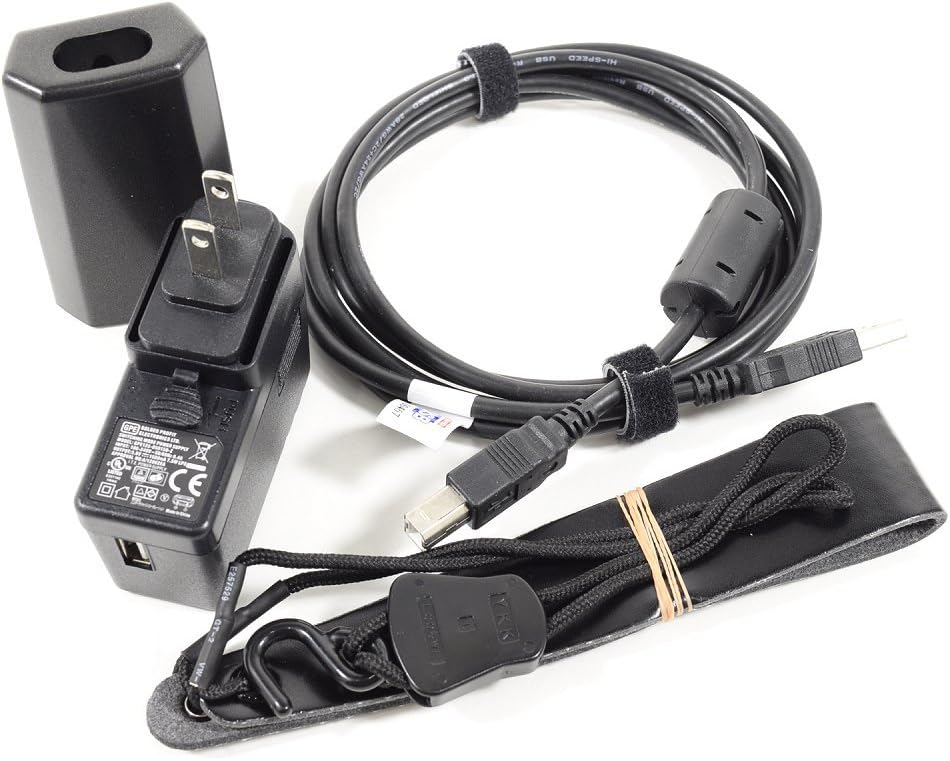
Figure 2: Included Accessories. The EWI5000 comes with a power adapter, USB cable, and a neck strap.
Charging the Battery
The EWI5000 is powered by a rechargeable lithium-ion battery. Before first use, fully charge the instrument using the included power adapter and USB cable. Connect the USB cable to the EWI5000's USB port and the power adapter to a wall outlet. The charging indicator will show the battery status.
Connecting the Wireless Receiver
For wireless operation, connect the included 2.4GHz wireless receiver to your audio system or amplifier. The receiver supports stereo wireless audio. Ensure the receiver is powered on and paired with the EWI5000 for seamless, low-latency performance.
Operating the EWI5000
The EWI5000 offers versatile performance capabilities with its intuitive controls and extensive sound library.
Basic Operation
To begin playing, ensure the EWI5000 is charged and powered on. The ultra-responsive mouthpiece features an air-pressure level sensor and bite sensor for precise control over volume and pitch dynamics. Eight dedicated precision dials allow for on-the-fly adjustment of instrument or effect parameters.

Figure 3: Playing the EWI5000. The instrument is designed for comfortable and expressive performance.
Fingering Modes
The EWI5000 supports multiple playing styles, making it adaptable for woodwind and brass musicians. Its interface can be switched to emulate flute, oboe, and saxophone fingering modes. An EVI (Electronic Valve Instrument) mode is also included for brass players.

Figure 4: Key Layout. The EWI5000 features a familiar key layout with additional controls for enhanced expression.
Sound Library and Editing
The EWI5000 comes pre-loaded with over 3GB of high-quality sounds designed by SONiVOX, covering traditional orchestral sounds (horn, brass, woodwind) and non-traditional sounds (synths, basses, leads). You can expand your creative capabilities using the EWI5000 Sound Editor software. Connect the EWI5000 to your computer via USB to access and manipulate the sound library, adjusting parameters like filter, LFOs, pan, tune, and envelopes. Edits can be stored directly on your EWI5000.
Connectivity
The EWI5000 offers various connectivity options:
- Wireless: 2.4GHz low-latency wireless connectivity with included receiver.
- Wired Audio: Built-in 1/4-inch output for direct connection to PA systems, mixers, or audio interfaces.
- Headphones: 1/8-inch headphone output for private practice.
- MIDI: USB-MIDI connectivity and a 5-pin MIDI output for controlling software synths, virtual samplers, or traditional MIDI modules.

Figure 5: Connectivity Ports. The EWI5000 features multiple ports for versatile integration into your setup.
Maintenance
Proper care ensures the longevity and optimal performance of your EWI5000.
Cleaning
- Wipe the exterior with a soft, dry cloth.
- For the mouthpiece, gently clean with a damp cloth and mild soap if necessary, then dry thoroughly. Do not immerse the instrument in water.
- Avoid using abrasive cleaners or solvents.
Storage
Store the EWI5000 in a cool, dry place away from direct sunlight and extreme temperatures. If storing for extended periods, ensure the battery is partially charged (around 50%) to preserve battery health.
Troubleshooting
If you encounter issues with your EWI5000, refer to the solutions below.
| Problem | Possible Solution |
|---|---|
| No sound output | Check power connection, volume levels on EWI5000 and connected audio system. Ensure wireless receiver is properly connected and paired. Verify correct audio cable connection. |
| Wireless connection issues | Ensure EWI5000 and receiver are within range and free from obstructions. Check for interference from other 2.4GHz devices. Re-pair the instrument and receiver if necessary. |
| Keys not responding or erratic behavior | Ensure fingers are clean and dry. Calibrate the key sensitivity if available in the EWI5000 settings or Sound Editor software. Check for firmware updates. |
| Battery not charging | Verify the power adapter and USB cable are securely connected. Try a different power outlet. If the issue persists, contact customer support. |
Specifications
| Feature | Detail |
|---|---|
| Model Name | EWI 5000 |
| Dimensions (D x W x H) | 26.64" x 2.4" x 1.68" |
| Item Weight | 1.98 Pounds |
| Connectivity Technology | USB, Wireless (2.4GHz) |
| Power Source | Battery Powered (Rechargeable Lithium Ion) |
| Headphones Jack | 3.5mm Jack |
| Supported Software | EWI5000 Sound Editor |
| On-board Sound Library | 3GB by SONiVOX |
| Fingering Modes | Flute, Oboe, Saxophone, EVI |
Warranty and Support
Akai Professional warrants this product to be free from defects in material and workmanship under normal use and service for a period specified by your local distributor. Please retain your proof of purchase.
For technical support, product registration, and additional resources, please visit the official Akai Professional website or refer to the comprehensive User Manual (PDF).
Related documentsEWI 5000


Ask a question about this manual
Ask about setup, troubleshooting, compatibility, parts, safety, or missing instructions. Manuals+ will review the question and use this page’s manual context to help answer it.