
Introduction
This manual provides comprehensive instructions for the operation and maintenance of your Whistler WS1010 Analog Handheld Scanner. Please read this manual thoroughly before using the device to ensure proper functionality and to maximize your scanning experience.

Image: Front view of the Whistler WS1010 Analog Handheld Scanner, showing the display, keypad, and antenna.
Product Features
- 400 Channel Memory: Store up to 400 frequencies across 10 distinct memory banks.
- Skywarn Storm Spotter Functionality: Access frequencies used by storm spotter networks for weather monitoring.
- SAME and All Hazards Weather Alerting: Receive weather event notifications and alerts for specific counties.
- Spectrum Sweeper: Rapidly scan frequency ranges to detect nearby transmissions.
- PC Programmable: Facilitates data backup, database updates, and direct programming via a PC. Requires a PCIF cable and compatible third-party software.
- Service Banks: Preprogrammed frequencies for common services including marine, fire/police, aircraft, amateur radio (ham), and weather bands.
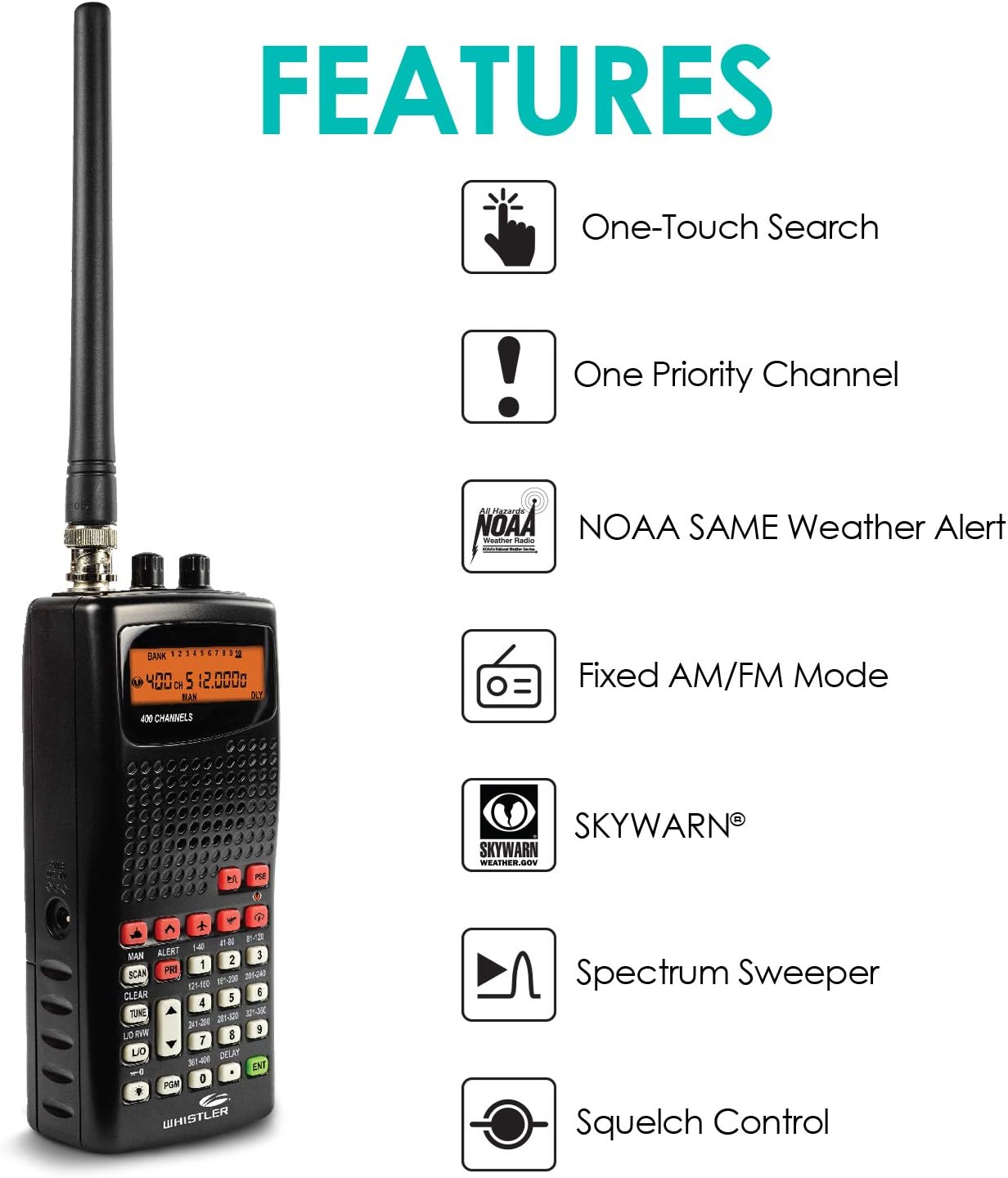
Image: Diagram illustrating key features of the Whistler WS1010 scanner, including One-Touch Search, Priority Channel, NOAA SAME Weather Alert, Fixed AM/FM Mode, SKYWARN, Spectrum Sweeper, and Squelch Control.
Setup
1. Battery Installation
The scanner requires four (4) AA batteries for operation. Ensure correct polarity when inserting batteries into the compartment located on the rear of the device. The scanner can operate with either alkaline or rechargeable AA batteries. A battery type switch is available inside the battery compartment to select between alkaline and rechargeable modes for proper power management.
2. Antenna Attachment
Screw the provided antenna clockwise onto the antenna jack located at the top of the scanner until it is finger-tight. Do not overtighten.
3. Initial Power On
After installing batteries and attaching the antenna, turn the volume knob clockwise to power on the scanner. The LCD display will illuminate.
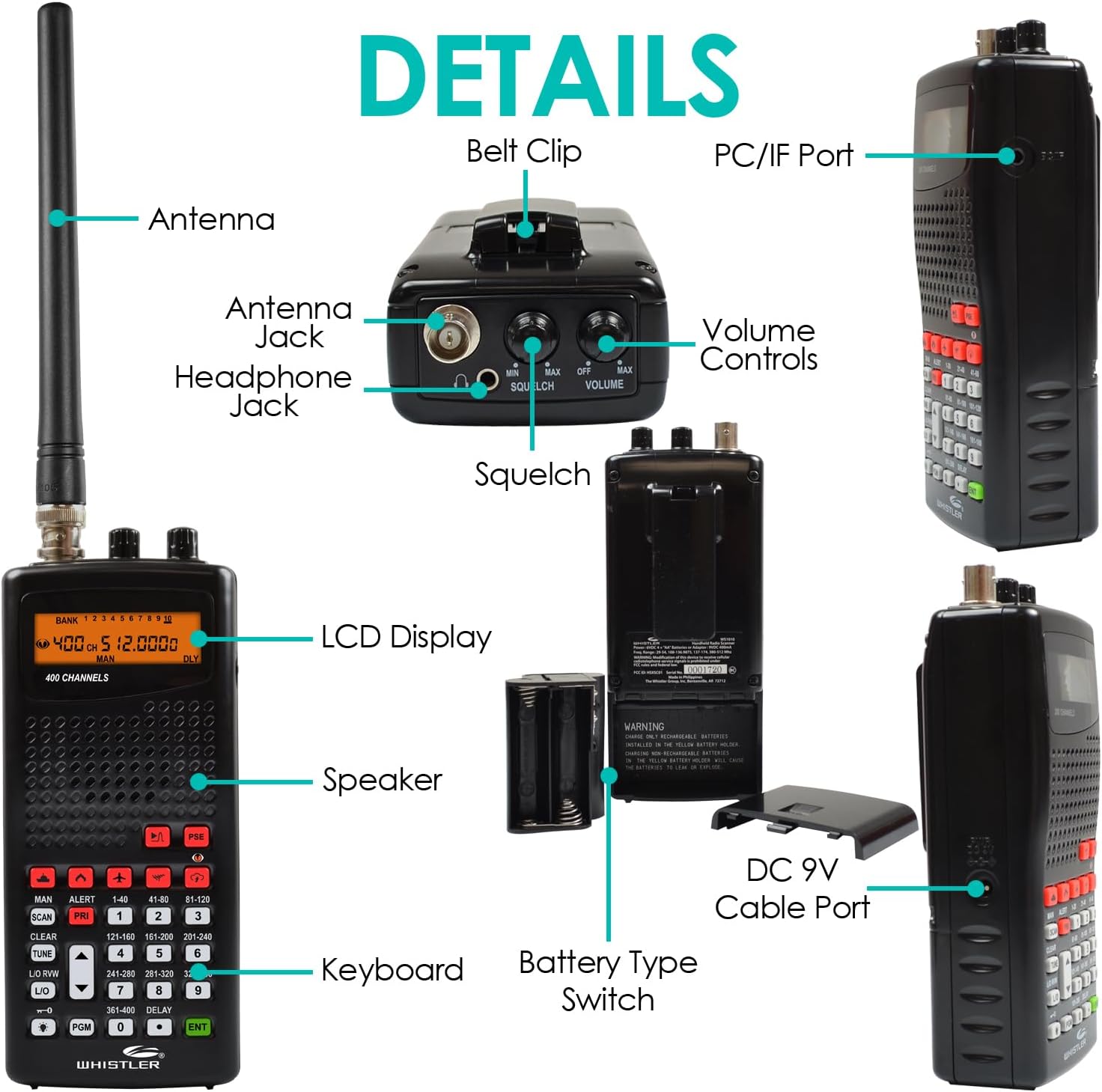
Image: Detailed diagram of the Whistler WS1010 scanner, highlighting components such as the antenna, antenna jack, headphone jack, PC/IF port, volume controls, squelch, LCD display, speaker, keyboard, battery type switch, and DC 9V cable port.
Operating Instructions
Basic Operation
- Power On/Off and Volume: Rotate the top-right knob to turn the scanner on or off and adjust the audio volume.
- Squelch Control: Rotate the top-left knob to adjust the squelch level. This control eliminates static noise between transmissions. Adjust it until the static disappears, but not so high that it blocks weak signals.
- Manual Mode: Press the MAN button to enter manual mode, allowing you to directly enter frequencies.
- Scan Mode: Press the SCAN button to initiate scanning through programmed channels or service banks.
Programming Channels
To program a frequency into a memory channel:
- Enter manual mode by pressing MAN.
- Use the numeric keypad to enter the desired frequency.
- Press PGM (Program) followed by the desired memory bank and channel number.
- Press ENT (Enter) to save the frequency.
Using Service Banks
The scanner includes preprogrammed service banks for quick access to common frequencies. Press the dedicated buttons (e.g., POLICE, FIRE, AIR, MARINE, HAM, WX) to scan these specific frequency ranges.
Weather Alerts (SAME/Skywarn)
To activate weather alerts, press the ALERT button. The scanner will monitor for SAME (Specific Area Message Encoding) and Skywarn alerts, providing timely notifications for severe weather events.

Image: A person operating the Whistler WS1010 scanner inside a vehicle, demonstrating its portable use.
Maintenance
- Cleaning: Use a soft, dry cloth to clean the exterior of the scanner. Do not use liquid cleaners or solvents.
- Battery Care: Remove batteries if the scanner will not be used for an extended period to prevent leakage.
- Storage: Store the scanner in a cool, dry place away from direct sunlight and extreme temperatures.
- Antenna: Handle the antenna with care to avoid bending or breaking.
Troubleshooting
| Problem | Possible Cause | Solution |
|---|---|---|
| Scanner does not power on. | Dead or incorrectly installed batteries. | Replace batteries or ensure correct polarity. Check AC adapter if using external power. |
| No audio or weak reception. | Squelch set too high; antenna not connected; out of range of transmissions. | Adjust squelch control; ensure antenna is securely attached; move to an area with better signal reception. |
| Cannot program frequencies. | Incorrect programming steps followed. | Refer to the "Programming Channels" section in this manual. |
| PC programming issues. | Incorrect cable; incompatible software; driver issues. | Ensure you are using a compatible PCIF cable and third-party software. Check PC device manager for driver status. |
Specifications
- Model: WS1010
- Dimensions (H x W x D): 5.68 x 2.37 x 1.56 inches (14.43 x 6.02 x 3.96 cm)
- Weight: 7.7 ounces (218 grams)
- Power Source: 4 AA batteries (not included) or external DC 9V power supply (not included).
- Channels: 400 (10 banks of 40 channels)
- Color: Black
- Included in Box: Scanner unit.
Warranty and Support
For warranty information and technical support, please refer to the official Whistler website or contact Whistler customer service directly. Keep your purchase receipt as proof of purchase.
Whistler Website: www.whistlergroup.com
Important Information
Proposition 65 Warning:
This product contains chemicals known to the State of California to cause cancer and birth defects or other reproductive harm.


