
Soundbot SB510
Soundbot SB510 HD Waterproof Bluetooth Shower Wireless Speaker User Manual
Model: SB510
Introduction
Thank you for purchasing the Soundbot SB510 HD Waterproof Bluetooth Shower Wireless Speaker. This manual provides essential information for setting up, operating, and maintaining your speaker to ensure optimal performance and longevity. Please read these instructions carefully before use.

Image: The Soundbot SB510 speaker, designed for use in wet environments, shown amidst water splashes.
Safety Information
WARNING: THIS PRODUCT CONTAINS SMALL PARTS. Swallowed small parts can stick together across intestines causing serious infections and fatal injury. Seek immediate medical attention if small parts are swallowed or inhaled.
- Do not expose the speaker to extreme temperatures or direct sunlight for extended periods.
- Avoid dropping or subjecting the speaker to strong impacts.
- Keep the charging port dry before connecting the USB cable.
- Do not attempt to disassemble or modify the speaker, as this will void the warranty and may cause damage.
Package Contents
Please check the package for the following items:
- 1 x Soundbot SB510 Water Resistant Bluetooth Shower Speaker
- 1 x USB Charging Cable
- 1 x User Guide

Image: Contents of the Soundbot SB510 package, including the speaker, USB charging cable, and user manual.
Product Features
- Water Resistant Design: IPX4 rated for protection against splashing water from any direction.
- Bluetooth 4.0 Connectivity: High-definition wireless audio streaming with a range of up to 33 feet (10 meters).
- Integrated Speakerphone: Built-in microphone for hands-free calling.
- Easy Control Buttons: Dedicated buttons for power, play/pause, volume, track skipping, and call management.
- Rechargeable Battery: Provides up to 6 hours of playtime on a single charge.
- Suction Cup Mount: Conveniently attachable to smooth surfaces.
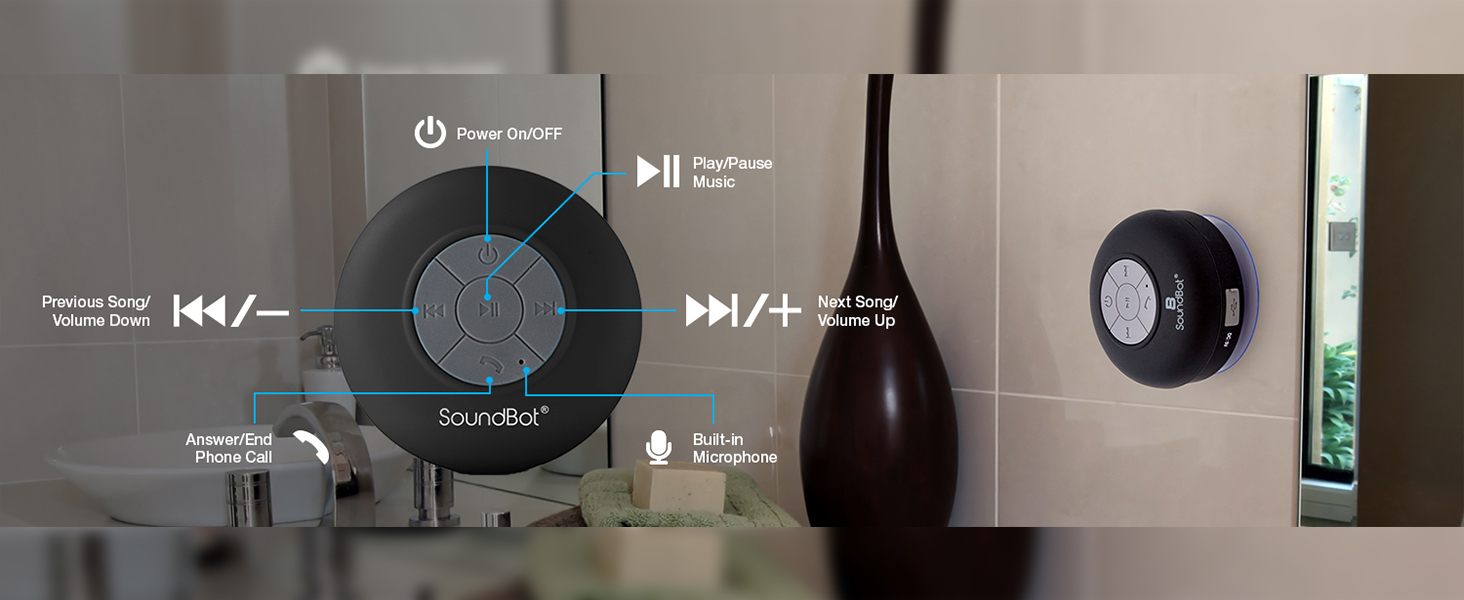
Image: A visual representation highlighting the main features of the Soundbot SB510 speaker.
Controls and Functions
The Soundbot SB510 features intuitive controls on its front panel:

Image: Detailed diagram of the speaker's control buttons and their functions.
- Power Button (⏻): Press and hold to power on/off.
- Play/Pause Button (⏸): Press to play or pause music.
- Previous Track / Volume Down (⏪ / -): Short press for previous track. Long press to decrease volume.
- Next Track / Volume Up (⏩ / +): Short press for next track. Long press to increase volume.
- Call Button (☎): Press to answer an incoming call or end an ongoing call.
- Built-in Microphone: For hands-free communication during calls.
Setup
1. Charging the Speaker
- Ensure the speaker is powered off.
- Open the rubber flap covering the charging port on the side of the speaker.
- Connect the small end of the included USB charging cable to the speaker's Micro-USB port.
- Connect the larger end of the USB cable to a USB power source (e.g., computer USB port, USB wall adapter).
- The LED indicator will illuminate during charging and turn off when fully charged. A full charge takes approximately 6 hours.
- Close the rubber flap securely after charging to maintain water resistance.
2. Mounting the Speaker
The SB510 features a suction cup for easy mounting on smooth, non-porous surfaces.
- Ensure the surface is clean, dry, and smooth (e.g., tile, glass, polished metal).
- Press the suction cup firmly against the desired surface.
- Verify that the speaker is securely attached before releasing it.

Image: The Soundbot SB510 speaker securely mounted on a smooth bathroom wall.
Operating Instructions
1. Powering On/Off
- To power on, press and hold the Power button (⏻) for approximately 3 seconds until you hear an audible tone and the LED indicator flashes.
- To power off, press and hold the Power button (⏻) for approximately 3 seconds until you hear an audible tone and the LED indicator turns off.
2. Bluetooth Pairing
- Ensure the speaker is powered on and in pairing mode (LED indicator will flash rapidly).
- On your Bluetooth-enabled device (smartphone, tablet, etc.), go to the Bluetooth settings menu.
- Search for available devices. You should see "SB510" in the list.
- Select "SB510" to connect. Once paired, you will hear a confirmation tone, and the LED indicator will flash slowly or remain solid blue.
- If prompted for a password, enter "0000".
- The speaker will automatically attempt to reconnect to the last paired device when powered on.
3. Music Playback
- After successful pairing, open your music player application on your device.
- Use the Play/Pause button (⏸) on the speaker to control playback.
- Use the Previous Track (⏪) and Next Track (⏩) buttons for track navigation.
- Long press the Volume Down (-) or Volume Up (+) buttons to adjust the speaker's volume. You can also control volume from your connected device.
4. Answering/Ending Calls
- When an incoming call is received, the speaker will ring.
- Press the Call button (☎) once to answer the call.
- To end an ongoing call, press the Call button (☎) once.
- To reject an incoming call, press and hold the Call button (☎) for approximately 2 seconds.
Maintenance
- Clean the speaker with a soft, damp cloth. Do not use abrasive cleaners or solvents.
- Ensure the charging port's rubber flap is always securely closed when not charging to maintain water resistance.
- If the suction cup loses adhesion, clean both the suction cup and the mounting surface with soap and water, then allow to air dry.
- Store the speaker in a cool, dry place when not in use for extended periods.
Troubleshooting
| Problem | Possible Solution |
|---|---|
| Speaker does not power on. | Ensure the speaker is fully charged. Connect to a power source and try again. |
| Cannot pair with Bluetooth device. |
|
| No sound or low volume. |
|
| Suction cup does not stick. |
|
Specifications
- Model: SB510
- Bluetooth Version: 4.0
- Wireless Range: Up to 33 feet (10 meters)
- Water Resistance: IPX4 (Splash-proof)
- Playtime: Up to 6 hours
- Charging Time: Approximately 6 hours
- Speaker Output: 5 Watts
- Built-in Microphone: Yes
- Power Source: Battery Powered (1 Lithium Ion battery required)
- Product Dimensions: 3.5"D x 3.5"W x 2.3"H
- Item Weight: 5.6 ounces
- Material: Plastic
- Mounting Type: Suction Cup Mount
Warranty and Support
The Soundbot SB510 speaker comes with a limited warranty. Please refer to the warranty card included in your package for specific terms and conditions.
For technical support or customer service inquiries, please visit the official Soundbot website or contact their customer support channels. Keep your purchase receipt as proof of purchase for warranty claims.
Manufacturer: Soundbot
Ask a question about this manual
Ask about setup, troubleshooting, compatibility, parts, safety, or missing instructions. Manuals+ will review the question and use this page’s manual context to help answer it.