
Roland TR-8
Contents
Roland AIRA TR-8 Rhythm Performer Instruction Manual
Model: TR-8
Brand: Roland
1. Introduction
The Roland AIRA TR-8 is a performance rhythm machine designed to emulate the classic sounds and operational feel of the legendary TR-808 and TR-909 drum machines, while incorporating modern features for contemporary music production and live performance. This manual will guide you through the setup, operation, and maintenance of your TR-8.
2. Setup
2.1 Unpacking and Inspection
Carefully remove the TR-8 from its packaging. Ensure all components are present and undamaged. The package should contain:
- Roland AIRA TR-8 Rhythm Performer unit
- AC Adapter
- Owner's Manual (this document)
2.2 Power Connection
Connect the supplied AC adapter to the DC IN jack on the rear panel of the TR-8. Plug the AC adapter into a standard electrical outlet. Use only the specified AC adapter to prevent malfunction.

Image: Rear panel connections of the Roland TR-8, including power input, USB, MIDI IN/OUT, External IN, Assignable OUT, Mix OUT, and Phones output.
2.3 Audio Connections
Connect the TR-8 to your mixer, amplifier, or audio interface using appropriate audio cables. The TR-8 features:
- MIX OUT (L/MONO, R): Standard stereo output for the main mix.
- ASSIGNABLE OUT (1, 2): Two assignable analog outputs for individual instrument routing.
- EXTERNAL IN (L, R): Stereo input for connecting external audio sources, which can be processed with the TR-8's Side Chain function.
- PHONES: Stereo headphone output for monitoring.
2.4 USB Connection
Connect the TR-8 to your computer using a USB cable. The TR-8 functions as a multi-channel audio interface and MIDI controller, allowing for parallel audio output and MIDI control.
2.5 MIDI Connections
Use standard MIDI cables to connect the TR-8 to other MIDI devices for synchronization or control.
- MIDI IN: Receives MIDI data.
- MIDI OUT: Transmits MIDI data.
3. Key Features
The Roland TR-8 offers a comprehensive set of features for rhythm performance and production:
- Full reproduction of classic TR-808 and TR-909 drum sounds.
- 16 drum kits with 11 instrument types, including custom kits combining 808 and 909 sounds.
- Large Tempo knob with Tap Tempo, Fine, and Shuffle adjustments.
- Dedicated Accent function control.
- Per-step Reverb and Delay effects with dedicated knobs.
- Two assignable analog outputs and full parallel outputs via USB.
- External In jacks with per-step Side Chain function.
- Scatter function for real-time groove manipulation.
- 7-segment, 4-character LED display.
- 16 per-step pads with full-color LEDs.
- Real-time pattern creation up to 32 steps with on-the-fly step count adjustment.

Image: The Roland TR-8 Rhythm Performer, showcasing its illuminated step sequencer pads, faders, and knobs for real-time control.
4. Operation
4.1 Basic Pattern Creation
The TR-8 uses a 16-step sequencer for pattern creation. Each step corresponds to a numbered pad.
- Select a Kit: Press the [KIT] button in the DRUM SELECT section, then use the VALUE knob to select a drum kit.
- Select an Instrument: Press the [INST] button in the DRUM SELECT section, then press one of the 16 pads corresponding to the desired instrument (e.g., BD for Bass Drum, SD for Snare Drum).
- Enter Steps: While the sequencer is stopped or playing, press the numbered pads (1-16) to activate or deactivate steps for the selected instrument. The illuminated pads indicate active steps.
- Play Pattern: Press the [START/STOP] button to play or stop the pattern.
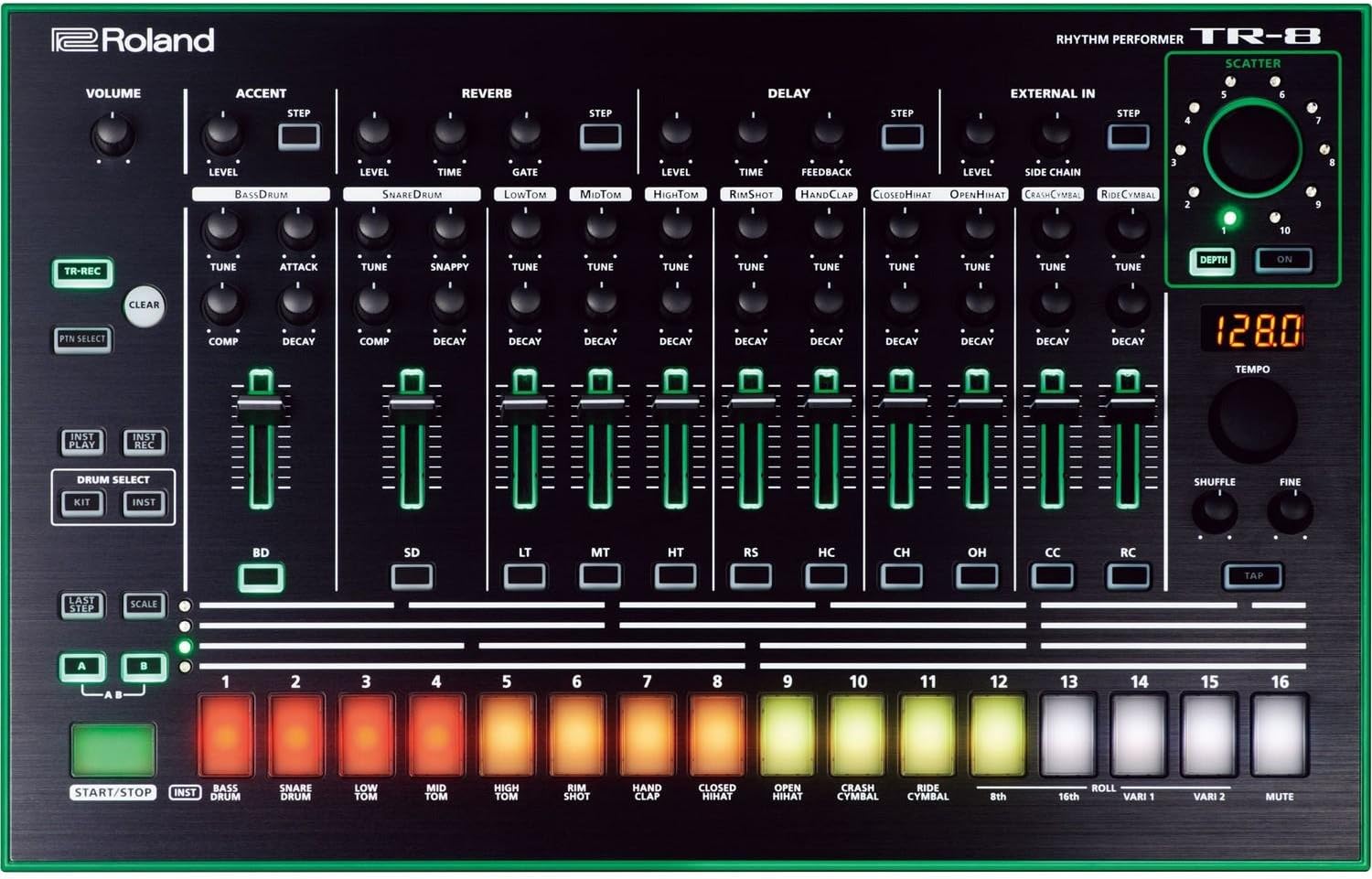
Image: Detailed view of the TR-8's control surface, illustrating the individual instrument faders, tuning and decay knobs, and the 16 step sequencer pads.
4.2 Adjusting Instrument Parameters
Each instrument has dedicated controls for fine-tuning its sound:
- LEVEL: Adjusts the volume of the instrument.
- TUNE: Changes the pitch of the instrument.
- DECAY: Controls the length of the instrument's sound.
- COMP (Compressor): Applies compression to the Bass Drum and Snare Drum.
4.3 Tempo and Shuffle
Use the large [TEMPO] knob to adjust the overall speed of the pattern. The [TAP] button allows for tap tempo input. The [SHUFFLE] knob adds a swing feel to the rhythm.
4.4 Effects (Reverb, Delay, Side Chain)
The TR-8 includes built-in effects:
- REVERB: Apply reverb to individual instruments. Adjust LEVEL, TIME, and GATE.
- DELAY: Apply delay to individual instruments. Adjust LEVEL, TIME, and FEEDBACK.
- SIDE CHAIN: Use the EXTERNAL IN signal to duck or gate other instruments. Adjust DEPTH and STEP.
4.5 Scatter Function
The SCATTER function allows for real-time manipulation and glitch effects on your patterns. Turn the [SCATTER] knob to select different scatter types and adjust the intensity.

Image: The Roland TR-8 from an angle, highlighting the Scatter knob on the upper right, used for real-time pattern effects.
5. Maintenance
5.1 Cleaning
Wipe the unit with a soft, dry cloth. Do not use abrasive cleaners, waxes, or solvents. Avoid spraying liquid directly onto the unit.
5.2 Storage
When not in use, store the TR-8 in a clean, dry environment away from direct sunlight, extreme temperatures, and high humidity. Disconnect the AC adapter when storing for extended periods.
5.3 Firmware Updates
Periodically check the official Roland website for firmware updates. Updates can improve performance, add new features, or fix bugs. Follow the instructions provided by Roland carefully when performing updates.
6. Troubleshooting
| Problem | Possible Cause | Solution |
|---|---|---|
| No power | AC adapter not connected properly or faulty. | Ensure the AC adapter is securely connected to the TR-8 and a working power outlet. Use only the supplied adapter. |
| No sound output | Audio cables not connected, volume low, or incorrect output selected. | Check audio cable connections to your mixer/amplifier. Increase the TR-8's VOLUME knob and the volume on your connected audio equipment. Ensure the correct input is selected on your mixer/amplifier. |
| MIDI synchronization issues | Incorrect MIDI settings or cable connections. | Verify MIDI IN/OUT connections. Check MIDI clock settings on both the TR-8 and the external device to ensure they are synchronized (e.g., TR-8 set to MIDI Slave, external device set to MIDI Master). |
| Pads not responding | Unit frozen or specific mode active. | Try restarting the unit. Ensure you are in the correct mode for pad input (e.g., INST mode for step sequencing). |
7. Specifications
- Model Name: TR-8
- Brand: Roland
- Body Material: Plastic
- Item Weight: 4.2 pounds (1.9 kg)
- Product Dimensions (L x W x H): 15.7 x 10.2 x 2.6 inches (39.9 x 25.9 x 6.6 cm)
- Connector Type: USB, MIDI (In, Out), Audio (Mix Out L/Mono, R; Assignable Out 1, 2; External In L, R; Phones)
- Power Supply: AC Adapter (DC IN)
- Date First Available: February 15, 2014
8. Warranty and Support
For warranty information and customer support, please refer to the warranty card included with your product or visit the official Roland website. You can find detailed support resources, FAQs, and contact information there.
Roland Official Website: www.roland.com
Documents and downloads
Ask a question about this manual
Ask about setup, troubleshooting, compatibility, parts, safety, or missing instructions. Manuals+ will review the question and use this page’s manual context to help answer it.