Introduction
This manual provides comprehensive instructions for the setup, operation, maintenance, and troubleshooting of the Datalogic Magellan 9800i Scanner/Scale. The Magellan 9800i is a high-performance, multi-interface point-of-sale (POS) scanner designed for retail environments, offering advanced scanning capabilities and integrated weighing functionality.
Please read this manual thoroughly before operating the device to ensure proper use and to maximize its lifespan.
Product Overview
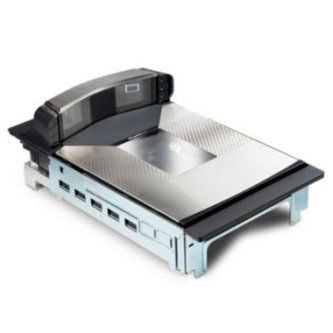
Figure 1: Datalogic Magellan 9800i Scanner/Scale unit. This image shows the top-down view of the scanner/scale, highlighting its integrated design with the scanning window and weighing platter.
The Datalogic Magellan 9800i is an advanced in-counter scanner/scale solution. Key features include:
- High-performance barcode scanning for 1D and 2D codes.
- Integrated weighing scale for accurate product measurement.
- Long platter/Sapphire glass for durability and ease of use.
- Multiple interface options (e.g., RS232, USB).
- Designed for high-volume retail checkout environments.
Setup and Installation
Unpacking the Device
Carefully remove all components from the packaging. Verify that all items listed below are present:
- Magellan 9800i Scanner/Scale unit
- Power supply brick
- RS232 cable (or other interface cable as specified)
- Documentation (this manual, quick start guide)
Physical Installation
- Prepare the Countertop: Ensure the countertop cutout meets the specified dimensions for the Magellan 9800i. Refer to the product's technical drawings for precise measurements.
- Insert the Scanner/Scale: Carefully lower the Magellan 9800i unit into the prepared cutout until it sits flush with the countertop surface.
- Connect Cables:
- Connect the RS232 cable to the appropriate port on the scanner and to your host system (e.g., POS terminal).
- Connect the power supply brick to the power input port on the scanner.
- Plug the power supply into a grounded electrical outlet.
- Secure the Unit (Optional): If applicable, use the provided mounting hardware to secure the scanner/scale to the countertop from underneath.
Initial Power-Up
Once all connections are secure, the device will typically power on automatically. Observe the indicator lights for initial self-test sequences. Refer to the troubleshooting section if the device does not power on or shows error indicators.
Operating Instructions
Barcode Scanning
To scan a barcode:
- Ensure the item's barcode is clean and unobstructed.
- Present the barcode to the scanning window. The Magellan 9800i features a large scanning area for omnidirectional reading.
- Move the item smoothly across the scanning window. A successful scan is typically indicated by an audible beep and/or a visual confirmation light.
- For difficult-to-read barcodes, try rotating the item or adjusting its distance from the scanning window.
Weighing Products
To weigh a product using the integrated scale:
- Ensure the scale platter is clear of any obstructions and is clean.
- Place the item to be weighed gently onto the center of the scale platter.
- Wait for the weight reading to stabilize on the connected POS system display.
- Remove the item from the platter once the weight has been recorded.
Note: For accurate weighing, avoid placing items on the edge of the platter or applying excessive force.
Maintenance
Cleaning the Scanner/Scale
Regular cleaning helps maintain optimal performance and extends the life of your device.
- Scanning Window: Use a soft, lint-free cloth dampened with a mild, non-abrasive glass cleaner. Spray the cleaner onto the cloth, not directly onto the scanning window. Wipe gently to remove dust, smudges, and debris.
- Scale Platter: Wipe the scale platter with a damp cloth. For stubborn stains, a mild detergent can be used, followed by wiping with a clean, damp cloth to remove any residue.
- Exterior Surfaces: Clean the exterior housing with a soft, damp cloth. Avoid using harsh chemicals, solvents, or abrasive materials, as these can damage the finish.
Caution: Always disconnect the power supply before cleaning the device.
Preventive Measures
- Avoid dropping or subjecting the unit to severe impacts.
- Do not expose the device to excessive moisture or extreme temperatures.
- Ensure proper ventilation around the unit to prevent overheating.
Troubleshooting
This section provides solutions to common issues encountered with the Magellan 9800i Scanner/Scale. For problems not listed here, contact Datalogic technical support.
| Problem | Possible Cause | Solution |
|---|---|---|
| Device does not power on. | Power cable disconnected; faulty power supply; power outlet issue. | Check all power connections. Ensure the power outlet is functional. Test with a known good power supply if available. |
| Cannot scan barcodes. | Barcode damaged/unreadable; scanning window dirty; incorrect symbology enabled; cable connection issue. | Try scanning a different, known good barcode. Clean the scanning window. Verify scanner configuration (if applicable). Check data cable connection to host. |
| Scale not providing accurate readings. | Platter obstructed; scale not calibrated; unit not level; environmental factors (e.g., drafts). | Ensure platter is clear. Check if the unit is level. Refer to calibration procedures (if user-accessible) or contact support. Minimize drafts around the scale. |
| No data transmitted to POS system. | Data cable disconnected/faulty; incorrect interface settings; POS software issue. | Verify data cable connection. Check interface settings on both scanner and POS system. Consult POS system documentation. |
Specifications
The following table outlines the key technical specifications for the Datalogic Magellan 9800i Scanner/Scale:
| Feature | Detail |
|---|---|
| Model | Magellan 9800i |
| Dimensions (L x W x H) | 15.1 x 12.5 x 22.7 inches |
| Item Weight | 26.6 pounds |
| Scanning Technology | Omnidirectional imaging (for 1D/2D barcodes) |
| Scale Type | Integrated US Scale |
| Platter Type | Long Platter / Sapphire Glass |
| Connectivity | RS232, USB, Bluetooth, Wireless (as per product variations) |
| Power Source | Corded Electric (via power brick) |
| Manufacturer | Datalogic |
| ASIN | B00ICHZ92M |
Warranty Information
Datalogic products are manufactured to high quality standards. For specific warranty terms and conditions applicable to your Magellan 9800i Scanner/Scale, please refer to the warranty card included with your product or visit the official Datalogic website. Typically, warranty coverage addresses defects in materials and workmanship under normal use.
Keep your proof of purchase for warranty claims.
Customer Support
For technical assistance, service, or additional information regarding your Datalogic Magellan 9800i Scanner/Scale, please contact Datalogic Customer Support:
- Website: www.datalogic.com/support
- Phone: Refer to the Datalogic website for regional support contact numbers.
- When contacting support, please have your product model (Magellan 9800i) and serial number ready.