
1. Introduction
The Muse M-195 CDB is a versatile radio alarm clock designed to provide reliable timekeeping, alarm functions, and high-quality radio reception. It supports both Digital Audio Broadcasting (DAB+) and Frequency Modulation (FM) radio bands, featuring Radio Data System (RDS) for FM stations. The device includes a clear, backlit LCD display with adjustable brightness, dual alarms, snooze, and sleep timer functions. Its compact design and telescopic antenna ensure optimal performance and ease of use.
2. Safety Information
- Power Source: Use only the provided USB power adapter and cable. Ensure the power outlet voltage matches the adapter's requirements.
- Water and Moisture: Do not expose the unit to rain, moisture, or dripping/splashing liquids. Keep it away from sources of water such as bathtubs, sinks, or swimming pools.
- Heat: Do not place the unit near heat sources such as radiators, heat registers, stoves, or other apparatus (including amplifiers) that produce heat.
- Ventilation: Ensure adequate ventilation. Do not block any ventilation openings.
- Cleaning: Unplug the unit from the power source before cleaning. Use a soft, dry cloth. Do not use liquid cleaners or aerosol cleaners.
- Servicing: Do not attempt to service this product yourself. Refer all servicing to qualified service personnel.
3. Package Contents
Please check that all items listed below are present in your package:
- Muse M-195 CDB Radio Alarm Clock
- USB Power Adapter
- USB Cable
- User Manual (this document)
4. Product Overview
Familiarize yourself with the various parts and controls of your Muse M-195 CDB radio alarm clock.

Figure 1: Front and top view of the Muse M-195 CDB, showing the LCD display, speaker grille, and control buttons.
The front panel features a large LCD display for time, date, and radio information. The top panel houses the main control buttons and the integrated speaker. The telescopic antenna is located at the rear for optimal radio reception. The rear panel also includes the USB power input.
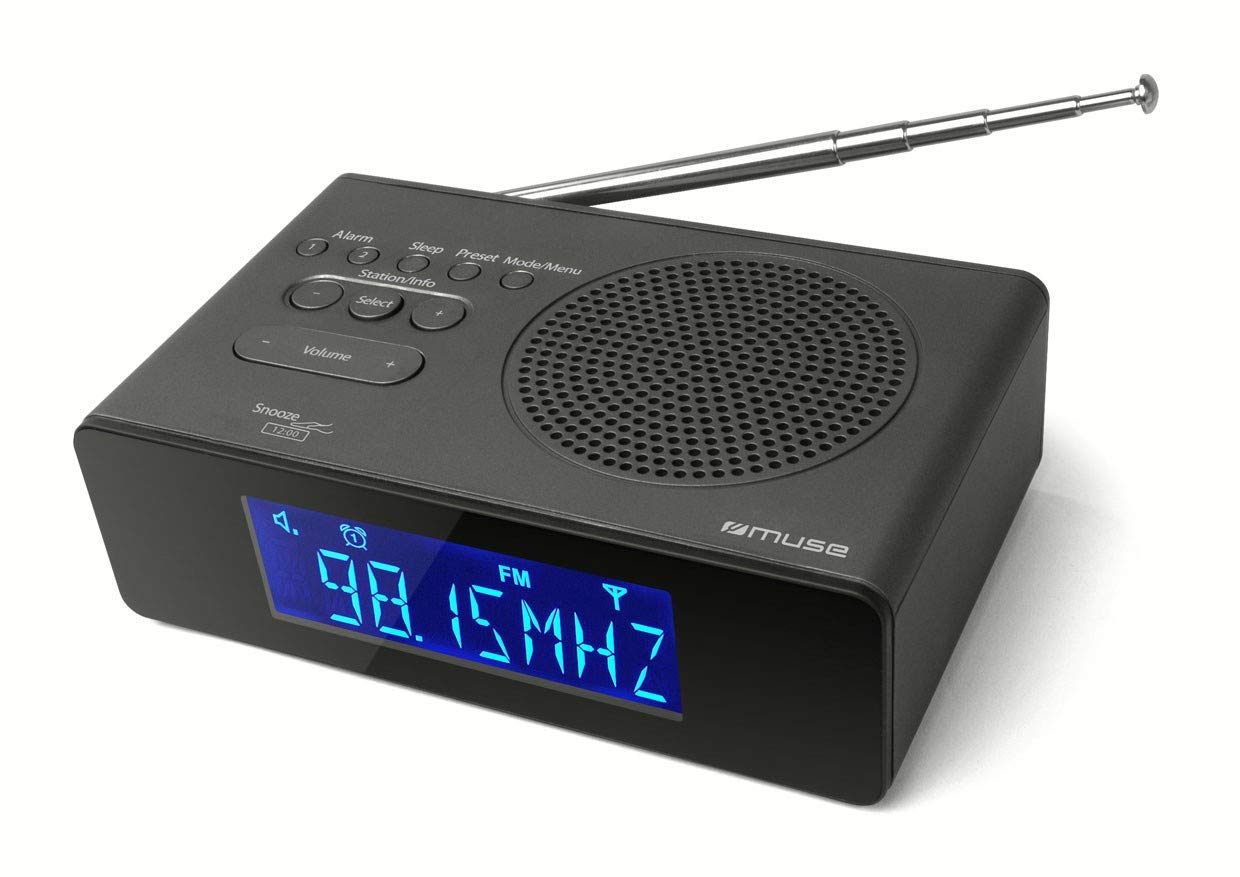
Figure 2: The Muse M-195 CDB positioned on a bedside table, illustrating its compact size and display visibility.
5. Setup
5.1 Power Connection
- Connect the supplied USB cable to the USB power input port on the rear of the M-195 CDB.
- Plug the other end of the USB cable into the provided USB power adapter.
- Insert the USB power adapter into a standard wall outlet.
- The unit will power on, and the display will illuminate.
5.2 Antenna Adjustment
For optimal radio reception, fully extend the telescopic antenna located at the rear of the unit. Adjust its position for the best signal quality, especially when tuning into DAB+ or FM stations.
5.3 Initial Time Setting
Upon initial power-on, the M-195 CDB will attempt to automatically synchronize its time and date via DAB+ or FM RDS signals. Ensure the antenna is extended for this process. If automatic synchronization is not successful or you wish to set the time manually, refer to the 'Setting Time and Date' section in Operating Instructions.
6. Operating Instructions
6.1 Power On/Off
Press the POWER button (usually located on the top or rear) to turn the unit on or off.
6.2 Setting Time and Date
If the time is not set automatically via DAB+ or FM RDS, or if you prefer manual adjustment:
- In standby mode, press and hold the TIME SET button (or similar, refer to button labels).
- Use the TUNING/SET buttons (or +/-) to adjust the hour, then press TIME SET to confirm.
- Repeat for minutes, year, month, and day.
- Press TIME SET again to exit the setting mode.
6.3 Radio Operation (DAB+/DAB and FM)
The M-195 CDB supports both digital (DAB+/DAB) and analog (FM) radio reception.
6.3.1 Selecting Radio Band
Press the MODE or BAND button to switch between DAB and FM modes.
6.3.2 Automatic Station Scan (DAB)
- In DAB mode, press and hold the SCAN or AUTO TUNE button.
- The radio will scan for available DAB stations and store them automatically.
6.3.3 Manual Tuning (FM)
- In FM mode, press the TUNING +/- buttons to manually adjust the frequency.
- Press and hold TUNING +/- for automatic scanning to the next available station.
6.3.4 Storing and Recalling Presets
The unit can store up to 20 stations (10 DAB+/DAB, 10 FM).
- Tune to the desired station.
- Press and hold the PRESET or MEM button.
- Use the TUNING/SET buttons to select a preset number (1-10).
- Press PRESET or MEM again to confirm and save.
- To recall a preset, briefly press the PRESET button and use TUNING/SET to select the desired preset.
6.4 Alarm Settings
The M-195 CDB features two independent alarms (Alarm 1 and Alarm 2).
- In standby mode, press and hold the ALARM 1 or ALARM 2 button.
- Use the TUNING/SET buttons to adjust the alarm hour, then press the alarm button to confirm.
- Repeat for minutes.
- Select alarm source (Buzzer, DAB, or FM) and desired volume level.
- Select alarm frequency (Daily, Weekdays, Weekends, Once).
- Press the alarm button again to activate the alarm and exit setting mode. An alarm icon will appear on the display.
6.5 Snooze Function
When an alarm sounds, press the SNOOZE button (often a large button on top or by pressing the unit down) to temporarily silence the alarm for a few minutes. The alarm will sound again after the snooze period.
6.6 Sleep Timer
The sleep timer allows the radio to play for a set duration before automatically turning off.
- While the radio is playing, press the SLEEP button repeatedly to cycle through available sleep times (e.g., 15, 30, 60, 90 minutes, OFF).
- The radio will automatically turn off after the selected duration.
6.7 Display Brightness (Dimmer)
Press the DIMMER button (or similar) repeatedly to adjust the brightness level of the LCD display to your preference.
7. Maintenance
7.1 Cleaning
To clean the unit, unplug it from the power source. Use a soft, dry, lint-free cloth to wipe the surfaces. Do not use abrasive cleaners, waxes, or solvents as they may damage the finish.
7.2 General Care
- Avoid placing heavy objects on the unit.
- Do not drop the unit or subject it to strong impacts.
- Keep the unit away from strong magnetic fields.
8. Troubleshooting
| Problem | Possible Cause | Solution |
|---|---|---|
| No power | Power cable not connected; Power outlet not working. | Ensure the USB cable and adapter are securely connected. Try a different power outlet. |
| Poor radio reception | Antenna not extended; Weak signal; Interference. | Fully extend and adjust the telescopic antenna. Move the unit to a different location. Keep away from other electronic devices. |
| Alarm does not sound | Alarm not activated; Alarm volume too low; Incorrect alarm time. | Ensure the alarm icon is displayed. Check alarm volume settings. Verify the alarm time is correctly set. |
| Display is too bright/dim | Dimmer setting needs adjustment. | Press the DIMMER button to cycle through brightness levels. |
| Buttons unresponsive | Temporary software glitch. | Unplug the unit from power for a few minutes, then plug it back in to reset. |
9. Specifications
| Brand | Muse |
| Model Name | M-195 CDB |
| Model Year | 2014 |
| Product Dimensions | 15.5 x 9.5 x 4.7 cm |
| Product Weight | 420 g |
| Display Technology | LCD |
| Display Type | Digital |
| Tuner Technology | DAB |
| Supported Radio Bands | DAB, DAB+, FM |
| Power Source | Corded Electric |
| Output Power | 2 Watts |
| Connectivity Technology | USB |
| Number of Alarms | 2 |
10. Warranty and Support
This product is covered by a manufacturer's warranty. Please refer to the warranty card included in your package or contact your retailer for specific warranty terms and conditions. For technical support or service inquiries, please contact Muse customer service through their official website or the contact information provided with your purchase documentation.


