
1. Introduction
This manual provides essential information for the safe and effective use of your Nikon COOLPIX S9700 digital camera. Please read these instructions thoroughly before using the camera and retain them for future reference.
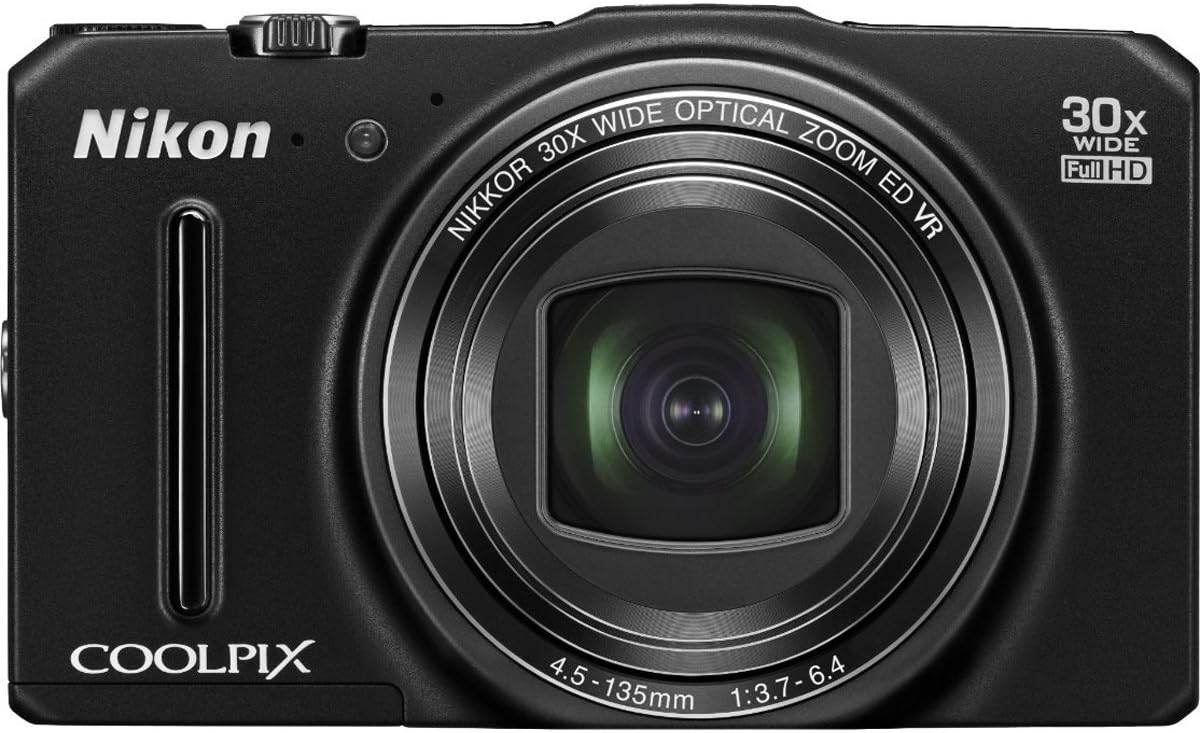
Figure 1: Front view of the Nikon COOLPIX S9700 Digital Camera with its NIKKOR 30x optical zoom lens extended.
2. Product Overview
The Nikon COOLPIX S9700 is a compact digital camera featuring a 16.0 MP BSI CMOS sensor, a 30x optical zoom NIKKOR lens, built-in Wi-Fi, and GPS capabilities. It is designed for versatility, offering full HD 1080p video recording and various shooting modes.
Key Features:
- 30x Optical Zoom NIKKOR Lens: Provides extensive reach for capturing distant subjects.
- 16.0 MP BSI CMOS Sensor: Delivers high-resolution images, especially in low-light conditions.
- Built-in Wi-Fi: Enables instant photo sharing and remote camera control via a compatible smart device.
- Built-in GPS: Records location data for photos and offers mapping, Electronic Compass, and Points of Interest (POI) features.
- Full HD 1080p Video: Records high-quality videos with stereo sound.
- 3-inch LCD Display: For composing shots and reviewing images.
3. Setup
3.1. Charging the Battery
The camera uses an EN-EL12 rechargeable battery. To charge the battery:
- Insert the EN-EL12 battery into the camera.
- Connect the UC-E21 USB cable to the camera's USB port and the Charging AC Adapter EH-71P.
- Plug the AC adapter into a power outlet. The charging indicator light will illuminate.
- Charging is complete when the indicator light turns off.
3.2. Inserting a Memory Card
The camera supports SD, SDHC, and SDXC memory cards. To insert a memory card:
- Open the battery/card compartment cover on the bottom of the camera.
- Insert the memory card into the card slot with the contacts facing the correct direction, as indicated by the diagram inside the compartment.
- Push the card in until it clicks into place.
- Close the compartment cover securely.
4. Operating the Camera
4.1. Power On/Off
Press the ON/OFF button located on the top of the camera to power it on or off.
4.2. Basic Photography (Still Images)
- Select a Shooting Mode: Use the mode dial on the top of the camera to select your desired shooting mode (e.g., Auto, Scene, Program Auto).
- Compose Your Shot: Frame your subject using the 3-inch LCD monitor.
- Zoom: Use the zoom lever around the shutter button to adjust the 30x optical zoom.
- Focus: Press the shutter button halfway down to focus. The camera will automatically detect and focus on the subject.
- Capture: Press the shutter button fully down to take the picture.
4.3. Special Effects
The COOLPIX S9700 offers 26 special effects to enhance your photos. To apply an effect:
- Turn the mode dial to the EFFECTS position.
- Use the multi-selector to navigate through the available effects (e.g., Sepia, Soft, Selective Color).
- Select an effect and compose your shot. The effect will be previewed on the LCD.
- Press the shutter button to capture the image with the selected effect.
4.4. Wi-Fi Connectivity and Remote Control
The built-in Wi-Fi allows for wireless transfer of images and remote camera control using a compatible smart device (smartphone or tablet).
- Install the App: Download and install the free Nikon Wireless Mobile Utility (WMU) app from the App Store (for iOS) or Google Play (for Android) on your smart device.
- Activate Wi-Fi on Camera: Turn on the camera and activate its Wi-Fi function (refer to the camera's on-screen menu for specific steps).
- Connect Devices: On your smart device, go to Wi-Fi settings and select the camera's network.
- Use the App: Open the WMU app. You can now view photos on the camera, transfer them to your smart device, or use your smart device as a remote control to take pictures.
4.5. GPS Functionality
The integrated GPS module records location data for your photos, allowing you to geotag your memories. It also includes mapping, an Electronic Compass, and Points of Interest (POI).
- Activate GPS: Enable the GPS function in the camera's setup menu.
- Location Data: The camera will automatically embed latitude and longitude coordinates into the image metadata.
- Viewing Maps: Use Nikon View NX2 software or compatible online services to view your geotagged photos on a map.
4.6. Full HD 1080p Video Recording
The COOLPIX S9700 can record Full HD 1080p videos with stereo sound.
- Switch to Video Mode: Press the dedicated movie-record button or select video mode from the mode dial (if available).
- Start Recording: Press the movie-record button to start recording.
- Stop Recording: Press the movie-record button again to stop recording.
Video 1: An overview of the Nikon COOLPIX S9700 camera's features, including its compact size, 30x zoom, special effects, Wi-Fi, GPS, and low-light performance. This video highlights the camera's versatility for travel and capturing memorable moments.
4.7. Low Light Performance
The camera features a BSI CMOS sensor specifically designed to perform well in low-light conditions. Utilize scene modes like 'Night Portrait' and 'Night Landscape' for optimal results in challenging lighting environments.
5. Maintenance
- Cleaning the Lens: Use a soft, lint-free cloth or a lens brush to gently remove dust and smudges. Avoid touching the lens surface with your fingers.
- Cleaning the Camera Body: Wipe the camera body with a soft, dry cloth. For stubborn dirt, use a slightly damp cloth and then dry thoroughly.
- Battery Care: Store the battery in a cool, dry place when not in use. Avoid fully discharging the battery for extended periods.
- Storage: When storing the camera for long periods, remove the battery and memory card. Store the camera in a dry, well-ventilated area, away from direct sunlight and extreme temperatures.
6. Troubleshooting
6.1. Camera Does Not Turn On
- Ensure the battery is fully charged.
- Check that the battery is inserted correctly.
- Try using a different, fully charged battery if available.
6.2. Images Are Blurry
- Check if the lens is clean and free from smudges.
- Ensure the camera is properly focused on the subject.
- Use a higher shutter speed or enable Vibration Reduction (VR) in low light.
- Hold the camera steady or use a tripod.
6.3. Wi-Fi Connection Issues
- Verify that the Nikon WMU app is installed and updated on your smart device.
- Ensure Wi-Fi is enabled on both the camera and your smart device.
- Check that you are connected to the correct camera Wi-Fi network.
- Restart both the camera and your smart device.
7. Specifications
| Feature | Specification |
|---|---|
| Model Name | Nikon COOLPIX S9700 |
| Photo Sensor Resolution | 16 MP |
| Photo Sensor Technology | BSI CMOS |
| Optical Zoom | 30x |
| Digital Zoom | 4x |
| Lens Type | NIKKOR glass lens, f/3.7-6.4 |
| Image Stabilization | Optical |
| Video Resolution | Full HD 1080p |
| Screen Size | 3 Inches LCD |
| Connectivity Technology | Wi-Fi, HDMI, USB |
| Special Features | Built-in GPS, Lightweight |
| Compatible Flash Memory | SD, SDHC, SDXC |
| Item Weight | 0.51 Pounds |
8. Included Accessories
- AN-CP19 Strap
- UC-E21 USB Cable
- EN-EL12 Rechargeable Battery
- Charging AC Adapter EH-71P
9. Warranty and Support
For detailed warranty information and customer support, please refer to the documentation provided with your product or visit the official Nikon website. Keep your proof of purchase for warranty claims.


