
Product Overview
The Hailo Euro Cargo S 500 30/19 is a high-quality built-in waste collector designed for kitchen cabinets with a width of 500 mm. It features a front slide mechanism and two separate bins for efficient waste separation, offering a total capacity of 49 liters (30L + 19L).

Image: The Hailo Euro Cargo S waste bin, shown installed within a kitchen cabinet. The unit is partially extended, revealing the two internal bins designed for waste separation. The sleek design integrates seamlessly with modern kitchen cabinetry.
Safety Warning
Attention: Ensure the cabinet is correctly installed and the extraction function operates properly to prevent accidents. Avoid overloading to maintain the stability and safety of the cabinet.
Setup and Installation
This waste bin system is designed for integration into kitchen cabinets. Proper installation is crucial for optimal performance and safety. It is recommended to have the cabinet width at least 500 mm to accommodate the unit.
Required Tools (Typical)
- Measuring tape
- Screwdriver (Phillips head)
- Drill (if pre-drilled holes are not present)
- Pencil for marking
Installation Steps
- Prepare the Cabinet: Ensure the cabinet interior is clean and free of obstructions. Verify the cabinet dimensions match the product specifications.
- Position the Frame: Place the main frame of the waste bin system inside the cabinet. Align it according to the cabinet's depth and width, ensuring sufficient clearance for the sliding mechanism.
- Secure the Frame: Mark the drilling points through the pre-drilled holes on the frame. Drill pilot holes if necessary, then secure the frame to the cabinet base using the provided screws.
- Attach the Front Panel: If applicable, attach the cabinet's front door panel to the waste bin's front slide mechanism. Follow the specific instructions provided with the mounting hardware to ensure proper alignment and smooth operation.
- Insert Bins: Place the 30L and 19L waste bins into their designated compartments within the frame.
- Test Operation: Gently pull the unit out and push it back in to ensure smooth sliding and proper alignment. Check that the automatic closing mechanism (if present) functions correctly.

Image: A technical diagram illustrating the key dimensions of the Hailo Euro Cargo S waste bin. This includes the height (439 mm), depth (403 mm), and width (462-468 mm), essential for cabinet integration.
Operating Instructions
The Hailo Euro Cargo S is designed for convenient waste management and separation.
- Opening: Gently pull the cabinet door or the integrated handle to slide the waste bin unit out. The smooth glides ensure easy access to both bins.
- Waste Separation: Utilize the two distinct bins (30L and 19L) for separating different types of waste, such as organic, recyclable, or general waste, according to local regulations.
- Closing: Push the unit back into the cabinet. The integrated damping mechanism ensures a soft and quiet return, and the automatic closing feature will fully retract the unit.
- Bin Removal: To empty or clean the individual bins, simply lift them vertically out of the frame.

Image: The Hailo Euro Cargo S waste bin in an extended position, demonstrating its use with various items placed inside the two compartments, highlighting its functionality for waste separation.
Maintenance
Regular cleaning and maintenance will ensure the longevity and hygienic operation of your Hailo waste bin.
- Cleaning Bins: Remove the individual plastic bins. Wash them with warm water and a mild detergent. Rinse thoroughly and allow them to dry completely before placing them back into the frame.
- Cleaning Frame and Glides: Wipe down the metal frame and glides with a damp cloth. For stubborn dirt, use a mild, non-abrasive cleaner. Avoid harsh chemicals or abrasive materials that could damage the finish.
- Lubrication: Periodically check the sliding mechanisms. If the glides become stiff, a small amount of silicone spray or a similar lubricant can be applied to ensure smooth operation.
- Odor Control: To minimize odors, regularly empty the bins and consider using bin liners. Baking soda or activated charcoal can be placed at the bottom of the bins to absorb smells.
Troubleshooting
| Problem | Possible Cause | Solution |
|---|---|---|
| Unit does not slide smoothly or gets stuck. | Obstruction in glides, dirt accumulation, or misalignment. | Check for debris in the glides. Clean the glides. Verify the frame is securely and levelly installed. Apply lubricant if necessary. |
| Automatic closing mechanism not working. | Mechanism obstructed, damaged, or unit overloaded. | Ensure no items are blocking the closing path. Reduce load if overloaded. Inspect the mechanism for visible damage. |
| Unpleasant odors persist. | Infrequent emptying, unlined bins, or food residue. | Empty bins more frequently. Use bin liners. Clean bins thoroughly with disinfectant. Use odor absorbers. |
| Bins do not fit correctly. | Incorrect bin placement or foreign objects. | Ensure bins are placed in their correct compartments. Remove any objects preventing proper seating. |
Specifications
| Feature | Detail |
|---|---|
| Brand | Hailo |
| Model Number | 3610521 |
| Color | Grey |
| Product Dimensions (L x W x H) | 40.3 x 46.8 x 43.9 cm (11.1 kg) |
| Capacity | 49 Liters (30L + 19L) |
| Material | Metal |
| Special Feature | Automatic closing with synchronized extension |
| Opening Mechanism | Manual pull-out |
| Recommended Use | Cabinets, Kitchen |
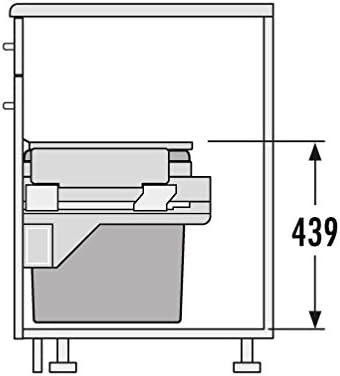
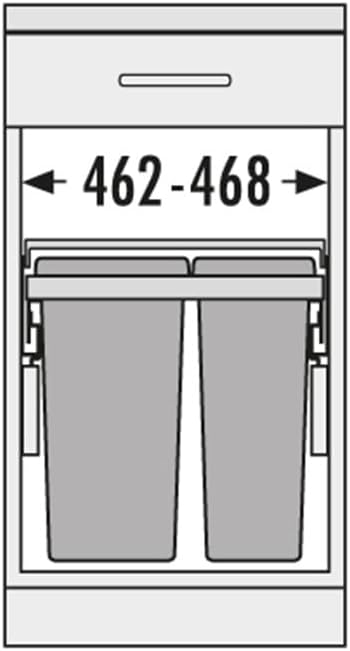
Image: Two technical diagrams illustrating the height (left) and width (right) dimensions of the Hailo Euro Cargo S waste bin, crucial for installation planning.
Warranty and Support
For information regarding warranty coverage and customer support, please refer to the official Hailo website or contact your point of purchase. Keep your proof of purchase for any warranty claims.
Please note that information on spare parts availability for this specific model is not readily available. For any service inquiries, it is recommended to contact Hailo customer service directly.
You can visit the official Hailo store for more information: Hailo Official Store


