1. Introduction and Overview
The Sony Alpha a6000 is a compact, lightweight mirrorless digital camera designed for high-quality photography and video recording. It features a newly developed 24.3-effective-megapixel Exmor APS HD CMOS sensor and a BIONZ X image processing engine, delivering superb image quality. The camera offers intuitive operation with an OLED Tru-Finder and two operation dials. Key features include a 79-point focal plane phase-detection AF sensor, built-in Wi-Fi and NFC, and a robust anti-dust system.
2. What's in the Box
- Sony Alpha a6000 Mirrorless Digital Camera Body (Black)
- NP-FW50 Lithium-Ion Rechargeable Battery (1020mAh)
- Eye Cup
- AC Adapter AC-UB10
- Micro USB Cable
- Warranty
3. Key Features
- 24 MP APS-C CMOS sensor with ISO 100-25600 and Focus Sensitivity Range: EV 0 to EV 20 (at ISO 100 equivalent with F2.8 lens attached).
- Hybrid AF with 179-point focal plane phase-detection and 25 contrast detect points.
- Built-in Wi-Fi and NFC for easy connectivity.
- Up to 11 FPS continuous shooting.
- 3-inch tilting LCD with 921,000 dots, compatible with Sony E Mount lenses.
- OLED electronic viewfinder with 100% coverage and 1.4 million dots.
- Supports SD/SDHC/SDXC and Memory Stick Pro Duo, Pro-HG Duo memory cards.
4. Setup Guide
4.1. Battery Installation and Charging
Insert the NP-FW50 Lithium-Ion Rechargeable Battery into the battery compartment located at the bottom of the camera. Ensure it clicks into place. Connect the AC Adapter AC-UB10 to the camera using the Micro USB Cable to charge the battery. The charging time is approximately 310 minutes.
4.2. Memory Card Insertion
Open the memory card slot cover, usually located on the side or bottom of the camera. Insert a compatible SD/SDHC/SDXC or Memory Stick Pro Duo/Pro-HG Duo card with the contacts facing the correct direction until it clicks into place. Close the cover securely.
4.3. Attaching a Lens
Align the white index mark on the lens barrel with the white index mark on the camera's lens mount. Rotate the lens clockwise until it clicks into place. To remove the lens, press the lens release button on the camera body and rotate the lens counter-clockwise.

Figure 1: Front view of the Sony Alpha a6000 camera body, showing the E-mount for lens attachment.

Figure 2: Front view of the Sony Alpha a6000 with a lens attached, ready for use.
4.4. Initial Settings
Upon first power-on, the camera will guide you through initial setup, including language, date, and time settings. Follow the on-screen prompts to complete this process.
5. Operating the Camera
5.1. Power On/Off
To power on the camera, slide the ON/OFF switch located on the top plate. To power off, slide the switch back to OFF.

Figure 3: Top view of the Sony Alpha a6000, highlighting the power switch and mode dial.
5.2. Basic Photography Modes
Use the mode dial on the top of the camera to select your desired shooting mode:
- Intelligent Auto (iA): Camera automatically detects the scene and applies optimal settings.
- Program Auto (P): Camera sets aperture and shutter speed, while you control other settings.
- Aperture Priority (A): You set the aperture, camera sets shutter speed.
- Shutter Priority (S): You set the shutter speed, camera sets aperture.
- Manual (M): You control both aperture and shutter speed.
- Scene Selection (SCN): Choose from various scene modes (e.g., Portrait, Landscape, Night Scene).
- Movie Mode: For recording videos.
5.3. Autofocus System
The a6000 features a Hybrid AF system with 179 phase-detection points and 25 contrast-detection points, covering almost the entire frame for fast and accurate focusing. You can select various AF modes and areas via the camera's menu.
5.4. ISO Sensitivity
The camera supports an ISO range of 100-25600, allowing for excellent performance in various lighting conditions. Adjust ISO settings through the menu or a customizable button for optimal exposure and noise control.
5.5. Video Recording
To record video, set the mode dial to Movie Mode. Press the dedicated MOVIE button to start and stop recording. The camera supports Full HD video capture at 1080/60p and 24p with clean HDMI output.
Video 1: DPReview's overview of the Sony Alpha a6000 Interchangeable Lens Camera, detailing its features and capabilities.
5.6. Connectivity (Wi-Fi and NFC)
The a6000 includes built-in Wi-Fi and NFC for seamless connection to compatible smartphones and tablets. Use these features to transfer images, control the camera remotely, and share your photos instantly.
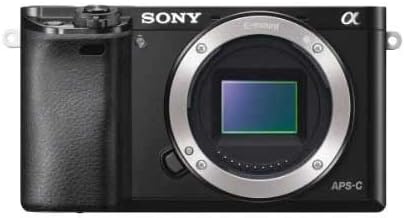
Figure 4: Side view of the Sony Alpha a6000, illustrating the HDMI and Multi ports for connectivity.

Figure 5: Rear view of the Sony Alpha a6000 with the LCD screen tilted, showing various control buttons.
6. Maintenance
6.1. Cleaning
Regularly clean the camera body with a soft, dry cloth. For the lens, use a lens brush or blower to remove dust, followed by a lens cleaning solution and microfiber cloth. The sensor features an anti-dust system with a charge protection coating on the optical filter and an ultrasonic vibration mechanism.
6.2. Battery Care
Store batteries in a cool, dry place. Avoid fully discharging the battery frequently to prolong its lifespan. Remove the battery if the camera will not be used for an extended period.
6.3. Storage
When not in use, store the camera in a dry, dust-free environment, preferably in a camera bag with desiccant packs to prevent moisture buildup.
7. Troubleshooting
- Camera not powering on: Ensure the battery is fully charged and correctly inserted.
- Images are blurry: Check focus settings, ensure adequate lighting, and use a faster shutter speed or tripod if necessary.
- Memory card error: Reinsert the memory card, try a different card, or format the card (backing up data first).
- Wi-Fi/NFC connection issues: Ensure both devices have Wi-Fi/NFC enabled and are within range. Refer to your smartphone's manual for specific connection instructions.
Video 2: DPReview's discussion on camera trends, including the Sony a6000, offering insights that may help with advanced troubleshooting and understanding camera capabilities.
8. Specifications
- Product Dimensions: 4.72 x 1.77 x 2.64 inches
- Item Weight: 12.2 ounces
- Item Model Number: ILCE6000/B
- Batteries: 1 D batteries required (NP-FW50 Lithium-Ion Rechargeable Battery included)
- Compatible Mountings: Sony E (NEX), Sony FE
- Aspect Ratio: 3:2
- Photo Sensor Technology: CMOS
- Supported File Format: JPEG (DCF v2.0, EXIF v2.3), RAW (Sony ARW 2.3)
- Image Stabilization: No (Lens-based stabilization may be available depending on the lens)
- Optical Zoom: 1x (Digital zoom available)
- Maximum Aperture: 3.6f (Varies by lens)
- Expanded ISO Minimum: 100
- Metering Description: Multi, Center-weighted, Spot
9. Warranty and Support
This product comes with a manufacturer's warranty. Please refer to the included warranty documentation for details on coverage and duration. For technical support, service, or additional information, please visit the official Sony support website or contact their customer service.
Legal Disclaimer: As is no warranty through seller.
Video 3: DPReview's field test highlights featuring the Sony a6000, RX100 IV, and a7R II digital cameras, demonstrating their performance in real-world scenarios.


