
Introduction
This manual provides essential instructions for the safe and efficient operation, maintenance, and troubleshooting of your BlueDri BD-76 Commercial Dehumidifier. Designed for high-performance moisture extraction, this unit is suitable for various environments including homes, basements, garages, and job sites. Please read this manual thoroughly before operating the unit and retain it for future reference.
Safety Information
Important Safety Instructions:
- Always connect the unit to a properly grounded electrical outlet.
- Do not operate the unit with a damaged power cord or plug.
- Ensure the unit is placed on a stable, level surface to prevent tipping.
- Keep children and pets away from the operating unit.
- Do not block air inlets or outlets.
- Disconnect power before performing any maintenance or cleaning.
- This appliance is not intended for use by persons (including children) with reduced physical, sensory or mental capabilities, or lack of experience and knowledge, unless they have been given supervision or instruction concerning use of the appliance by a person responsible for their safety.
- Proposition 65 Warning: This product contains chemicals known to the State of California to cause cancer and birth defects or other reproductive harm.
Product Overview
The BlueDri BD-76 is a robust commercial-grade dehumidifier designed for effective moisture removal. Its durable roto-molded polyethylene housing ensures longevity and protection. The unit features an intuitive digital control panel and an automatic water pump for continuous operation.

Figure 1: Front view of the BlueDri BD-76 Commercial Dehumidifier. This image displays the unit's robust green exterior and front air intake grille.
Key Features:
- High Capacity: Extracts up to 150 pints of water per day (90°F 90%RH) or 76 PPD at AHAM (80°F 60%RH).
- Automatic Water Pump: Facilitates continuous drainage without manual emptying.
- Digital Control Panel: Easy-to-use interface with auto-restart, hour counter, RH, and temperature sensors.
- Durable Construction: Roto-molded polyethylene housing for dent resistance and superior durability.
- Portability: Equipped with a rigid handle and semi-pneumatic wheels for easy transport.
- Stackable Design: Units can be stacked up to two high for efficient storage.

Figure 2: BlueDri BD-76 Dehumidifier shown next to a person for scale. This illustrates the unit's compact yet substantial size, highlighting its portability features like the handle and wheels.
Setup
- Unpacking: Carefully remove the dehumidifier from its packaging. Inspect for any shipping damage.
- Placement: Position the unit on a firm, level surface in the area requiring dehumidification. Ensure there is adequate space around the unit for proper airflow (at least 12 inches from walls or obstructions).
- Drainage Hose Connection:
The BD-76 features an automatic internal pump and a drainage hose for continuous operation. Locate the drainage hose, typically coiled at the back of the unit. Extend the hose and direct it to a suitable drain (e.g., floor drain, sink, or bucket). Ensure the hose is free of kinks and has a continuous downward slope to prevent water backup.
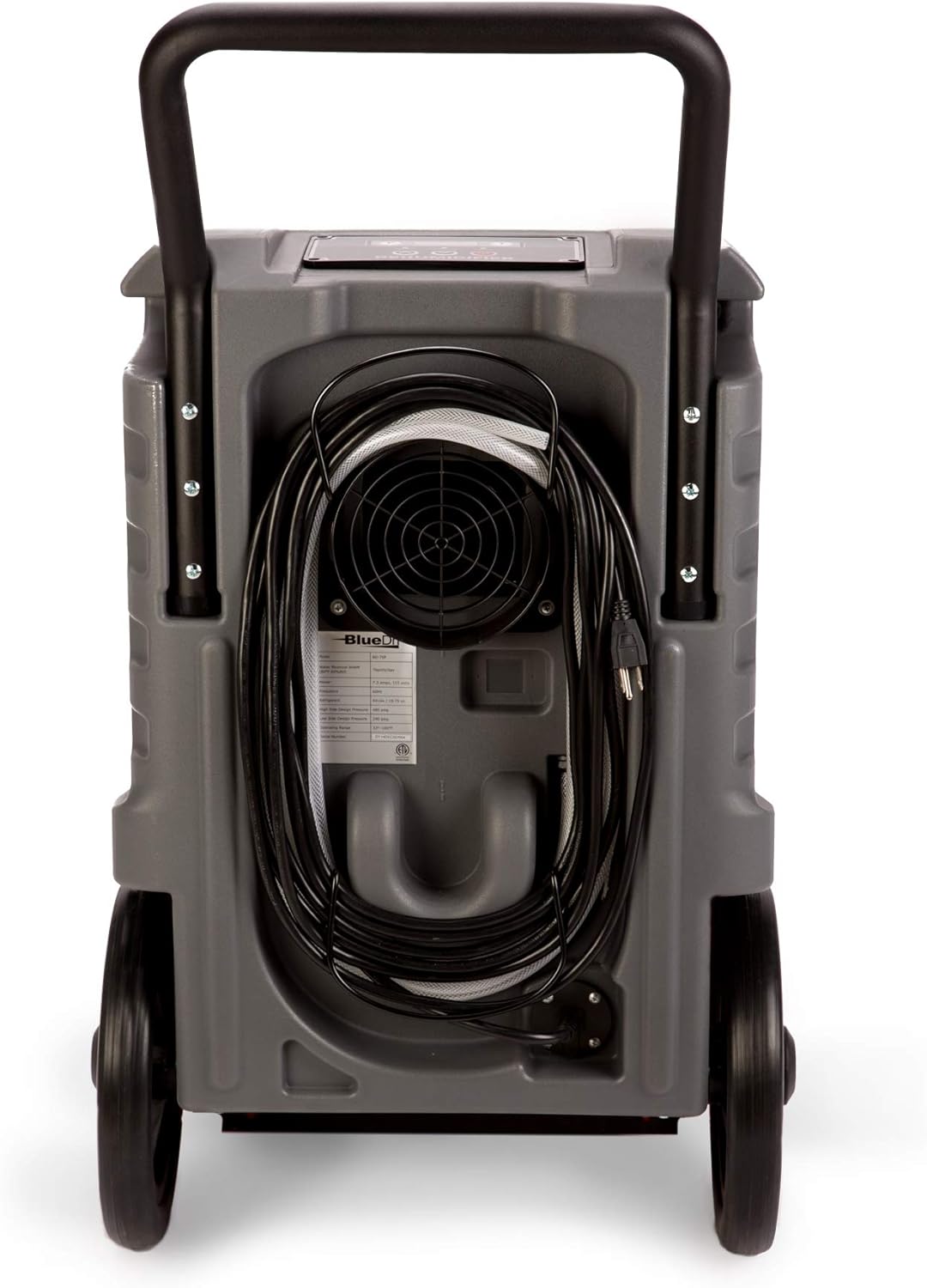
Figure 3: Rear view of the BlueDri BD-76 Dehumidifier, showing the integrated storage for the drainage hose and power cord. The hose should be uncoiled and directed to a drain before operation.
- Power Connection: Plug the power cord into a grounded 115V 60Hz electrical outlet.
Operating Instructions
Control Panel:
The control panel is located on the top of the unit and provides access to all operational settings.
- Power Button: Turns the unit ON/OFF.
- Up/Down Arrows: Adjust desired humidity level (Relative Humidity - RH).
- 'P' Button (Purging): Initiates the purging cycle for the internal pump.
- 'T' Button (Timer): Sets the operating timer.
- Display Screen: Shows current humidity, temperature, and operating status (Running, Defrosting, Purging).
Starting Operation:
- Press the Power button to turn on the unit. The display will show the current ambient relative humidity.
- Use the Up/Down arrow buttons to set your desired humidity level. The unit will operate until the set humidity is reached, then cycle off. It will restart automatically if the humidity rises above the set point.
- For continuous operation, set the desired humidity to the lowest possible setting (e.g., 25% RH).
- The unit features an auto-defrost function. If frost builds up on the coils, the unit will automatically enter defrost mode, indicated on the display.
- The internal pump will automatically activate to drain collected water. You can manually initiate a pump purge cycle by pressing the 'P' button if needed.
Maintenance
Regular maintenance ensures optimal performance and extends the lifespan of your dehumidifier.
- Filter Cleaning: The unit is equipped with an air filter to prevent dust and debris from entering. Check and clean the filter regularly (e.g., monthly, or more frequently in dusty environments). To clean, remove the filter, wash it with warm soapy water, rinse thoroughly, and allow it to air dry completely before reinstalling.
- Exterior Cleaning: Wipe the exterior of the unit with a soft, damp cloth. Do not use harsh chemicals or abrasive cleaners.
- Storage: If storing the unit for an extended period, ensure it is clean and dry. Drain any residual water from the pump and hose. Coil the power cord and drainage hose neatly for storage.
Troubleshooting
Before contacting customer support, please refer to the following common issues and solutions:
| Problem | Possible Cause | Solution |
|---|---|---|
| Unit does not turn on. | No power, power cord loose, circuit breaker tripped. | Check power connection, ensure outlet is functional, reset circuit breaker. |
| Unit runs but no water is collected. | Ambient humidity too low, temperature too low, filter clogged. | Verify humidity settings, ensure operating temperature is within range (33°F-100°F), clean air filter. |
| Water leakage. | Drainage hose kinked or blocked, improper hose connection. | Straighten hose, clear any blockages, ensure secure connection to drain. |
| Unit displays an error code (e.g., "E6"). | Internal malfunction, sensor error. | Turn off the unit, unplug it for 5 minutes, then restart. If the error persists, contact customer support. |
Specifications
| Specification | Value |
|---|---|
| Brand | BlueDri |
| Model Name | BD-BD-76-GN (BD-76P-GREEN) |
| Water Removal (AHAM) | 76 PPD (80°F 60%RH) |
| Water Removal (Saturation) | 150 PPD (90°F 90%RH) |
| Voltage | 115V 60Hz |
| Refrigerant | R410A |
| Max Air Process | 235 CFM |
| Amp Draw | 7.3 AMPS |
| Wattage | 839.5 watts |
| Item Weight | 81 lbs |
| Product Dimensions | 19"D x 20"W x 32"H |
| Body Construction | Molded Polyethylene (PE) |
| Operating Range | 33°F - 100°F |
| Power Cord Length | 25' 3-Wire |
| Safety Certifications | C-ETL-US |
| Color | Green |

Figure 4: Side view of the BlueDri BD-76 Dehumidifier illustrating its key dimensions: 39 inches total height (including handle), 31 inches unit height, 22.5 inches length, and 18 inches width.
Warranty and Support
The BlueDri BD-76 Commercial Dehumidifier comes with a 1-year limited warranty on the unit and a 5-year warranty on the housing. For warranty claims, technical support, or service inquiries, please contact BlueDri customer service. Refer to your purchase documentation for specific contact details.
Manufacturer: BluDri