
Introduction
The EDUP EP-B3511 is a compact wireless Bluetooth music receiver designed to add Bluetooth audio streaming capabilities to any device with a 3.5mm audio input. This device allows you to wirelessly connect your smartphone, laptop, or other Bluetooth-enabled devices to car stereos, home audio systems, headphones, and more. It also features an integrated microphone for hands-free calling.
Safety Information
- Do not expose the device to extreme temperatures, moisture, or direct sunlight.
- Avoid dropping or subjecting the device to strong impacts.
- Keep out of reach of children.
- Use only the provided charging cable or a certified equivalent.
- Do not attempt to disassemble or modify the device. This will void the warranty.
Package Contents
Please check the package for the following items:
- EDUP EP-B3511 Wireless Bluetooth Music Receiver
- USB to Mini-USB Charging Cable
- 3.5mm Male-to-Male Audio Connector
- User Manual (this document)
Product Overview
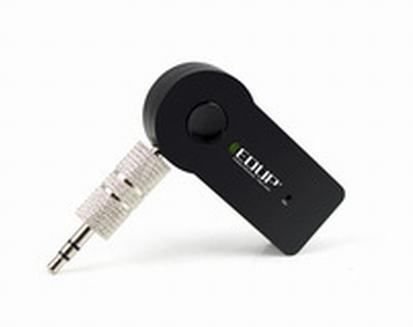
Image: The EDUP EP-B3511 Wireless Bluetooth Music Receiver, a small black rectangular device with a 3.5mm audio jack on one side and a mini-USB charging port on the other. It features a central multi-function button and an indicator light.
The EDUP EP-B3511 is designed for ease of use. It typically features:
- Multi-function Button: For power on/off, pairing, play/pause, and call management.
- 3.5mm Audio Output Jack: Connects to your audio system's AUX input.
- Mini-USB Charging Port: For recharging the internal battery.
- LED Indicator Light: Displays power, pairing, and charging status.
- Integrated Microphone: For hands-free communication.
Setup
1. Charging the Device
- Connect the Mini-USB end of the charging cable to the receiver's charging port.
- Connect the USB end of the cable to a USB power source (e.g., car charger, computer USB port, USB wall adapter).
- The LED indicator will typically glow red during charging and turn off or change color when fully charged.
- A full charge usually takes 1-2 hours.
2. Connecting to an Audio System
- Ensure your audio system (car stereo, home theater, headphones) has a 3.5mm AUX input.
- Insert the 3.5mm male-to-male audio connector into the receiver's 3.5mm audio output jack.
- Connect the other end of the 3.5mm connector to the AUX input of your audio system.
- Set your audio system's input source to AUX.
3. Pairing with a Bluetooth Device
- Power On: Press and hold the multi-function button on the receiver until the LED indicator flashes blue rapidly (or red and blue alternately), indicating it is in pairing mode.
- Enable Bluetooth: On your smartphone, tablet, or laptop, enable Bluetooth and search for new devices.
- Select Device: Look for "EP-B3511" or a similar name in the list of available Bluetooth devices and select it to pair.
- Confirmation: Once successfully paired, the LED indicator will typically flash blue slowly or remain solid blue. A voice prompt might also confirm the connection.
- The device will automatically attempt to reconnect to the last paired device when powered on.
Operating Instructions
Power On/Off
- Power On: Press and hold the multi-function button for approximately 3 seconds until the LED indicator flashes blue.
- Power Off: Press and hold the multi-function button for approximately 5 seconds until the LED indicator turns off.
Music Playback
- Once paired, open your music player on your Bluetooth device.
- Music will stream wirelessly to your connected audio system.
- Use the controls on your Bluetooth device to play, pause, skip tracks, and adjust volume. The receiver's multi-function button may also act as a play/pause control (single press).
Hands-Free Calling
- Answer Call: When a call comes in, press the multi-function button once to answer.
- End Call: During a call, press the multi-function button once to end the call.
- Reject Call: Press and hold the multi-function button for approximately 2 seconds to reject an incoming call.
- Redial Last Number: Double-press the multi-function button to redial the last number.
- The integrated microphone will pick up your voice for communication. Ensure you are within reasonable proximity to the receiver for clear audio.
Maintenance
- Cleaning: Use a soft, dry cloth to clean the device. Do not use liquid cleaners or solvents.
- Storage: Store the device in a cool, dry place away from direct sunlight and extreme temperatures when not in use for extended periods.
- Battery Care: To prolong battery life, avoid fully discharging the battery frequently. Charge the device regularly, even if not in constant use.
Troubleshooting
| Problem | Solution |
|---|---|
| Device does not power on. | Ensure the device is charged. Connect it to a power source using the USB cable. |
| Cannot pair with Bluetooth device. |
|
| No sound or poor sound quality. |
|
| Microphone not working during calls. |
|
| Device automatically turns off. | The device may have an auto-off feature if not connected or active for a period (e.g., 5 minutes). Recharge the battery if it's low. |
Specifications
- Model: EP-B3511
- Connectivity Technology: Bluetooth
- Wireless Communication Standard: Bluetooth V4.1 (supports all Bluetooth versions of mobile/tablet)
- Power Source: Battery Powered (inbuilt rechargeable battery)
- Compatible Devices: Headphone, Laptop, Smartphone, Car Audio Systems, Home Audio Systems
- Item Weight: Approximately 60 g
- Package Dimensions: Approximately 13.6 x 11.4 x 2.6 cm
- Features: Integrated Microphone for calls
Warranty and Support
This product comes with a standard manufacturer's warranty. For specific warranty terms, duration, and support inquiries, please refer to the documentation provided at the time of purchase or contact your retailer or the manufacturer directly. Keep your proof of purchase for warranty claims.

