
1. Introduction
This manual provides essential information for the safe and efficient use of your Delta Dore Tybox 417 thermostat, specifically designed for heat pump applications. Please read these instructions carefully before installation and operation to ensure proper functionality and to prevent damage to the device or your heating system.
2. Product Overview
The Delta Dore Tybox 417 is a programmable thermostat designed to optimize the control of heat pump systems, contributing to energy efficiency and comfort. It features a clear digital display and intuitive controls.

Figure 1: Front view of the Delta Dore Tybox 417 thermostat, showing the digital display with time (10:57) and current temperature (19.7°C), along with four control buttons on the right side and a rotary knob at the bottom. The display also indicates weekly programming (numbers 1-7 on the left) and an active heating icon.
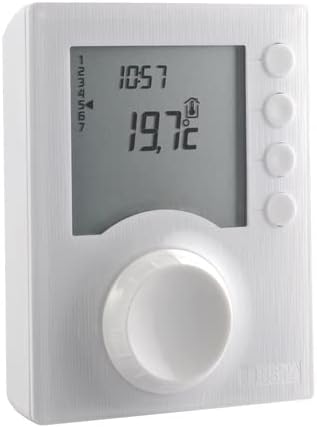
Figure 2: Angled view of the Delta Dore Tybox 417 thermostat, showcasing its compact design and the depth of the unit.
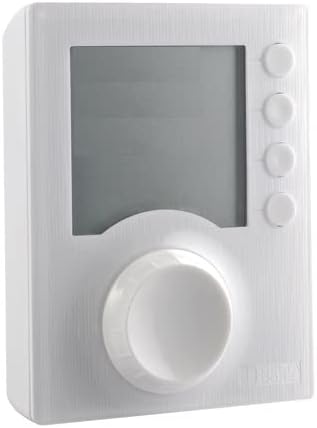
Figure 3: Front view of the Delta Dore Tybox 417 thermostat with the digital display inactive, demonstrating its clean and unobtrusive design.
Key Components:
- Digital Display: Shows time, current temperature, operating mode, and programming indicators.
- Control Buttons: Located on the right side, used for menu navigation and setting adjustments.
- Rotary Knob: Located at the bottom, primarily used for temperature adjustment and confirming selections.
3. Safety Instructions
Please observe the following safety precautions:
- Electrical Safety: Installation and wiring must be performed by a qualified electrician in accordance with local electrical codes and regulations. The device operates at 230 Volts.
- Power Disconnection: Always disconnect power to the heating system at the main circuit breaker before performing any installation, wiring, or maintenance.
- Intended Use: Use this thermostat only for its intended purpose of controlling heat pump systems.
- Environmental Conditions: Do not expose the device to extreme temperatures, humidity, or direct water contact.
4. Setup and Installation
Installation of the Delta Dore Tybox 417 requires electrical knowledge. It is strongly recommended that a professional electrician performs the installation.
4.1 Mounting Location
Choose an interior wall location, approximately 1.5 meters (5 feet) from the floor, away from direct sunlight, drafts, and heat sources (e.g., lamps, fireplaces, refrigerators) that could affect temperature readings.
4.2 Wiring
- Disconnect Power: Turn off the main power supply to your heating system at the circuit breaker.
- Access Wiring Terminals: Carefully open the thermostat casing to access the wiring terminals. Refer to the wiring diagram provided with the product packaging for specific connections.
- Connect Wires: Connect the 230V power supply and the heat pump control wires to the appropriate terminals. Ensure all connections are secure.
- Close Casing: Securely close the thermostat casing.
4.3 Initial Power-Up
Once wiring is complete and the casing is closed, restore power to the heating system. The thermostat display should illuminate, indicating it is powered on. Follow any on-screen prompts for initial setup, such as setting the current time and date.
5. Operating Instructions
The Tybox 417 offers various modes and settings for precise temperature control.
5.1 Display Information
- Time: Current time (e.g., 10:57).
- Temperature: Current ambient temperature (e.g., 19.7°C).
- Operating Mode: Icons may indicate heating active (up arrow), frost protection, or other modes.
- Program Indicators: Numbers 1-7 on the left side typically represent days of the week for programming.
5.2 Adjusting Temperature
To manually adjust the desired temperature, rotate the large knob at the bottom of the thermostat. The display will show the new setpoint. The system will then work to achieve and maintain this temperature.
5.3 Mode Selection
Use the buttons on the right side to navigate through different operating modes. Common modes include:
- Auto/Program Mode: Follows the pre-set weekly schedule.
- Manual Mode: Maintains a constant temperature set by the user, overriding the program.
- Frost Protection Mode: Maintains a minimum temperature (e.g., 7°C) to prevent pipes from freezing.
Consult the detailed instructions in the product packaging for specific button functions and mode configurations.
5.4 Programming Schedule
The Tybox 417 allows for weekly programming to set different temperatures at various times of the day for each day of the week. Access the programming menu using the control buttons and follow the on-screen prompts to:
- Set desired temperatures for comfort and economy periods.
- Define time slots for these temperatures.
- Copy programs between days.
6. Maintenance
The Delta Dore Tybox 417 requires minimal maintenance.
6.1 Cleaning
To clean the thermostat, gently wipe the surface with a soft, dry, or slightly damp cloth. Do not use abrasive cleaners, solvents, or chemical sprays, as these can damage the casing or display.
6.2 Battery Replacement (if applicable)
This model is primarily powered by 230V mains electricity. If your specific unit includes a backup battery for memory retention (not for primary operation), consult the product packaging for instructions on how to replace it. Typically, a low battery indicator will appear on the display when replacement is needed.
7. Troubleshooting
If you encounter issues with your Tybox 417, try the following steps:
| Problem | Possible Cause | Solution |
|---|---|---|
| Display is blank | No power supply | Check the circuit breaker for your heating system. Ensure the thermostat is correctly wired. |
| Incorrect temperature reading | Thermostat location affected by external factors | Ensure the thermostat is not exposed to direct sunlight, drafts, or heat sources. |
| Heat pump not responding | Incorrect mode, wiring issue, or heat pump fault | Verify the thermostat is in the correct operating mode (e.g., Auto or Manual with a high setpoint). Check wiring connections. If the issue persists, consult a professional. |
| Programming not working | Thermostat not in Auto/Program mode, or incorrect settings | Ensure the thermostat is set to Auto/Program mode. Review your programmed schedule for accuracy. |
If these steps do not resolve the issue, please contact a qualified technician or Delta Dore customer support.
8. Specifications
Key technical specifications for the Delta Dore Tybox 417 thermostat:
- Brand: Delta Dore
- Model: Tybox
- Voltage: 230 Volts
- Dimensions (Package): 14 x 8.6 x 4.2 cm
- Item Weight: 220 grams
9. Warranty and Support
For information regarding the warranty period and terms for your Delta Dore Tybox 417, please refer to the warranty card included with your product packaging or your purchase documentation. For technical support, spare parts, or service inquiries, please contact Delta Dore customer service directly or visit their official website.
