
1. Introduction
Thank you for purchasing the Silvercrest Full HD Action Camcorder. This manual provides essential information on how to set up, operate, and maintain your new device. Please read this manual carefully before using the camcorder to ensure proper operation and to maximize its lifespan. Keep this manual for future reference.
Key Features:
- Super wide-angle lens, ideal for action shots
- 2-in-1: Full High-Definition video camera and digital photo camera
- Extensive accessories: includes holders for bicycle, helmet, etc.
- Waterproof up to 60 m with robust housing
- Micro-USB port with charging function
- Integrated OLED status indicator, microphone, and external microphone connection
- Includes 4 GB micro-SD memory card
2. Product Overview
Familiarize yourself with the components of your Silvercrest Action Camcorder.

Figure 2.1: Front view of the Silvercrest Action Camcorder enclosed in its transparent waterproof housing. The lens is prominently visible at the center, surrounded by a black ring, with a yellow top section on the housing. A mounting bracket is attached at the bottom.
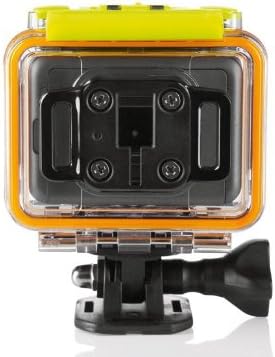
Figure 2.2: Rear view of the Silvercrest Action Camcorder within its waterproof housing. The back panel of the housing features a black mounting plate with four screws, designed for secure attachment to various accessories. The yellow top section of the housing is also visible.

Figure 2.3: The Silvercrest Action Camcorder removed from its waterproof housing. This view highlights the camera's grey body, the main lens, and the side ports including 'MIC IN' for an external microphone and 'DC IN' for power/charging via Micro USB.

Figure 2.4: The Silvercrest Action Camcorder, encased in its waterproof housing, securely mounted on a bicycle handlebar. The image demonstrates the camera's use in an outdoor, potentially rugged environment, with some dirt visible on the bike and housing.

Figure 2.5: A comprehensive view of all components included with the Silvercrest Action Camcorder. This includes the camera itself, the waterproof housing, various mounting brackets (for bicycle, helmet), straps, adhesive pads, a Micro USB cable, a 4 GB micro-SD card, and the instruction manual.
3. Setup
3.1 Battery Installation
- Open the battery compartment cover on the camcorder.
- Insert the included rechargeable battery, ensuring the correct polarity.
- Close the battery compartment cover securely.
3.2 Memory Card Insertion
The camcorder supports micro-SD/SDHC memory cards up to 32 GB. A 4 GB micro-SD card is included.
- Locate the micro-SD card slot on the camcorder.
- Insert the micro-SD card with the contacts facing down until it clicks into place.
- To remove, gently push the card in until it springs out.
3.3 Charging the Battery
Connect the camcorder to a power source using the supplied Micro USB cable. The OLED status display will indicate charging status.
3.4 Attaching Accessories
The camcorder comes with various mounts for bicycles, helmets, and other surfaces. Refer to the accessory guide included in the packaging for detailed instructions on attaching specific mounts.
4. Operating Instructions
4.1 Powering On/Off
- To Power On: Press and hold the Power button until the OLED display illuminates.
- To Power Off: Press and hold the Power button until the display turns off.
4.2 Mode Selection
Use the Mode button to switch between video recording mode and digital photo mode. The current mode will be indicated on the OLED status display.
4.3 Video Recording
- Switch to video recording mode.
- Press the Record button to start recording. The recording indicator will flash.
- Press the Record button again to stop recording.
Available Video Resolutions:
- Full HD: 1920 x 1080 (30 frames/s)
- 1280 x 960 (30 frames/s)
- 1280 x 720 (60 frames/s)
4.4 Taking Photos
- Switch to digital photo mode.
- Frame your shot.
- Press the Shutter button to take a photo.
Self-timer Function: The camera features a 10-second self-timer for photos.
4.5 Waterproof Usage
Ensure the camcorder is securely placed inside its waterproof housing and all seals are properly closed before submerging. The housing is designed to protect the camera up to a depth of 60 meters.
4.6 Connecting to a PC
Use the Micro USB cable to connect the camcorder to your computer. The camcorder will appear as a removable storage device, allowing you to transfer videos and photos.
5. Maintenance
- Cleaning: Use a soft, dry cloth to clean the camcorder body. For the lens, use a specialized lens cleaning cloth. For the waterproof housing, rinse with fresh water after saltwater use and dry thoroughly.
- Battery Care: Store the battery in a cool, dry place when not in use. Avoid fully discharging the battery for extended periods.
- Storage: When not in use, store the camcorder in a protective case or bag to prevent dust and scratches. Remove the battery if storing for a long period.
6. Troubleshooting
| Problem | Possible Cause | Solution |
|---|---|---|
| Camcorder does not power on. | Battery is drained or not inserted correctly. | Charge the battery. Ensure the battery is inserted with correct polarity. |
| Cannot record video/take photos. | Memory card is full or not inserted. | Insert a memory card. Delete unnecessary files or replace with an empty card. |
| Poor video/photo quality. | Lens is dirty or lighting conditions are poor. | Clean the lens. Ensure adequate lighting for your shots. |
| Computer does not recognize camcorder. | USB cable issue or driver problem. | Try a different USB port or cable. Ensure your computer meets the system requirements. |
7. Specifications
| Feature | Detail |
|---|---|
| Brand | Silvercrest |
| Manufacturer | Targa GmbH |
| Model Name | sc-1hd |
| Item Model Number | sc-1hd |
| Video Capture Resolution | 1080p (Full HD) |
| Video Capture Format | MP4 |
| Connectivity Technology | USB |
| Lens Type | Wide-angle |
| Water Resistance Level | Waterproof (up to 60m) |
| Image Stabilization | Digital |
| Included Components | 4 GB micro SD memory card, micro-USB cable, battery, manual, bicycle and helmet holders |
| Dimensions (W x H x D) | Approx. 6 x 4.3 x 4.3 cm (with lens) |
| Weight | Approx. 77 g |
| Supported Memory Cards | Micro-SD/SDHC up to 32 GB |
8. Warranty and Support
For warranty information and customer support, please refer to the documentation included with your product packaging or visit the official website of the manufacturer, Targa GmbH. Keep your proof of purchase for any warranty claims.


