Introduction
This manual provides instructions for the operation and maintenance of your Timex Intelligent Quartz Compass Watch, model T2P289DH. Please read this manual thoroughly to ensure proper use and to maximize the lifespan of your timepiece.
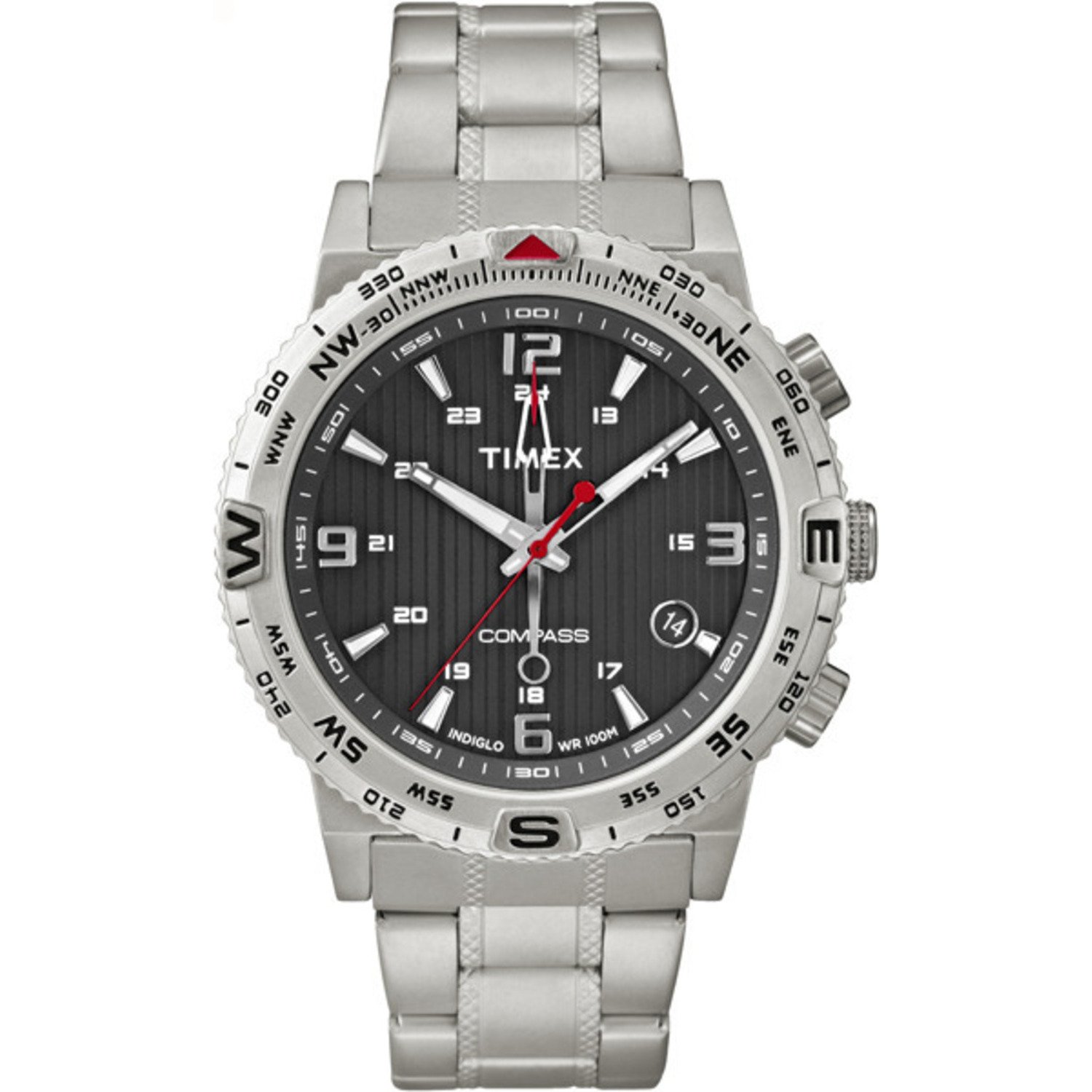
Figure 1: Front view of the Timex Intelligent Quartz Compass Watch T2P289DH. The watch features a silver stainless steel case and bracelet, a black dial with white hour markers, and a prominent compass bezel. The watch face displays the time, date, and compass readings.
Setup and Initial Configuration
1. Setting the Time and Date
- Pull the Crown: Gently pull the crown (the knob on the side of the watch) out to the first or second position. Refer to your watch's specific crown positions for time and date setting.
- Adjust Time: Rotate the crown to move the hour and minute hands to the correct time.
- Adjust Date: If applicable, rotate the crown in the opposite direction or pull it to a different position to set the date.
- Push the Crown: Once time and date are set, push the crown back in to its original position to start the watch movement.
2. Compass Calibration
For accurate compass readings, calibration is essential. The watch features an accurate digital compass. Specific calibration steps may vary slightly, but generally involve:
- Activate Compass Mode: Press the designated compass button (often one of the pushers on the side of the case).
- Rotate Watch: While in compass mode, rotate the watch slowly and steadily in a full circle (360 degrees) on a flat surface. This allows the internal sensors to detect magnetic north.
- Confirm Calibration: The watch will typically indicate successful calibration, often by a specific hand movement or digital display.
- Adjust Declination (if necessary): Some models allow for manual declination adjustment to compensate for the difference between true north and magnetic north in your location. Consult a local map or online resource for your area's magnetic declination.
Operating Instructions
1. Using the Compass
After calibration, the compass function can be used to determine direction.
- Activate Compass: Press the compass button. The compass hand (often a distinct red or arrow-shaped hand) will point towards magnetic north.
- Read Direction: Hold the watch level and observe the compass hand. The bezel, marked with cardinal directions (N, S, E, W) and degrees, will help you read the precise bearing.
- Deactivate Compass: The compass function may automatically turn off after a short period or can be manually deactivated by pressing the button again.
2. Indiglo Night-Light
The Indiglo night-light illuminates the watch dial for visibility in low-light conditions.
- Activate: Press the crown or the designated Indiglo button (if present). The dial will illuminate.
- Night Mode: Some models feature a "Night Mode" where the Indiglo light stays on for a longer duration or activates with any button press. Refer to your watch's specific instructions for activating Night Mode.
3. Date Window
The watch features a date window, typically located at the 3 o'clock position, displaying the current day of the month. Adjust the date as described in the "Setting the Time and Date" section.
Care and Maintenance
1. Water Resistance
This watch is water resistant to 100 meters (330 feet / 10 ATM). This rating means it is suitable for showering, swimming, and snorkeling. It is not suitable for scuba diving or high-impact water sports. Always ensure the crown is fully pushed in before exposing the watch to water.
2. Cleaning
Clean your watch regularly with a soft, damp cloth. For the stainless steel bracelet, a mild soap solution can be used, followed by thorough rinsing and drying. Avoid harsh chemicals or abrasive materials.
3. Battery Replacement
The watch is powered by a Lithium Metal battery. When the battery needs replacement, it is recommended to take your watch to an authorized Timex service center or a qualified watchmaker to ensure proper sealing and water resistance are maintained.
Troubleshooting
| Problem | Possible Cause | Solution |
|---|---|---|
| Watch not running or hands not moving. | Depleted battery. Crown not fully pushed in. | Replace battery (professional service recommended). Ensure crown is fully pushed in. |
| Compass readings are inaccurate. | Needs calibration. Magnetic interference. Incorrect declination. | Recalibrate the compass (refer to Setup section). Move away from strong magnetic fields (e.g., speakers, large metal objects). Adjust declination if your model supports it. |
| Indiglo light not working. | Depleted battery. Faulty mechanism. | Replace battery. If issue persists, contact customer support. |
| Water ingress after exposure. | Crown not fully pushed in. Seal damage. | Immediately take to a service center. Avoid further water exposure. |
Specifications
- Model Number: T2P289DH
- Brand: Timex
- Movement: Quartz
- Case Diameter: 42 Millimetres
- Case Material: Stainless Steel
- Dial Window Material: Mineral
- Band Material: Stainless Steel
- Band Color: Silver
- Water Resistance: 100 Meters (10 ATM / 330 Feet)
- Features: Digital Compass, Date Window, Indiglo Night-Light with Night Mode
- Battery: 1 Lithium Metal battery (included)
- Item Weight: 141 g
- Product Dimensions: 11.94 x 8.89 x 7.87 cm
Warranty Information
This Timex watch comes with a manufacturer's warranty. For specific details regarding warranty coverage, duration, and claims, please contact the seller of record or refer to the warranty card included with your purchase. Keep your proof of purchase for warranty validation.
Customer Support
Should you require further assistance, have questions not covered in this manual, or need service for your watch, please contact Timex customer support or the authorized retailer from whom you purchased the product. Visit the official Timex website for contact information and service center locations.
Timex Official Website: www.timex.com


