
Bose 369946-1300
Bose SoundLink Bluetooth Speaker III User Manual
Model: 369946-1300
Introduction
The Bose SoundLink Bluetooth Speaker III is a high-performance mobile Bluetooth speaker designed to deliver full-spectrum audio with clarity and depth. Its robust design and advanced Bose technologies ensure a superior listening experience. This manual provides essential information for setting up, operating, maintaining, and troubleshooting your speaker.

Image: Front view of the Bose SoundLink Bluetooth Speaker III, showcasing its sleek design with a silver grille and black top panel.
Setup
Charging the Speaker
Before first use, fully charge the speaker. Use the provided wall charger to connect the speaker to a power outlet.
- Connect the small end of the wall charger cord to the "POWER" port on the back of the speaker.
- Plug the larger end of the wall charger into a standard electrical outlet (120 Volts).
- The battery indicator light on the top panel will show charging status. A full charge typically takes several hours.

Image: The Bose SoundLink Bluetooth Speaker III shown alongside its power adapter and charging cable, illustrating how to connect for charging.
Initial Power On
Press the Power button ( ) on the top panel to turn the speaker on. The Bluetooth indicator will blink, indicating it's ready for pairing.
Operating Instructions
Bluetooth Pairing
The SoundLink Bluetooth Speaker III connects wirelessly to your smartphone, tablet, or other Bluetooth-enabled device.
- Turn on the speaker. The Bluetooth indicator will slowly pulse blue.
- On your device, enable Bluetooth and select "Bose SoundLink III" from the list of available devices.
- Once connected, the Bluetooth indicator on the speaker will glow solid white. The speaker remembers the most recent six devices it has been paired with.
Image: Top view of the speaker, showing the control panel with Power, Bluetooth, AUX, Mute, Volume Down, and Volume Up buttons.
Using the AUX Input
For devices without Bluetooth, use the AUX input.
- Connect a 3.5mm audio cable (not included) from your device's headphone jack to the "AUX IN" port on the back of the speaker.
- The speaker will automatically switch to AUX input mode. The AUX indicator light will illuminate.
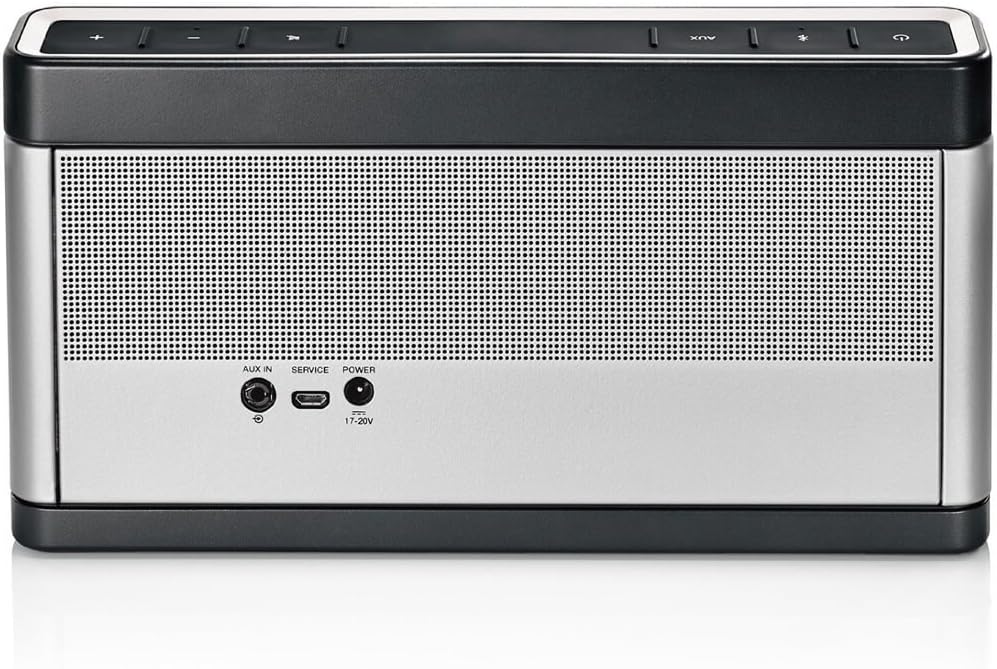
Image: Rear view of the speaker, highlighting the AUX IN, SERVICE, and POWER ports.
Controls
- Power Button: Turns the speaker on or off.
- Bluetooth Button: Initiates Bluetooth pairing mode.
- AUX Button: Switches to auxiliary input mode.
- Volume Down (-): Decreases the volume.
- Volume Up (+): Increases the volume.
- Mute Button: Mutes or unmutes the audio output.
Maintenance
Cleaning
To maintain the appearance and functionality of your speaker:
- Wipe the surface with a soft, dry cloth.
- Do not use any sprays near the speaker or allow liquids to spill into any openings.
- Avoid using solvents, chemicals, or cleaning solutions containing alcohol, ammonia, or abrasives.
Battery Care
The speaker contains a rechargeable lithium-ion battery. To prolong battery life:
- Avoid fully discharging the battery frequently.
- Store the speaker in a cool, dry place when not in use for extended periods.
- If storing for a long time, charge the battery to about 50% before storage.
Troubleshooting
| Problem | Possible Solution |
|---|---|
| No power | Ensure the speaker is charged. Connect the power adapter and check if the battery indicator lights up. |
| Cannot pair via Bluetooth |
|
| No sound |
|
| Poor sound quality |
|
Specifications
| Feature | Detail |
|---|---|
| Model Name | FBA_369946-1300 |
| Dimensions (H x W x D) | 5.18"H x 10.08"W x 1.89"D |
| Weight | 3.03 pounds |
| Connectivity | Bluetooth, Auxiliary (3.5mm), USB (for software updates) |
| Battery Life | Up to 14 hours |
| Power Source | Battery Powered, Wall Charger (120 Volts input) |
| Control Method | Touch |
| Color | Gray; Silver |

Image: The Bose SoundLink Bluetooth Speaker III with its dimensions (height, width, depth) clearly marked.
Warranty and Support
Warranty Information
This product comes with a Limited Warranty. Please refer to the warranty card included with your product or visit the official Bose website for detailed terms and conditions.
Customer Support
For further assistance, technical support, or service inquiries, please visit the official Bose support website or contact their customer service. You can find contact information and FAQs at the Bose Store on Amazon or the main Bose website.
For the most up-to-date information and software updates, please visit the Bose support page for the SoundLink Bluetooth Speaker III.
Related documents369946-1300


Ask a question about this manual
Ask about setup, troubleshooting, compatibility, parts, safety, or missing instructions. Manuals+ will review the question and use this page’s manual context to help answer it.