1. Introduction
The Raymarine i70 System Pack (Model T70226) is a comprehensive standalone marine instrument kit designed to provide essential navigation and environmental data on your vessel. This system includes the i70 color display, transducers for wind, depth, speed, and temperature, and all necessary cabling and an ITC-5 converter for seamless integration into SeaTalkng and NMEA2000 marine networks. The i70 display features a customizable 4.1-inch color LCD, offering clear visibility and an intuitive user interface for accessing critical information.
This manual provides detailed instructions for the installation, operation, and maintenance of your Raymarine i70 System Pack. Please read this manual thoroughly before attempting installation or operation to ensure proper functioning and to prevent damage to the equipment or injury.
2. Safety Information
Always observe the following safety precautions when installing, operating, or maintaining your Raymarine i70 System Pack:
- Electrical Safety: Ensure all power to the vessel's electrical system is disconnected before performing any installation or maintenance. Incorrect wiring can cause fire, electrical shock, or damage to the equipment.
- Water Exposure: While the i70 display is designed for marine environments, ensure all connections are properly sealed and protected from water ingress to prevent corrosion and electrical shorts.
- Mounting: Mount the display and transducers securely according to the instructions to prevent them from dislodging during vessel movement, which could cause injury or damage.
- Navigation Aid: The i70 System Pack is an aid to navigation. It should not be used as the sole source of navigation information. Always use official paper charts and other navigation aids as required by law.
- Professional Installation: If you are unsure about any aspect of the installation, consult a qualified marine electronics technician.
3. Package Contents
Verify that all components listed below are present in your Raymarine i70 System Pack (T70226) before beginning installation:
- Raymarine i70 Color Instrument Display
- Wind Transducer
- Depth Transducer
- Speed/Temperature Transducer
- ITC-5 Instrument Transducer Converter
- SeaTalkng Backbone Cable
- SeaTalkng Spur Cables
- SeaTalkng Power Cable
- SeaTalkng Terminators
- Mounting Hardware and Gaskets
- Documentation Pack (including this manual)
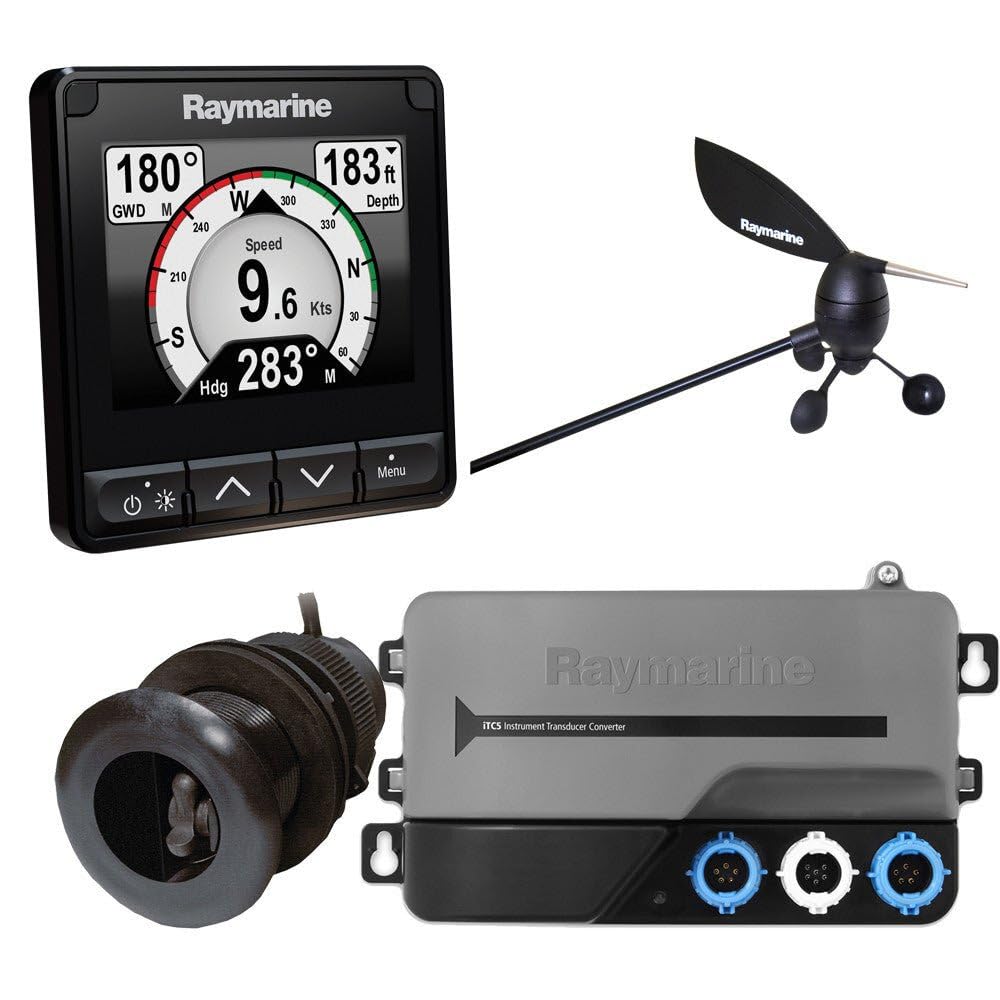
Image 1: Overview of the Raymarine i70 System Pack components. This image shows the i70 display, various transducers, and SeaTalkng cabling included in the box.
4. Setup and Installation
Proper installation is crucial for the optimal performance of your i70 System Pack. Follow these general steps, referring to the detailed installation guides for each component where necessary.
- Mount the i70 Display: Choose a suitable location on your dashboard or bulkhead that offers clear visibility and protection from direct impact. Cut the mounting hole using the provided template and secure the display with the supplied hardware.
- Install Transducers:
- Wind Transducer: Mount at the masthead, ensuring it is clear of obstructions for accurate wind data. Route the cable down the mast.
- Depth/Speed/Temperature Transducer: Install through-hull or transom-mount transducers according to their specific instructions, ensuring proper placement for accurate readings and minimal turbulence.
- Connect the ITC-5 Converter: The ITC-5 converts analog transducer signals to digital SeaTalkng data. Mount the ITC-5 in a dry, accessible location. Connect the wind, depth, speed, and temperature transducers to the corresponding ports on the ITC-5.
- Build the SeaTalkng Network:
- Connect the ITC-5 to the SeaTalkng backbone using a spur cable.
- Connect the i70 display to the SeaTalkng backbone using another spur cable.
- Connect the SeaTalkng power cable to the backbone and to a 12V DC power source (ensure proper fusing).
- Terminate both ends of the SeaTalkng backbone with the supplied terminators.
- Power On and Initial Configuration: Once all connections are secure, apply power to the system. The i70 display will power on. Follow the on-screen prompts for initial setup, including language, units, and transducer calibration.
Image 2: Illustrative diagram of a typical SeaTalkng network setup, showing the i70 display, ITC-5 converter, and transducers connected to the backbone.
5. Operation
The Raymarine i70 display utilizes the intuitive Lighthouse user interface, making navigation and data access straightforward.
5.1 Display Modes and Customization
The i70 display offers various data views, which can be customized to show the information most relevant to your current activity. Use the keypad to navigate through menus and select display pages.
- Supported Data Views: Wind (apparent and true), Speed (boat speed through water, speed over ground), Depth (current depth, historical data), Temperature (water temperature), Tridata (combined speed, depth, temp), Engine data (NMEA2000), Environmental data (NMEA2000), Fuel data (NMEA2000), and Navigation data.
- Page Customization: You can create custom pages with multiple data boxes, choosing which data fields are displayed and their size. Access the customization options through the main menu.
- Backlight Control: Adjust the display backlight for optimal viewing in various light conditions.
5.2 Menu Navigation
The i70 features a simple button layout for easy navigation:
- MENU button: Access the main menu for settings, calibration, and customization.
- PAGE button: Cycle through available display pages.
- Arrow buttons: Navigate within menus and adjust values.
- OK button: Confirm selections.
Image 3: The Raymarine i70 display showing a typical wind data page with apparent wind speed and angle.
6. Maintenance
Regular maintenance ensures the longevity and reliable performance of your Raymarine i70 System Pack.
- Cleaning the Display: Use a soft, damp cloth to clean the display screen. Avoid abrasive cleaners or solvents, which can damage the screen coating.
- Transducer Cleaning: Periodically inspect and clean transducers (especially speed and depth) to remove marine growth, which can affect accuracy. Follow specific transducer cleaning instructions.
- Cable Inspection: Regularly check all cables and connections for signs of wear, corrosion, or damage. Ensure all connections are secure and watertight.
- Software Updates: Check the Raymarine website periodically for software updates for the i70 display and ITC-5 converter. Updates can provide new features and performance improvements.
7. Troubleshooting
This section provides solutions to common issues you might encounter. For more complex problems, contact Raymarine customer support.
| Problem | Possible Cause | Solution |
|---|---|---|
| Display does not power on. | No power to the SeaTalkng network; faulty power cable; blown fuse. | Check the SeaTalkng power cable connection and fuse. Verify 12V DC supply. |
| No data displayed (e.g., depth, speed, wind). | Transducer not connected to ITC-5; ITC-5 not connected to SeaTalkng; faulty transducer; marine growth on transducer. | Check all transducer connections to the ITC-5. Ensure ITC-5 is powered and connected to the SeaTalkng backbone. Inspect transducers for fouling. Perform transducer diagnostics if available in the i70 menu. |
| Inaccurate speed or depth readings. | Fouled transducer; incorrect calibration; transducer placement issues. | Clean the transducer. Check calibration settings in the i70 menu. Review transducer installation for optimal placement. |
| Wind speed or direction is erratic or absent. | Wind transducer cable damage; faulty wind transducer; obstruction at masthead. | Inspect the wind transducer cable for damage. Ensure the masthead unit is free from obstructions. If the issue persists, the transducer may require replacement. |
| System not communicating with other NMEA2000 devices. | Incorrect SeaTalkng/NMEA2000 gateway settings; network issues. | Ensure the SeaTalkng network is properly terminated and powered. Check for any NMEA2000 gateway settings within the i70 display or connected MFDs. |
8. Specifications
Key technical specifications for the Raymarine i70 System Pack (T70226):
| Feature | Detail |
|---|---|
| Model Name | T70226 |
| Display Size | 4.1 inches |
| Display Type | Color LCD |
| Connectivity | SeaTalkng, NMEA2000 (via ITC-5) |
| Included Transducers | Wind, Depth, Speed/Temperature |
| Included Components | i70 System Pack (stand-alone system) |
| Item Package Dimensions (L x W x H) | 26.38 x 14.96 x 8.27 inches |
| Item Dimensions (L x W x H) | 10.53 x 5.91 x 3.25 inches |
| Item Weight | 14.9 Pounds |
| Material | Plastic |
| Color | Black |
| Manufacturer | Raymarine |
| Date First Available | January 16, 2014 |
9. Warranty and Support
Warranty: The Raymarine i70 System Pack (T70226) is covered by a Manufacturer Limited Warranty. Please refer to the warranty card included in your package or visit the official Raymarine website for full terms and conditions regarding warranty coverage, duration, and claims procedures.
Customer Support: For technical assistance, troubleshooting beyond this manual, or warranty inquiries, please contact Raymarine customer support. You can find contact information, FAQs, and additional resources on the official Raymarine website (www.raymarine.com/support).
When contacting support, please have your product model (T70226) and serial number ready.


