
Liebert SN-2D
Contents
Vertiv Liebert Two-Door Switch Monitor Sensor Probe User Manual
Model: SN-2D | Brand: Liebert
Introduction
The Vertiv Liebert SN-2D is a modular two-door switch monitor sensor designed to enhance the monitoring capabilities within a rack environment. This sensor features two connection points, allowing for flexible and custom string designs. It integrates seamlessly with Vertiv Liebert RPC cards and enables comprehensive monitoring through Vertiv MPX or MPH rack PDU models. Additionally, it can connect to the IS-UNITY-DP communications card for broader system integration. The SN-2D is engineered to assist in monitoring conditions and door status, contributing to overall equipment protection.
What's in the Box
Upon opening the package, verify that all components are present:
- Vertiv Liebert SN-2D Sensor Probe
- Mounting Hardware
- Quick Start Guide

Figure 1: Contents of the SN-2D package. This image displays the Liebert SN-2D sensor, various cables, mounting hardware, and the quick start guide, all neatly laid out.
Setup
The SN-2D sensor is designed for straightforward installation. Follow these steps to set up your sensor:
- Identify Connection Points: The SN-2D sensor features two distinct connection points for integrating with your monitoring system.
- Connect to RPC Card: Connect the sensor wiring to the Vertiv Liebert RPC card. This connection is essential for enabling the sensor's monitoring capabilities.
- Integrate with PDU Models: For monitoring through Vertiv MPX or MPH rack PDU models, ensure the sensor is properly connected to these units.
- Connect to Communications Card (Optional): If required for your setup, connect the sensor to the Vertiv Liebert IS-UNITY-DP communications card for broader system integration and data transmission.
- Mounting: Utilize the provided mounting hardware to securely place the sensor in the desired location within your rack. The flexible arrangement allows it to be placed in any area to effectively read door status.

Figure 2: Side view of the SN-2D sensor. This image highlights the compact design of the sensor, displaying its two connection ports and a barcode label on the side.
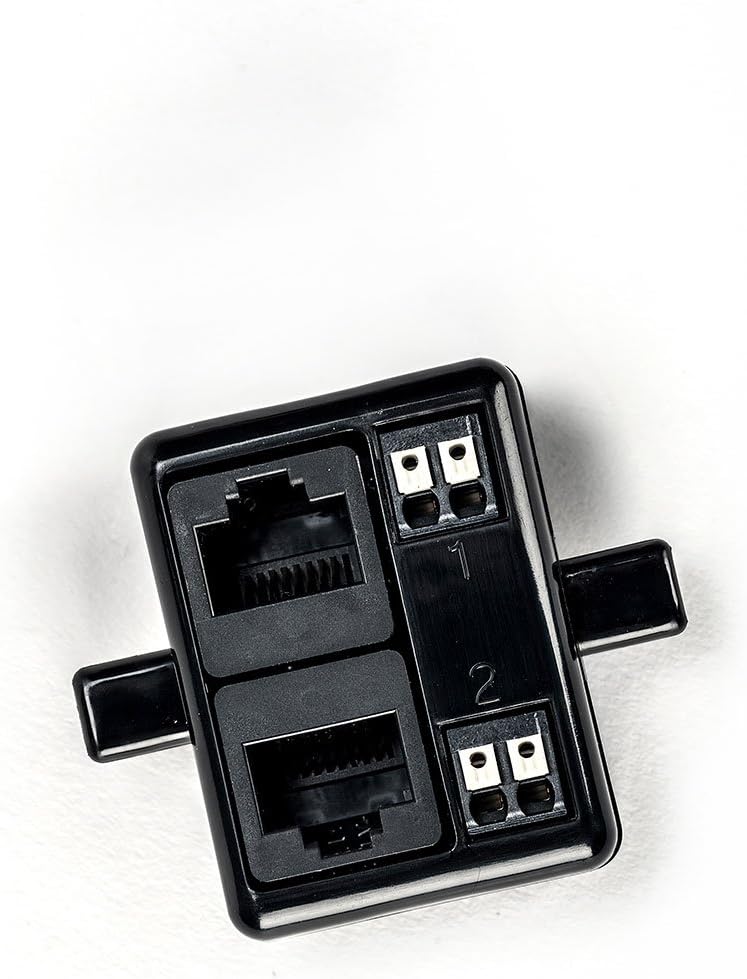
Figure 3: Top view of the SN-2D sensor. This perspective clearly shows the two RJ45-style ports and two smaller input terminals, labeled 1 and 2, for connecting external switches.
Operating the SN-2D Sensor
The Vertiv Liebert SN-2D is a non-powered door-switch contact sensor, meaning it does not require an external power source for its primary function. It operates by detecting the open or closed status of a door or contact point to which it is connected. The sensor is rated for a minimum of 5V, 1mA, ensuring compatibility with standard monitoring systems.
Once properly connected to a Vertiv Liebert RPC card or directly to MPX/MPH rack PDU models, the sensor transmits its status (open/closed) to the monitoring system. This allows administrators to receive alerts or log events related to door access or security within the rack.
Maintenance
The Vertiv Liebert SN-2D sensor is designed for minimal maintenance. To ensure optimal performance and longevity:
- Regular Inspection: Periodically inspect the sensor and its connections for any signs of physical damage, wear, or loose connections.
- Cleaning: If necessary, gently clean the exterior of the sensor with a soft, dry cloth. Avoid using harsh chemicals or abrasive materials.
- Environmental Conditions: Ensure the sensor is operating within its specified environmental conditions to prevent premature failure.
Troubleshooting
If you encounter issues with your SN-2D sensor, consider the following troubleshooting steps:
- No Reading/Incorrect Status:
- Verify all cable connections are secure and properly seated at both the sensor and the monitoring device (RPC card, PDU, or IS-UNITY-DP).
- Ensure the door or contact point the sensor is monitoring is functioning correctly and making proper contact.
- Check the configuration settings on your Vertiv monitoring system to ensure the sensor input is correctly enabled and configured.
- Sensor Not Detected:
- Confirm that the sensor is compatible with your specific Vertiv monitoring hardware (e.g., RPC card, MPX/MPH PDU, IS-UNITY-DP).
- Try connecting the sensor to a different port or a known working monitoring device to rule out a port issue.
- Physical Damage:
- Inspect the sensor for any visible signs of damage. If damaged, contact Vertiv support for replacement options.
If problems persist after attempting these steps, refer to the detailed documentation for your Vertiv monitoring system or contact Vertiv technical support.
Specifications
| Attribute | Detail |
|---|---|
| Brand | Liebert |
| Model Number | SN-2D |
| Item Weight | 4 ounces (0.25 Pounds) |
| Product Dimensions (LxWxH) | 2 x 0.75 x 1.63 inches |
| Voltage Rating | 5 Volts (minimum) |
| Input Current Rating | 1 mA (minimum) |
| Manufacturer | Vertiv Co. |
| Connector Gender | Male-to-Female |
| First Available Date | January 15, 2014 |
Warranty Information
Specific warranty terms and conditions for the Vertiv Liebert SN-2D sensor are typically provided at the time of purchase or can be found on the official Vertiv website. Please refer to the documentation included with your product or visit www.vertiv.com for the most current warranty details.
Support
For technical assistance, product inquiries, or further support regarding your Vertiv Liebert SN-2D sensor, please visit the official Vertiv support website or contact their customer service department. Detailed contact information and support resources can be found at www.vertiv.com/support.
Documents and downloads
Ask a question about this manual
Ask about setup, troubleshooting, compatibility, parts, safety, or missing instructions. Manuals+ will review the question and use this page’s manual context to help answer it.