
Introduction
This manual provides instructions for the Aftermarket PURSUIT ELVAT5B keyless entry remote. This device is designed as a replacement key fob for compatible vehicle alarm and keyless entry systems. It allows for remote locking, unlocking, and alarm activation functions.
It is important to note that this remote requires programming to your specific vehicle before it can be used. Please ensure this part number is compatible with your vehicle's system.
Product Overview
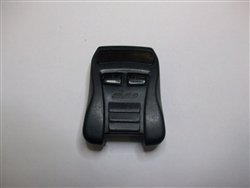
This image displays the Aftermarket PURSUIT ELVAT5B key fob, featuring its buttons for lock, unlock, and alarm functions.
The PURSUIT ELVAT5B key fob typically features buttons for common functions such as:
- Lock: Secures vehicle doors.
- Unlock: Unlocks vehicle doors.
- Panic/Alarm: Activates the vehicle's alarm system.
Setup and Programming
The PURSUIT ELVAT5B key fob must be programmed to your vehicle before it will function. Programming instructions are often available and can frequently be performed by the user without professional assistance. However, some vehicle models may require programming by a qualified automotive locksmith or dealership.
General Programming Information:
- Vehicle-Specific Instructions: Programming procedures vary significantly by vehicle make, model, and year. Refer to your vehicle's owner's manual or search for specific programming instructions for your vehicle and the ELVAT5B remote.
- Self-Programming: Many vehicles allow for a simple sequence of steps (e.g., turning the ignition on/off, pressing buttons on the remote) to program new key fobs.
- Professional Programming: If self-programming is not possible or unsuccessful, professional programming services are available.
It is recommended to obtain programming instructions or consult with a professional if you are unsure about the process.
Operating Instructions
Once successfully programmed, the PURSUIT ELVAT5B key fob operates as follows:
- Locking Doors: Press the Lock button once to secure all vehicle doors. The vehicle's lights may flash, and a horn chirp may sound to confirm.
- Unlocking Doors: Press the Unlock button once to unlock the driver's door, or twice to unlock all doors (behavior may vary by vehicle). The vehicle's lights may flash to confirm.
- Panic/Alarm Activation: Press and hold the Panic or Alarm button for a few seconds to activate the vehicle's alarm system. Press any button again to deactivate.
Ensure you are within range of your vehicle for the remote to function correctly. Obstructions and environmental factors can affect signal range.
Maintenance
Proper care and maintenance will extend the life of your key fob.
Battery Replacement:
The key fob is powered by a small coin-cell battery, typically a CR2032 or similar. When the remote's range decreases or it stops responding, the battery may need replacement.
- Carefully open the key fob casing using a small flat-head screwdriver or a coin in the designated slot.
- Note the orientation of the old battery before removing it.
- Insert a new battery of the same type, ensuring correct polarity (+ side up).
- Snap the key fob casing back together securely.
General Care:
- Avoid exposing the key fob to water or excessive moisture.
- Do not expose the key fob to extreme temperatures.
- Avoid dropping the key fob or subjecting it to strong impacts.
- Keep the key fob away from strong magnetic fields.
Troubleshooting
If your key fob is not functioning as expected, consider the following troubleshooting steps:
- Remote Not Responding: Check the battery. Replace it if it's old or depleted.
- Reduced Range: This often indicates a low battery. Replace the battery. Ensure there are no strong radio interference sources nearby.
- Functions Not Working After Battery Change: Some vehicles may require the remote to be re-synchronized or re-programmed after a battery replacement. Refer to your vehicle's manual.
- Remote Still Not Working: The remote may need to be re-programmed to the vehicle. If self-programming fails, professional assistance may be required.
- Incorrect Functions: Ensure you have the correct key fob model for your vehicle.
If issues persist after attempting these steps, contact customer support or a qualified automotive technician.
Specifications
| Brand | Aftermarket |
| Model Number | PURSUIT ELVAT5B |
| Manufacturer Part Number | PURSUIT ELVAT5B |
| UPC | 760488901489 |
| ASIN | B00HVMMXOG |
| Remote Control Included | Yes |
Warranty and Support
This product is offered with a 100% Satisfaction Guarantee. For any questions regarding compatibility, programming, or general support, please refer to the seller's contact information or the original purchase platform for assistance.


