
SilverStone SST-DS380
Contents
SilverStone SST-DS380 Mini-ITX Computer Case User Manual
Model: SST-DS380
1. Product Overview
The SilverStone SST-DS380 is a high-performance, compact Mini-ITX computer case engineered for robust storage solutions. It offers an exceptional balance of size, capacity, and cooling, making it suitable for Network Attached Storage (NAS) systems, home servers, or compact workstations requiring extensive drive support.

The SilverStone SST-DS380 is a compact Mini-ITX computer case designed for storage-centric systems, featuring a brushed aluminum front door.
2. Key Features
- High Storage Capacity: Supports 12 total drives, including 8 hot-swappable 3.5" or 2.5" SAS/SATA drives and 4 fixed 2.5" drives.
- Compact Form Factor: Unbelievable storage space and versatility for small form factor systems.
- Premium Construction: Features a premium brushed aluminum front door and a durable SECC body.
- Efficient Cooling: Includes three 120mm fans with filtered intake vents for optimal thermal performance.
- Security: Lockable front door to secure hot-swappable drive bays.
- Modern Connectivity: Front I/O panel with USB 3.0 ports and audio jacks.
3. Package Contents
Please verify that all items are present in your package:
- 1x SilverStone SST-DS380 Mini-ITX Computer Case
- 1x Accessory Package (includes screws, cables, and other small parts)

The accessory package typically includes screws, cables, and other small parts necessary for installation.
4. Product Layout and Components
Familiarize yourself with the various parts and features of the SST-DS380 case.
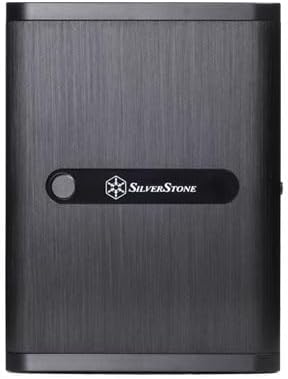
The front panel features a lockable door, providing access to the hot-swappable drive bays.

The rear panel includes cutouts for motherboard I/O, expansion slots, and a dedicated mount for a 120mm exhaust fan.

This view highlights the internal layout of the case, including the motherboard tray area and rear fan mount.

The front I/O panel includes two USB 3.0 ports, a headphone jack, and a microphone jack for convenient connectivity.

The case supports eight hot-swappable 3.5-inch or 2.5-inch SAS/SATA drives, accessible from the front.

The lockable front door secures the hot-swappable drive bays, preventing unauthorized access.

This diagram illustrates the precise width, height, and depth measurements of the case, crucial for planning your setup.
5. Installation Guide
This section provides general guidance for installing components into your SST-DS380 case. For detailed instructions specific to your components, please refer to their respective manuals.
5.1 Motherboard Installation
- Remove the side panels of the case.
- Install the I/O shield provided with your motherboard into the rear I/O cutout.
- Carefully align your Mini-ITX or Mini-DTX motherboard with the standoffs inside the case.
- Secure the motherboard using the appropriate screws.
5.2 Drive Installation
5.2.1 Hot-Swappable Drives (3.5"/2.5" SAS/SATA)
- Unlock and open the front door of the case.
- Press the release tab on a drive tray and pull it out.
- Mount your 3.5" or 2.5" drive onto the tray using the provided screws.
- Slide the tray back into the bay until it clicks into place.
- Connect the necessary SAS/SATA data and power cables to the backplane.
5.2.2 Fixed 2.5" Drives
- Locate the dedicated 2.5" drive mounting points inside the case.
- Secure your 2.5" drives using screws.
- Connect SATA data and power cables to these drives.
5.3 Power Supply Unit (PSU) Installation
- The SST-DS380 supports SFX PSUs.
- Mount your SFX PSU into the designated area at the bottom of the case.
- Secure the PSU with screws from the rear of the case.
- Connect the necessary power cables to your motherboard, drives, and other components.
5.4 Cooling System Setup
The case comes with pre-installed 120mm fans for optimal airflow.

The case comes with two 120mm fans on the left side for efficient cooling of internal components.
- Ensure all fans are properly connected to your motherboard's fan headers or a fan controller.
- Verify that the fan cables are routed neatly to avoid obstructing airflow.
- The case supports liquid cooling radiators up to 240mm in the rear fan mount area.
6. Operation
6.1 Power On/Off
- Ensure all internal components are correctly installed and connected.
- Connect the power cable from your PSU to a wall outlet.
- Press the power button located on the front panel to turn on your system.
- To turn off, use the operating system's shutdown function or press and hold the power button for several seconds.
6.2 Hot-Swap Drive Management
The hot-swap bays allow for easy installation and removal of drives without powering down the system, provided your motherboard and operating system support hot-swapping.
- Before removing a drive, ensure it is safely ejected or unmounted from your operating system to prevent data loss.
- Unlock and open the front door.
- Press the release tab on the desired drive tray and pull it out.
- To insert a new drive, mount it onto an empty tray and slide it into an available bay until it locks.
- Close and lock the front door for security.
7. Maintenance
7.1 Cleaning
- Regularly clean the exterior of the case with a soft, damp cloth. Avoid abrasive cleaners.
- Dust filters (e.g., on top and side panels) should be removed and cleaned periodically to maintain optimal airflow. Use compressed air or rinse with water if applicable, ensuring they are completely dry before reinstallation.
7.2 Fan Maintenance
- Inspect fans for dust buildup every few months.
- Use compressed air to clear dust from fan blades and heatsinks.
- Ensure fan cables are not obstructing fan rotation.
8. Troubleshooting
This section addresses common issues you might encounter with your SST-DS380 case.
8.1 High Drive Temperatures
- Check Airflow: Ensure all pre-installed fans are operational and spinning correctly. Verify that dust filters are clean and not obstructing airflow.
- Cable Management: Poor cable management can restrict airflow. Reroute cables to allow for unobstructed air movement, especially around drive bays.
- Fan Configuration: Ensure fans are configured for optimal intake and exhaust. The two side fans are typically intake, and the rear fan is exhaust.
- Drive Spacing: While the case is compact, ensure drives are seated correctly in their bays.
8.2 Component Clearance Issues
- CPU Cooler Height: The maximum CPU cooler height is limited to 57mm. Ensure your cooler fits within this specification. Low-profile air coolers or AIO liquid coolers are recommended.
- Expansion Card Length: Graphics cards or other expansion cards are limited to 11 inches (279mm) in length and 4.38 inches (111mm) in width. Verify your card's dimensions before installation.
- PSU Compatibility: Only SFX form factor power supplies are supported.
8.3 Front Panel I/O Not Working
- Cable Connections: Double-check that the front panel USB 3.0, audio, and power/reset cables are correctly connected to the corresponding headers on your motherboard.
- Driver Installation: Ensure necessary drivers for USB and audio are installed on your operating system.
9. Technical Specifications
| Feature | Specification |
|---|---|
| Model No. | SST-DS380B |
| Material | Aluminum front door, SECC body |
| Motherboard Compatibility | Mini-DTX, Mini-ITX |
| Drive Bays (External) | 8 x 3.5" SAS/SATA hot-swap (2.5" compatible) |
| Drive Bays (Internal) | 4 x 2.5" |
| Cooling System (Rear) | 1 x 120mm fan (1200rpm, 22dBA) |
| Cooling System (Left) | 2 x 120mm fans (1200rpm, 22dBA) |
| Expansion Slots | 2 |
| Front I/O Ports | 2 x USB 3.0, 1 x Audio, 1 x Mic |
| Power Supply Support | SFX PSU (sold separately) |
| Expansion Card Length Limitation | 11" (279mm) long, 4.38" (111mm) wide |
| CPU Cooler Height Limitation | 57mm |
| Dimensions (W x H x D) | 211mm x 285mm x 360mm (21.6 Liters) |
| Weight | 6 kg (13.2 lbs) |
| Additional Features | Kensington lock support |
10. Warranty and Support
For warranty information and technical support, please refer to the official SilverStone website or contact their customer service directly. Details regarding warranty periods and support procedures are typically provided with your purchase documentation or on the manufacturer's website.
Official Product Page: http://www.silverstonetek.com/product.php?pid=452&area=en
Documents and downloads
Ask a question about this manual
Ask about setup, troubleshooting, compatibility, parts, safety, or missing instructions. Manuals+ will review the question and use this page’s manual context to help answer it.