
1. Introduction
Welcome to the Advent Air ACTH12 Digital Wall Thermostat user manual. This guide provides essential information for the proper installation, operation, and maintenance of your thermostat. Please read these instructions carefully before use to ensure optimal performance and safety.
The ACTH12 thermostat is designed to control both A/C and AC/Heat Pump units, featuring user-friendly digital controls and a clear LCD display.
2. Safety Information
- Always disconnect power to the heating/cooling system before installing or servicing the thermostat.
- Installation should be performed by a qualified technician to prevent electrical shock or damage to the system.
- Ensure all wiring connections are secure and comply with local electrical codes.
- Do not expose the thermostat to water or excessive moisture.
3. Product Overview
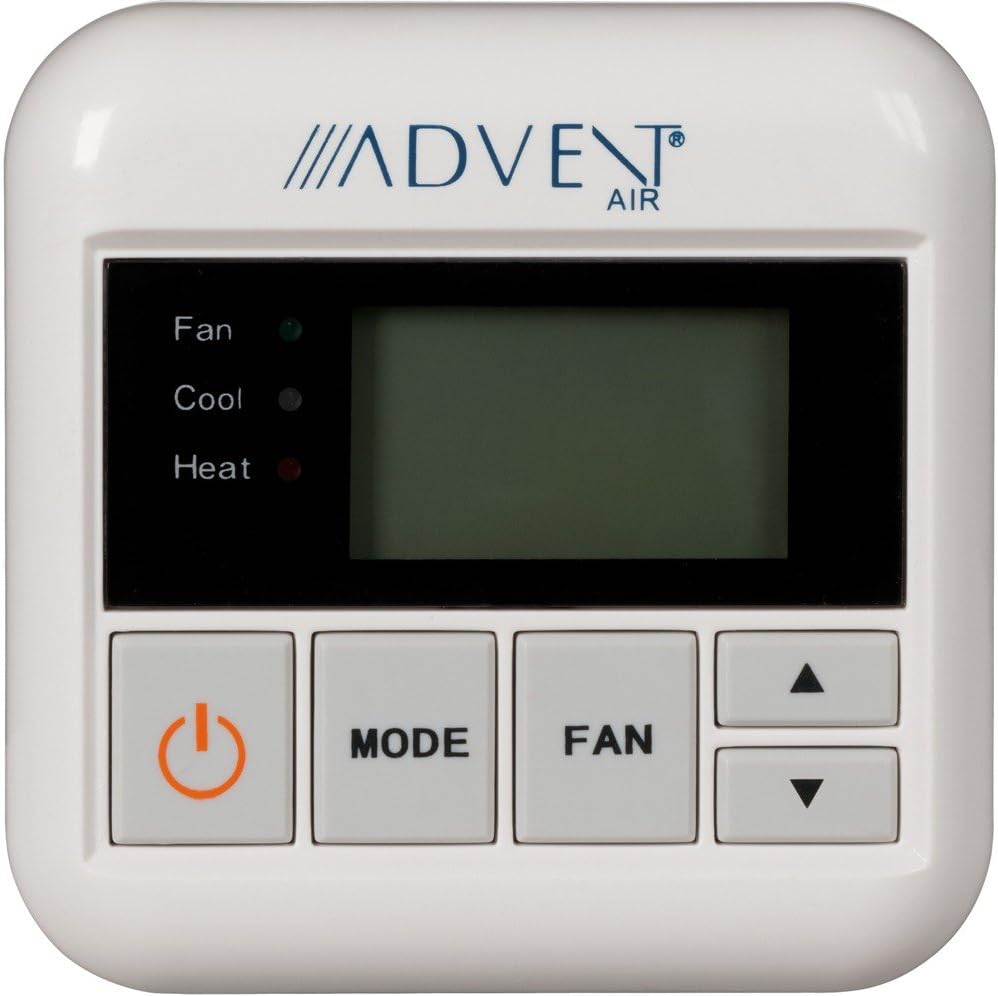
The Advent Air ACTH12 Digital Wall Thermostat offers precise control over your climate system. Key features include:
- Compatibility with A/C and AC/Heat Pump models.
- User-friendly digital controls.
- Digital communication with the rooftop unit.
- Pleasant blue LCD display for clear temperature and mode indication.
- Individual LED indicators for Fan, Cool, and Heat modes.
- Automatic or manual fan operation.
- Temperature display in Fahrenheit or Celsius.
- Auto Changeover feature for seamless mode transitions.
4. Installation and Setup
The ACTH12 thermostat is designed for wall mounting. It operates on 24 Volts and can be powered via corded electric connection or battery. A mounting bracket or back plate is included for installation.
4.1 Mounting Location
Choose a central location on an interior wall, away from direct sunlight, drafts, or heat sources that could affect temperature readings.
4.2 Wiring
- Turn off power to the heating and cooling system at the main circuit breaker.
- Remove the old thermostat (if applicable) and label the wires connected to it.
- Mount the ACTH12 thermostat's back plate to the wall using the provided hardware.
- Connect the system wires to the appropriate terminals on the thermostat. Refer to your system's wiring diagram for specific connections. The thermostat supports digital communication, and may also utilize Wi-Fi or ZigBee connectivity for advanced features, if configured.
- Secure the thermostat to the mounted back plate.
- Restore power to the system.
4.3 Initial Configuration
Upon initial power-up, the thermostat may require configuration for your specific system type (A/C or Heat Pump) and desired temperature unit (Fahrenheit or Celsius). Consult the on-screen prompts or a more detailed installation guide for specific setup procedures.
5. Operation
The ACTH12 thermostat features intuitive button controls for easy operation.
5.1 Control Buttons
- Power Button (⏻): Turns the thermostat and system on or off.
- MODE Button: Cycles through available operating modes: Cool, Heat, and Off. If your system supports it, an Auto mode may also be available.
- FAN Button: Cycles through fan settings: Auto (fan runs only when heating/cooling) and On (fan runs continuously).
- Up (▲) / Down (▼) Buttons: Adjusts the desired temperature setpoint.
5.2 LED Indicators
- Fan LED: Illuminates when the fan is active.
- Cool LED: Illuminates when the system is in cooling mode.
- Heat LED: Illuminates when the system is in heating mode.
5.3 Temperature Display
The LCD display shows the current room temperature and the setpoint temperature. The unit can display temperatures in either Fahrenheit or Celsius, configurable during setup or via a menu option.
6. Maintenance
6.1 Cleaning
To clean the thermostat, gently wipe the exterior with a soft, damp cloth. Do not use abrasive cleaners or solvents. Ensure no moisture enters the thermostat's internal components.
6.2 Battery Replacement
If your thermostat is battery-powered or uses batteries for backup, replace them annually or when a low battery indicator appears on the display. Use the recommended battery type as specified by the manufacturer.
7. Troubleshooting
If you experience issues with your ACTH12 thermostat, consider the following general troubleshooting steps:
- No Display/No Power: Check the circuit breaker for your heating/cooling system. If battery-powered, replace the batteries. Ensure all wiring connections are secure.
- System Not Responding: Verify the thermostat is set to the correct mode (Cool or Heat) and the temperature setpoint is appropriate. Check if the fan is operating.
- Incorrect Temperature Reading: Ensure the thermostat is not exposed to direct sunlight, drafts, or heat sources.
- System Cycles Too Frequently/Infrequently: This could indicate an issue with system sizing or thermostat placement. Consult a professional HVAC technician.
For persistent issues, contact a qualified HVAC technician or Advent customer support.
8. Specifications
| Brand | Advent |
| Model Number | ACTH12 |
| Control Type | Push Button, Button Control |
| Display Type | LCD (Blue Backlight) |
| Mounting Type | Wall Mount |
| Power Source | Corded Electric, Battery Powered |
| Voltage | 24 Volts |
| Connectivity Technology | Wi-Fi, ZigBee (for digital communication) |
| Special Feature | Auto Changeover |
| Product Dimensions | 11 x 4 x 1 inches |
| Item Weight | 0.32 ounces |
| Material | Copper (Note: This material is typically for internal components, not the casing) |
9. Warranty and Support
Specific warranty details and direct support contact information are not provided in this manual. For warranty claims, technical assistance, or further support, please refer to the product packaging or contact Advent customer service directly through their official website or the retailer where the product was purchased.


