
Sanus SA405-B1
Sanus SA405-B1 Universal Soundbar Speaker Mount Instruction Manual
Model: SA405-B1
Product Overview
The Sanus SA405-B1 Universal Soundbar Speaker Mount is designed to seamlessly integrate your soundbar with your television, providing a clean and stylish audio setup. This easy-to-assemble kit attaches directly to the bottom of most televisions, supporting soundbars weighing up to 15 lbs (6.8 kg).
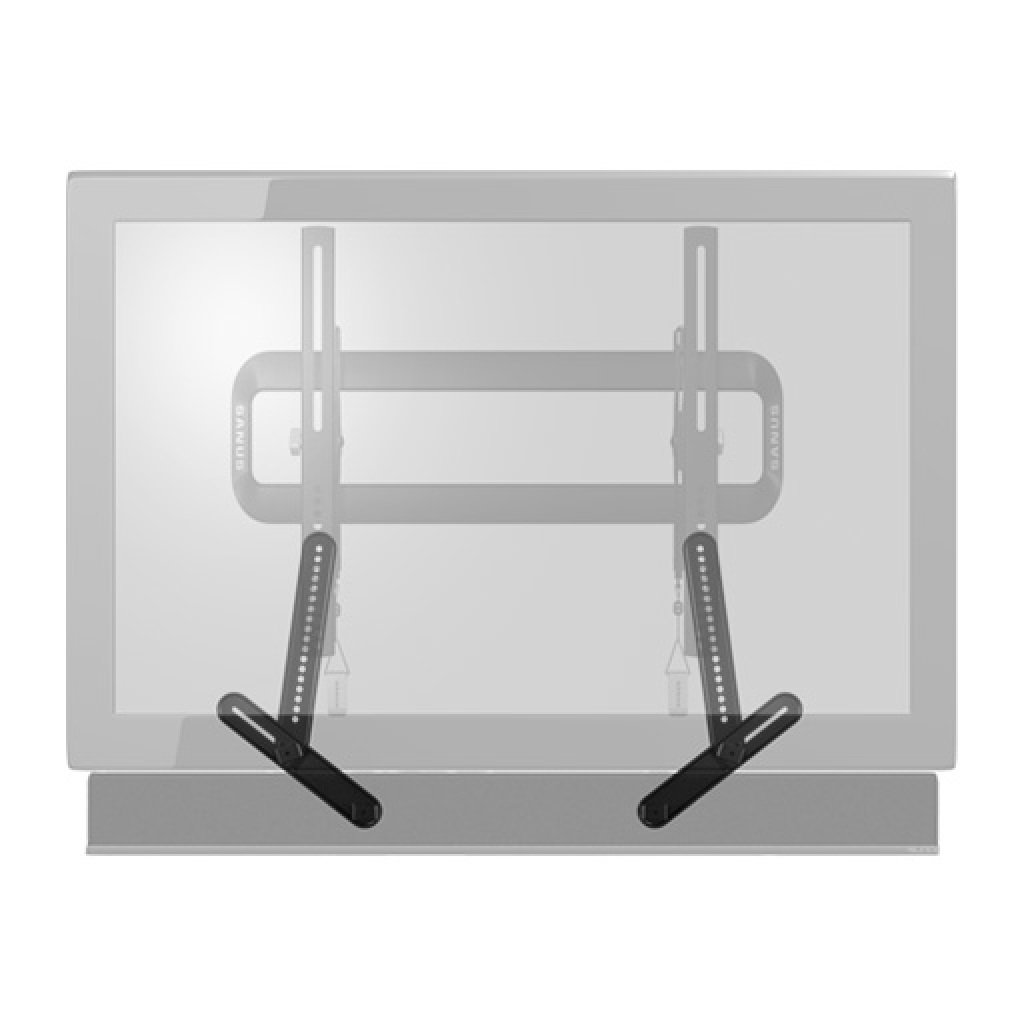
Image: The Sanus SA405-B1 mount securely holding a soundbar beneath a television, creating a streamlined entertainment system.
Safety Information
- Read all instructions carefully before installation. If you do not understand these instructions or have doubts about the safety of the installation, contact a qualified installer.
- Verify that the mounting surface can safely support the combined weight of the equipment and all attached hardware.
- Use only the hardware provided by the manufacturer. Using incompatible hardware may cause damage or injury.
- Do not exceed the maximum weight capacity of 15 lbs (6.8 kg) for the soundbar.
- Ensure all screws are tightened securely, but do not overtighten.
- Keep children and pets away during installation.
What's in the Box
Your Sanus SA405-B1 Universal Soundbar Speaker Mount package includes the following components:
- Universal Soundbar Speaker Mount Brackets (main horizontal bar and vertical L-brackets)
- Assorted Screws (M4, M5, M6, M8 sizes for TV and soundbar attachment)
- Washers and Spacers (various sizes for compatibility with different TV and soundbar models)
- Hex Key (for assembly)
- Instruction Manual
Note: Specific quantities and types of hardware may vary slightly based on packaging revisions. Refer to the included instruction manual for a precise list.
Setup and Installation
Follow these steps to properly install your Sanus SA405-B1 Universal Soundbar Speaker Mount.
Step 1: Prepare Your Television
- If your TV is already mounted, carefully remove it from the wall mount and place it face down on a soft, stable surface to prevent damage.
- Remove any existing mount brackets from the back of your TV.
Step 2: Assemble the Mount Brackets
- Identify the main horizontal bar and the two vertical L-brackets.
- Measure the width of the mounting holes on the back of your TV.
- Attach the vertical L-brackets to the main horizontal bar, aligning them with the measured width of your TV's lower VESA mounting holes. Secure them using the provided screws and hex key.
Step 3: Attach Mount to Television
- Align the assembled soundbar mount with the lower VESA mounting holes on the back of your TV.
- Use the appropriate screws and spacers (if necessary) to securely attach the soundbar mount to the TV. Ensure it is firmly fastened.
Step 4: Mount Soundbar
- Place your soundbar onto the L-shaped arms of the soundbar mount.
- Adjust the depth of the L-brackets to ensure the soundbar sits flush with the TV or at your desired position, avoiding obstruction of any up-firing speakers.
- Secure the soundbar to the L-brackets using the provided screws, if your soundbar has mounting points. If not, ensure it rests securely on the padded arms.
Step 5: Re-mount Television
- Carefully lift the TV (with the soundbar mount attached) and re-mount it onto your wall bracket.
- Double-check all connections and ensure the TV and soundbar are stable and secure.
Installation Video Guide
Video: Official ECHOGEAR guide demonstrating the installation process for a universal soundbar TV mount, including unboxing, assembly, and attachment to the television.
Operating Instructions
Once installed, the Sanus SA405-B1 mount requires no specific operation. Ensure your soundbar is powered on and connected to your television according to its own manufacturer's instructions. The mount provides a stable platform for your soundbar, enhancing your audio experience.
Maintenance
- Periodically check all screws and connections to ensure they remain tight and secure.
- Clean the mount with a soft, dry cloth. Avoid abrasive cleaners or solvents.
- Do not hang additional items from the soundbar mount.
Troubleshooting
Soundbar is not level:
- Ensure the TV itself is level.
- Verify that the L-brackets are evenly adjusted and securely tightened.
Soundbar feels loose:
- Check all screws connecting the mount to the TV and the soundbar to the mount. Tighten any loose connections.
- Ensure the soundbar's weight does not exceed 15 lbs (6.8 kg).
Specifications
| Feature | Detail |
|---|---|
| Brand | Sanus |
| Model Number | SA405-B1 |
| Product Dimensions | 12.1 x 3.4 x 2 inches (30.7 x 8.6 x 5.1 cm) |
| Item Weight | 2.95 pounds (1.34 kg) |
| Color | Black |
| Compatible Devices | Soundbars |
| Mounting Type | TV Mount (attaches to TV's VESA holes) |
| Maximum Soundbar Weight | 15 lbs (6.8 kg) |
| Date First Available | January 10, 2014 |
Warranty and Support
For warranty information or technical support, please refer to the official Sanus website or contact their customer service directly. Keep your purchase receipt for any warranty claims.
Related documentsSA405-B1


Ask a question about this manual
Ask about setup, troubleshooting, compatibility, parts, safety, or missing instructions. Manuals+ will review the question and use this page’s manual context to help answer it.