
InFocus IN122A
InFocus IN122a SVGA Wireless-Ready Projector User Manual
Model: IN122A | Brand: InFocus
Introduction
This manual provides comprehensive instructions for the setup, operation, and maintenance of your InFocus IN122a SVGA Wireless-Ready Projector. The InFocus IN122a is designed for ease of use and offers multiple ways to display content, including from mobile devices. Its high brightness and contrast ratio ensure outstanding image quality, and its lightweight design facilitates easy portability or installation.
Key Features
- SVGA (800 x 600) native resolution for clear image projection.
- 3500 lumens of brightness, suitable for various lighting conditions.
- Long-life lamp of up to 7,000 hours, contributing to long-term savings.
- High 15000:1 contrast ratio and BrilliantColor technology for vibrant and detailed images.
- Wireless connectivity with an optional USB adapter for flexible content sharing.
Setup Guide
Follow these steps to set up your InFocus IN122a projector:
- Unpacking: Carefully remove the projector and all accessories from the packaging.
- Placement: Position the projector on a stable, flat surface or mount it securely. Ensure adequate ventilation around the unit.
- Power Connection: Connect the power cord to the projector's power input and then to a grounded electrical outlet.
- Source Connection: Connect your video source (e.g., laptop, DVD player) to the appropriate input port on the projector (HDMI, VGA, USB).
- Power On: Press the power button on the projector or remote control to turn on the unit.
- Focus and Zoom: Adjust the focus and zoom rings on the lens to achieve a clear and appropriately sized image on your screen or wall.
- Keystone Correction: If the image appears trapezoidal, use the keystone correction feature to square the image.

InFocus IN122a Projector in operation, displaying a bright light from its lens. This image illustrates the projector's appearance during use.
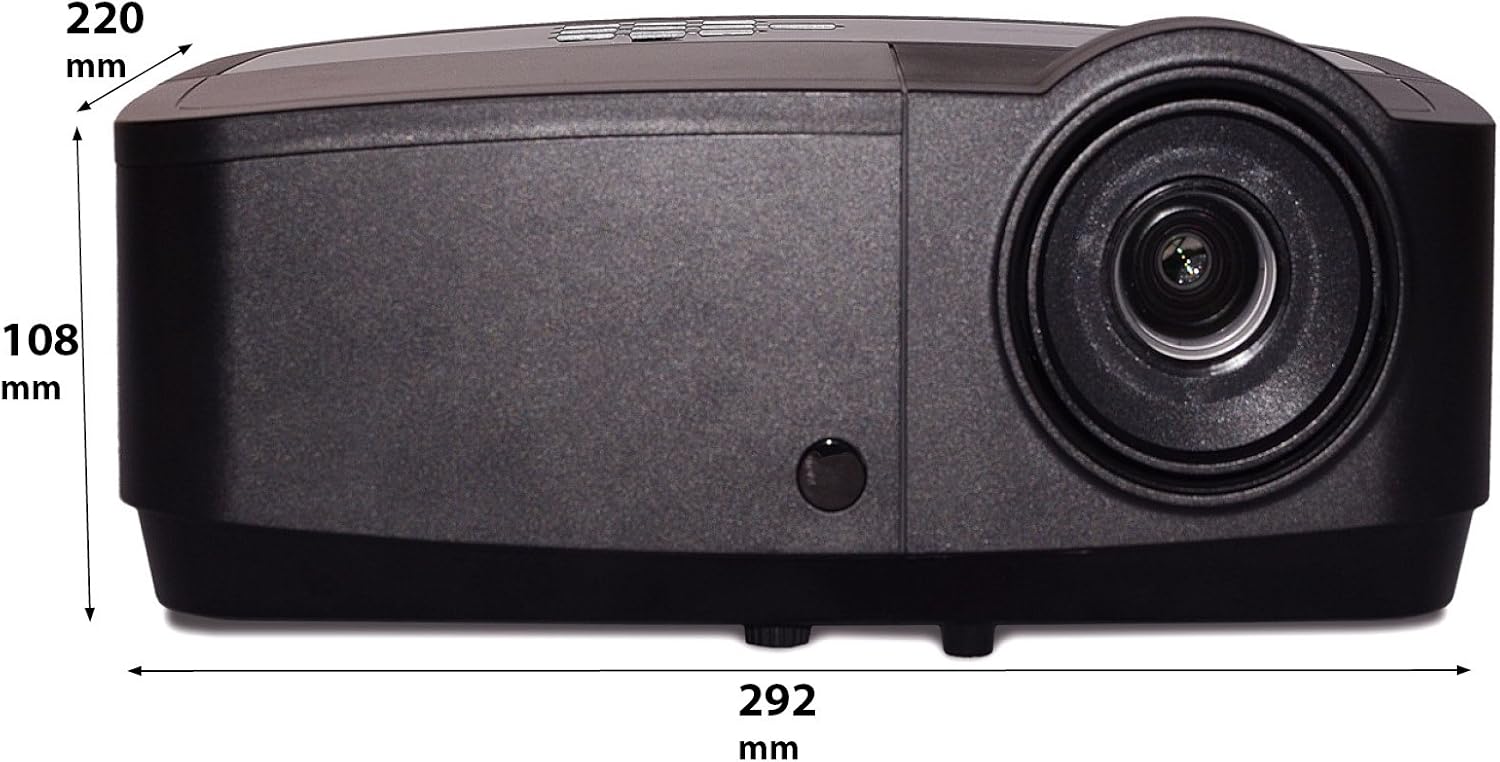
Diagram showing the dimensions of the InFocus IN122a Projector, with measurements in millimeters. This provides physical specifications for installation planning.
Operating Instructions
- Power On/Off: Press the power button once to turn on. Press twice to turn off, confirming the shutdown.
- Input Source Selection: Use the "Source" button on the projector or remote to cycle through available input sources (HDMI, VGA, USB).
- Menu Navigation: Use the directional arrows and "Enter" button on the control panel or remote to navigate the on-screen display (OSD) menu.
- Image Adjustments: Within the OSD menu, you can adjust settings such as brightness, contrast, color, aspect ratio, and picture mode to optimize your viewing experience.
- Audio: If your source provides audio through HDMI, the projector's internal speaker will play it. External speakers can be connected via the audio output port.
Maintenance
- Lamp Replacement: The projector lamp has a lifespan of up to 7,000 hours. When the lamp indicator light illuminates or the image becomes dim, it's time to replace the lamp. Refer to the full user manual for detailed lamp replacement procedures. Always allow the projector to cool down completely before attempting lamp replacement.
- Cleaning the Lens: Use a soft, lint-free cloth specifically designed for optical lenses to gently wipe the projector lens. Avoid using abrasive cleaners or excessive pressure.
- Cleaning the Projector Body: Wipe the exterior of the projector with a soft, dry cloth. Do not use liquid cleaners or solvents.
- Air Filter Cleaning: Regularly check and clean the air filter to ensure proper ventilation and prevent overheating. A clogged filter can reduce lamp life and performance.
Troubleshooting
If you encounter issues with your projector, refer to the following common problems and solutions:
| Problem | Possible Cause | Solution |
|---|---|---|
| No image on screen | Power cable disconnected, incorrect input source, source device off. | Check power connections. Select correct input source. Ensure source device is powered on and sending a signal. |
| Image is dim or faded | Lamp nearing end of life, Eco mode enabled, dirty lens. | Replace lamp if necessary. Disable Eco mode. Clean the projector lens. |
| Image is blurry | Out of focus, incorrect projection distance. | Adjust the focus ring on the lens. Ensure projector is within recommended projection distance. |
| Projector overheats and shuts down | Blocked ventilation, dirty air filter. | Ensure clear airflow around the projector. Clean or replace the air filter. |
Specifications
| Feature | Detail |
|---|---|
| Product Dimensions | 14.25 x 12 x 7.75 inches |
| Item Weight | 7.1 pounds |
| Item Model Number | IN122A |
| Brand | InFocus |
| Recommended Uses For Product | Indoor/Outdoor |
| Special Feature | 3D-Ready |
| Connectivity Technology | HDMI, USB, Wireless |
| Display Resolution | 800 x 600 (SVGA) |
| Brightness | 3500 Lumens |
| Contrast Ratio | 15000:1 |
| Lamp Life | Up to 7,000 hours |
Warranty and Support
For detailed warranty information, please refer to the warranty card included with your product or visit the official InFocus website. If you require technical support, have questions about product operation, or need assistance with troubleshooting beyond what is covered in this manual, please contact InFocus customer service. Contact details can typically be found on the manufacturer's website or in the product packaging.
Please retain your proof of purchase for warranty claims.
Related documentsIN122A


Ask a question about this manual
Ask about setup, troubleshooting, compatibility, parts, safety, or missing instructions. Manuals+ will review the question and use this page’s manual context to help answer it.