
APC BK500
APC Back-UPS CS 500VA User Manual
Model: BK500
Brand: APC
Introduction
This manual provides essential information for the safe and efficient operation of your APC Back-UPS CS 500VA (Model BK500). This Uninterruptible Power Supply (UPS) is designed to protect your electronic equipment from power outages, surges, and spikes. Please read this manual thoroughly before installation and use.
Safety Information
Observe the following safety precautions to prevent injury and damage to the UPS or connected equipment.
- This UPS contains a battery that can present a risk of electrical shock and high short circuit current.
- Servicing of batteries should be performed or supervised by personnel knowledgeable of batteries and the required precautions.
- Do not dispose of batteries in a fire. The batteries may explode.
- Do not open or mutilate batteries. Released electrolyte is harmful to the skin and eyes. It may be toxic.
- The UPS must be connected to a grounded AC power outlet.
- Do not use the UPS in direct sunlight, in contact with fluids, or where there is excessive dust or humidity.
- Ensure adequate ventilation around the UPS.
Package Contents
Verify that all items are present upon unpacking.
- APC Back-UPS CS 500VA Unit
- Software CD
- USB Cable
- Cord Management Straps
Product Overview
The APC Back-UPS CS 500VA provides battery backup and surge protection for your electronic devices.

Figure 1: Front view of the APC Back-UPS CS 500VA. This image displays the front panel of the UPS, highlighting the power button and the status indicator lights for "On Line", "On Battery", "Overload", and "Replace Battery".
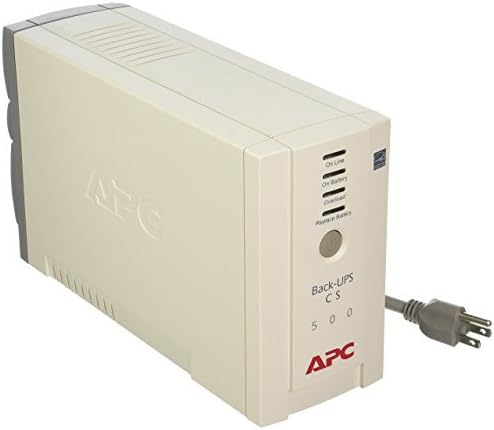
Figure 2: Rear view of the APC Back-UPS CS 500VA. This image shows the back of the UPS, detailing the arrangement of the six power outlets (three battery backup and surge protected, three surge only) and the USB communication port.
Front Panel Indicators:
- On Line: Illuminates when the UPS is supplying conditioned utility power to connected equipment.
- On Battery: Illuminates when the UPS is supplying battery power to connected equipment during a power outage or brownout.
- Overload: Illuminates when connected equipment exceeds the UPS's capacity.
- Replace Battery: Illuminates when the battery needs to be replaced.
Setup
1. Placement:
Place the Back-UPS in a location that protects it from excessive dust, temperature, and humidity. Avoid placing it near heat sources or in direct sunlight. Ensure adequate airflow around the unit.
2. Connecting to Power:
- Ensure the UPS is turned off.
- Plug the UPS power cord directly into a grounded 110V AC wall outlet. Do not use extension cords or surge protectors.
3. Connecting Equipment:
The Back-UPS CS 500VA has six outlets.
- Battery Backup & Surge Protected Outlets (3 outlets): Connect critical equipment such as your computer, monitor, and external hard drives to these outlets. These devices will receive power from the battery during an outage.
- Surge Only Outlets (3 outlets): Connect non-critical equipment such as printers, scanners, or speakers to these outlets. These devices are protected from surges but will not receive battery power during an outage.
4. Initial Battery Charge:
Allow the Back-UPS to charge for at least 8 hours before connecting any equipment. This ensures maximum battery runtime. The unit will charge whether it is turned on or off, as long as it is connected to utility power.
Operation
Turning On/Off:
- To Turn On: Press the power button firmly until you hear a short beep. The "On Line" indicator will illuminate.
- To Turn Off: Press the power button firmly until you hear a long beep. All indicators will turn off.
Understanding Indicators:
Refer to the "Product Overview" section for a description of each indicator light.
Battery Runtime:
The Back-UPS CS 500VA provides approximately 3 minutes of standby power at full load (300W). Runtime will vary based on the connected load.
Self-Test:
The UPS performs an automatic self-test periodically. You can also initiate a manual self-test by briefly pressing the power button while the unit is online. The UPS will switch to battery power for a few seconds and then return to utility power.
Maintenance
Battery Replacement:
The battery in your Back-UPS is a sealed lead-acid battery and is not user-serviceable beyond replacement. When the "Replace Battery" indicator illuminates, the battery needs to be replaced. Contact APC support or an authorized service center for replacement battery information.
Note: After replacing the battery, allow the new battery to charge for 8 hours to ensure full capacity.
Cleaning:
Clean the exterior of the UPS with a soft, dry cloth. Do not use liquid or aerosol cleaners.
Storage:
If storing the UPS for an extended period, charge the battery every three months to prevent battery degradation. Store in a cool, dry place.
Troubleshooting
| Problem | Possible Cause | Solution |
|---|---|---|
| UPS does not turn on. | Battery not connected or discharged. | Ensure the battery is properly connected. Allow the unit to charge for 8 hours. |
| UPS beeps continuously and "Overload" light is on. | Too much equipment connected. | Disconnect non-essential equipment from battery backup outlets until the "Overload" light turns off. |
| "Replace Battery" light is on. | Battery has reached end of life. | Replace the battery. Contact APC support for replacement options. |
| UPS switches to battery frequently. | Unstable utility power. | This is normal operation. The UPS is protecting your equipment. If it happens excessively, consult an electrician. |
Specifications
| Feature | Detail |
|---|---|
| Model | BK500 |
| Output Power Capacity | 500VA / 300W |
| Input Voltage | 110 V AC |
| Output Voltage | 120 V AC |
| Outlets | 6 (3 Battery & Surge, 3 Surge Only) |
| Battery Type | Lead Acid |
| Recharge Time | 8 Hours |
| Stand-by Time (Full Load) | 3 Minutes |
| Product Dimensions | 7.2 x 14 x 9.5 inches |
| Item Weight | 13.8 pounds |
Warranty and Support
For warranty information and technical support, please refer to the documentation included with your product or visit the official APC website.
APC Official Website: www.apc.com
Related documentsBK500


Ask a question about this manual
Ask about setup, troubleshooting, compatibility, parts, safety, or missing instructions. Manuals+ will review the question and use this page’s manual context to help answer it.