
GQ ADP-064
Instruction Manual: ADP-064 Adapter
For Hitachi H8/532/534/536 PLCC84 Programming
1. Introduction
The GQ ADP-064 adapter is a specialized tool designed for programming Hitachi H8 series CPUs. This adapter facilitates the programming of specific PLCC84-leaded Hitachi H8 microcontrollers when used in conjunction with compatible True USB Willem programmers.
It is engineered to work seamlessly with the GQ-3X and GQ-4X programmer models, providing a reliable interface for microcontroller operations.
2. Product Overview

Figure 1: Top-down view of the ADP-064 adapter. This image displays the main components including the PLCC84 socket, jumper configuration area (J1-J5), and various circuit traces. The text "ADP-064" is visible on the green PCB.
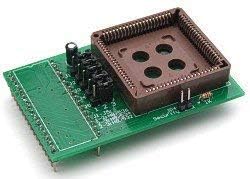
Figure 2: Angled view of the ADP-064 adapter. This perspective highlights the three-dimensional aspect of the adapter, showing the PLCC84 socket raised above the green circuit board and the connection pins at the bottom.
The ADP-064 adapter features a PLCC84 socket designed to securely hold the target Hitachi H8 CPU. It includes jumper settings (J1-J5) to configure the adapter for different H8 CPU models, ensuring proper communication during the programming process.
3. Setup Instructions
- Compatibility Check: Ensure you are using a compatible True USB Willem programmer, specifically the GQ-3X or GQ-4X model. This adapter is designed to interface exclusively with these programmers.
- Jumper Configuration: Before inserting the CPU, configure the jumpers (J1-J5) on the ADP-064 adapter according to the specific Hitachi H8 CPU model you intend to program. Refer to the markings on the adapter board for the correct settings for H8/532, H8/534, and H8/536 series CPUs.
- J1-J5: 1-2 for H8/536
- J1-J5: 2-3 for H8/534
- J1-J5: 2-3 for H8/532
- CPU Insertion: Carefully insert the PLCC84-leaded Hitachi H8 CPU into the PLCC84 socket on the ADP-064 adapter. Ensure correct orientation, aligning Pin 1 of the CPU with Pin 1 indicated on the adapter socket.
- Adapter Connection: Connect the ADP-064 adapter, with the CPU installed, to the appropriate socket on your GQ-3X or GQ-4X True USB Willem programmer. Ensure a firm and secure connection.
- Programmer Connection: Connect your GQ programmer to your computer via a USB cable.
4. Operating Instructions
Once the ADP-064 adapter and CPU are correctly set up and connected to the GQ programmer, follow these steps for programming:
- Launch Software: Open the programming software provided with your GQ-3X or GQ-4X programmer on your computer.
- Select Device: Within the software, select the specific Hitachi H8 CPU model (e.g., HD6475328CP, HD6475348CP, HD6475368CP) that is inserted into the adapter.
- Load Data: Load the firmware or data file you wish to program onto the CPU into the software.
- Initiate Programming: Follow the software's instructions to initiate the programming process. Monitor the progress and any status messages displayed by the software.
- Verification: After programming is complete, it is recommended to perform a verification step through the software to ensure the data has been written correctly to the CPU.
- Remove CPU: Once programming and verification are successful, safely disconnect the programmer from the computer, then carefully remove the CPU from the ADP-064 adapter socket.
Supported Devices:
- HD6475328CP PLCC84 leads CPU
- HD6475348CP PLCC84 leads CPU
- HD6475368CP PLCC84 leads CPU
5. Maintenance
To ensure the longevity and optimal performance of your ADP-064 adapter, please observe the following maintenance guidelines:
- Storage: Store the adapter in a clean, dry, and static-free environment when not in use. Keep it away from direct sunlight, extreme temperatures, and high humidity.
- Cleaning: If necessary, gently clean the adapter's surface with a soft, dry, lint-free cloth. Avoid using liquid cleaners or solvents, which can damage the electronic components.
- Handling: Always handle the adapter by its edges to avoid touching the pins or the socket contacts. Static electricity can damage sensitive electronic components, so use proper ESD (Electrostatic Discharge) precautions.
- Socket Care: Avoid forcing CPUs into the socket. Ensure correct alignment before insertion. The PLCC84 socket is a precision component; improper insertion can bend pins or damage the socket.
6. Troubleshooting
If you encounter issues while using the ADP-064 adapter, consider the following common troubleshooting steps:
- Connection Issues:
- Ensure the adapter is securely seated in the programmer's socket.
- Verify the CPU is correctly inserted into the adapter's PLCC84 socket with proper orientation.
- Check the USB connection between the programmer and the computer.
- Software Not Recognizing Device:
- Confirm that the correct Hitachi H8 CPU model is selected in the programming software.
- Verify that the jumpers (J1-J5) on the ADP-064 adapter are set correctly for the specific CPU model.
- Ensure your GQ programmer drivers are properly installed and updated on your computer.
- Programming Errors:
- Double-check the integrity of the data file you are attempting to program.
- Ensure the CPU is not damaged or faulty.
- Verify that the power supply to the programmer (if external) is stable.
If problems persist after following these steps, please refer to the support section or contact GQ customer service.
7. Specifications
| Feature | Detail |
|---|---|
| Model Number | ADP-064 |
| Brand | GQ |
| Compatibility | True USB Willem programmer GQ-3X, GQ-4X |
| Supported CPUs | Hitachi H8 series (HD6475328CP, HD6475348CP, HD6475368CP) |
| CPU Package | PLCC84 |
| Connector Type | USB (via programmer) |
| Number of Items | 3 (as per product listing, likely referring to a pack) |
| Power Source Type | Hand-Powered (refers to the overall system, not the adapter itself) |
| Date First Available | July 9, 2014 |
8. Warranty and Support
For warranty information and technical support regarding your ADP-064 adapter, please refer to the documentation provided with your GQ programmer or visit the official GQ website. You may also contact MCUmall Electronics, the seller, for product-specific inquiries.
For the latest support resources and contact details, please visit the GQ Store on Amazon.
Ask a question about this manual
Ask about setup, troubleshooting, compatibility, parts, safety, or missing instructions. Manuals+ will review the question and use this page’s manual context to help answer it.