
1. Introduction
This manual provides comprehensive instructions for the safe and efficient installation, operation, and maintenance of your HeatTech Electric Radiant Floor Heating Mat Kit. This kit includes a 120V electric radiant heating mat and an AUBE TH115-AF-GA 7-day programmable thermostat with a built-in GFCI and floor sensor. Please read this manual thoroughly before beginning installation or operation to ensure proper function and safety.
2. Safety Information
WARNING: Electrical installation should only be performed by a qualified electrician in accordance with local and national electrical codes. Failure to follow these instructions may result in electric shock, fire, or property damage.
- Always disconnect power at the main circuit breaker before installing or servicing the heating system.
- Do not cut the heating cable. Only the mesh backing can be cut.
- Ensure the heating mat is not overlapped or installed over itself.
- The thermostat must be installed in a standard electrical box and connected to a dedicated circuit.
- The built-in Ground Fault Circuit Interrupter (GFCI) in the thermostat is a critical safety feature. Test it regularly as per the thermostat instructions.
- Do not install the heating mat under permanent fixtures such as cabinets, bathtubs, or toilets.
- Protect the heating mat from damage during and after installation. Avoid sharp objects.
3. Package Contents
Verify that all components are present and undamaged before beginning installation:
- HeatTech Electric Radiant Floor Heating Mat (120V, 90 sqft, 20" wide x 54.9ft long)
- AUBE TH115-AF-GA 7-day Programmable Thermostat with built-in GFCI
- Floor Sensor for Thermostat
- Detailed Installation Manual (this document)
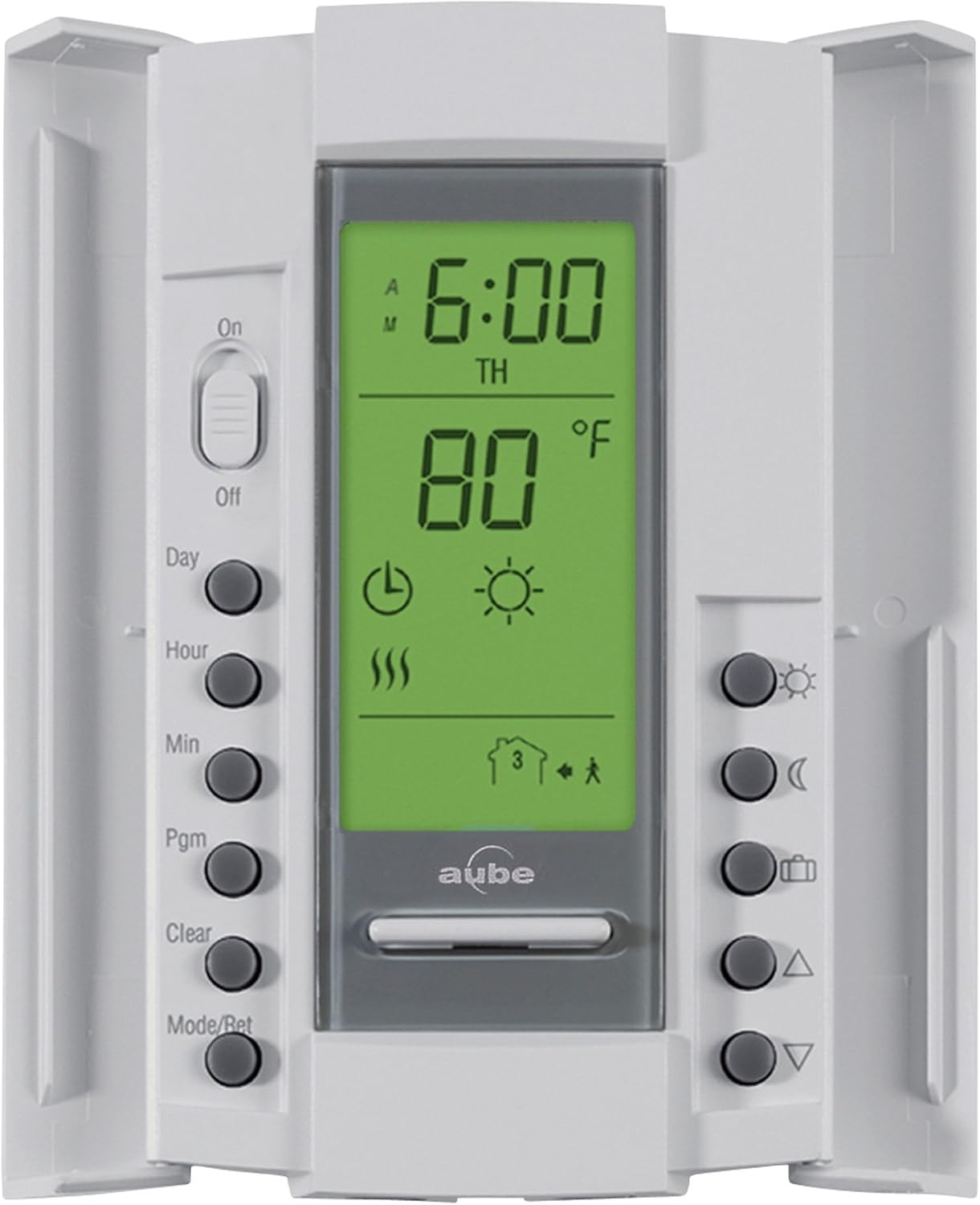
Image 3.1: HeatTech Electric Radiant Floor Heating Mat. The mat features a red mesh with heating cables embedded, designed for easy installation.
4. Setup and Installation
4.1. Mat Installation
The HeatTech heating mat features an adhesive backing for secure placement. The red mesh can be cut to facilitate turns and rotations, but never cut the heating cable itself.
- Prepare the subfloor: Ensure it is clean, dry, and level.
- Plan the layout: Determine the optimal path for the mat, avoiding permanent fixtures.
- Lay the mat: Unroll the mat and press it firmly onto the subfloor. Use the adhesive backing to keep it in place.
- Making turns: To change direction, cut the mesh backing (not the cable) and rotate the mat section.
- Obstacles: For obstacles, cut the mesh to route the mat around them, ensuring the heating cables maintain proper spacing.
- Install floor sensor: Place the floor sensor cable between two heating cables, ensuring it is centered and protected.
- Cover with flooring: Once the mat and sensor are in place, cover with a self-leveling compound or thin-set mortar before installing the final floor covering (tile, stone, etc.).

Image 4.1: Examples of cutting the mat mesh for 180-degree turns, open corner turns, obstacle routing, and full corner turns. Always cut only the mesh, not the heating cable.
4.2. Thermostat Wiring
The AUBE TH115-AF-GA thermostat requires connection to the main power source (120V), the heating mat's cold lead, and the floor sensor. This procedure must be performed by a qualified electrician.
- Ensure power is OFF at the circuit breaker.
- Mount the thermostat in a standard electrical box.
- Connect the hot (L1) and neutral (L2) wires from the power source to the corresponding terminals on the thermostat.
- Connect the heating mat's cold lead wires to the load terminals on the thermostat. The mat has a single armored 10ft long cold lead wire.
- Connect the ground wire from the power source and the mat to the ground terminal.
- Connect the floor sensor wires to the designated sensor terminals.
- Refer to the wiring diagram for detailed connections.

Image 4.2: Wiring diagram illustrating connections from the 120V power source to the AUBE TH115-AF-GA thermostat, the heating mat, and the floor sensor.
5. Operating Instructions (AUBE TH115-AF-GA Thermostat)
The AUBE TH115-AF-GA is a 7-day programmable thermostat designed for precise floor temperature control. Refer to the separate AUBE thermostat manual for detailed programming instructions. Below are general operating guidelines.

Image 5.1: AUBE TH115-AF-GA 7-day programmable thermostat with digital display and control buttons.
5.1. Initial Power-Up
- After installation, restore power at the circuit breaker.
- The thermostat will power on and display the current floor temperature.
- Set the current time and day.
5.2. Setting Temperature
- Use the Up/Down buttons to adjust the desired temperature.
- The thermostat will automatically maintain the set temperature.
5.3. Programming Schedule
The thermostat allows for a 7-day programmable schedule with up to four time periods per day. This optimizes energy usage by heating the floor only when needed.
- Press the "Pgm" button to enter programming mode.
- Follow the on-screen prompts to set desired temperatures for different times of the day and days of the week.
- Consult the AUBE TH115-AF-GA user guide for detailed programming steps.
5.4. GFCI Test
The GFCI (Ground Fault Circuit Interrupter) is a safety device. Test it monthly:
- Press the "Test" button on the thermostat. The display should go blank or show an error code, indicating the GFCI has tripped.
- Press the "Reset" button to restore power.
- If the GFCI does not trip or reset, discontinue use and contact a qualified electrician.
6. Maintenance
The HeatTech Electric Radiant Floor Heating System is designed for maintenance-free operation once installed. However, regular checks are recommended:
- GFCI Test: Perform the GFCI test on the thermostat monthly (refer to Section 5.4).
- Cleaning: Keep the thermostat clean by wiping it with a soft, damp cloth. Do not use abrasive cleaners.
- Visual Inspection: Periodically inspect the thermostat for any signs of damage or loose connections (ensure power is off before inspection).
- No User Serviceable Parts: The heating mat and cables contain no user-serviceable parts. Do not attempt to repair damaged cables.
7. Troubleshooting
If your HeatTech floor heating system is not operating as expected, consult the following table before contacting support:
| Problem | Possible Cause | Solution |
|---|---|---|
| No heat / System not turning on |
|
|
| Floor is not warm enough |
|
|
| Thermostat displays error code |
|
|
8. Specifications
| Brand | HeatTech |
| Model Number | HTMATKIT-120-90B |
| Heating Mat Size | 90 sqft (20" wide x 54.9ft long) |
| Voltage | 120V |
| Peak Power Output | 1080W |
| Amperage | 9 Amps |
| EMF | Zero EMF |
| Heating Cable Thickness | ~1/8" |
| Cold Lead Length | 10ft |
| Cable Spacing | 3" |
| System Output | 12 Watts/sq.ft (41 BTU/sq.ft) |
| Thermostat Model | AUBE TH115-AF-GA (7-day Programmable, 5mA GFCI, Floor Sensor) |
| Certifications | UL listed for USA |
9. Warranty Information
The HeatTech Electric Radiant Floor Heating Mat comes with a 3-year manufacturer's warranty. The AUBE TH115-AF-GA thermostat also includes a 3-year manufacturer's warranty. Please retain your proof of purchase for warranty claims. The warranty covers defects in materials and workmanship under normal use and service.
10. Support
For technical assistance, troubleshooting beyond this manual, or warranty inquiries, please contact HeatTech customer support. You can typically find contact information on the official HeatTech website or through your point of purchase.
For detailed operation and programming of the AUBE TH115-AF-GA thermostat, please refer to the specific user manual provided with the thermostat or available on the AUBE website.
