
1. Introduction
This manual provides detailed instructions for the proper setup, operation, and maintenance of your Rice Lake DC-782 Digital Counting Scale. Designed for precision and efficiency, this scale is equipped with features to streamline your counting tasks.
Key Features:
- Liquid Crystal Display (LCD) with yellow backlight for clear visibility.
- Ten preset keys for quick product identification.
- 25-item memory for storing frequently counted items.
- Internal resolution of 1/500,000 for high accuracy.
- Audible buzzer for low, OK, and high count indications.
- Durable stainless steel platter.
- Power via 110VAC power cord or optional rechargeable battery (not included).
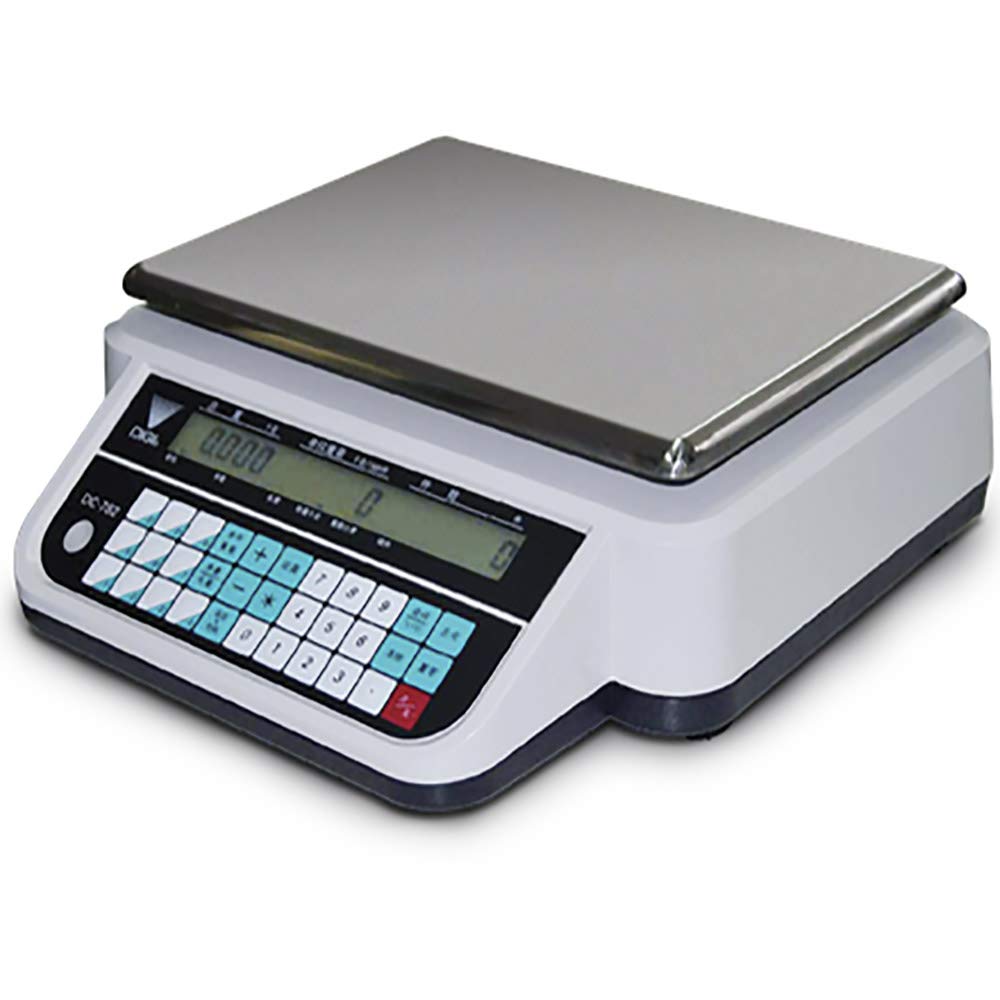
Figure 1: The Rice Lake DC-782 Digital Counting Scale. This image displays the scale featuring a rectangular stainless steel weighing platter on top of a white and black base. The front panel includes a digital LCD display showing '0.000' and a numeric keypad with additional function buttons.
2. Setup
2.1 Unpacking
- Carefully remove the scale from its packaging.
- Inspect the scale for any visible damage. If damage is found, contact your supplier immediately.
- Ensure all components are present: scale base, stainless steel platter, and power cord.
2.2 Platter Installation
- Gently place the stainless steel platter onto the scale base, ensuring it sits securely on the load cell support.
2.3 Power Connection
- Connect the provided 110VAC power cord to the power input on the rear of the scale.
- Plug the other end of the power cord into a standard 110VAC electrical outlet.
- If using a rechargeable battery (not included), ensure it is properly installed and charged according to battery manufacturer instructions.
2.4 Initial Placement
- Place the scale on a stable, level surface, free from vibrations and drafts.
- Avoid placing the scale near heat sources or direct sunlight.
3. Operation
3.1 Power On/Off
- Press the [ON/OFF] button to power on the scale. The display will perform a self-test and then show '0.000'.
- Press and hold the [ON/OFF] button to power off the scale.
3.2 Basic Weighing
- Ensure the scale displays '0.000' before placing any item. If not, press the [ZERO] button.
- Place the item to be weighed on the center of the stainless steel platter.
- Read the weight displayed on the LCD.
3.3 Tare Function
- Place an empty container on the platter.
- Press the [TARE] button. The display will return to '0.000', subtracting the container's weight.
- Add items to the container; only the net weight of the items will be displayed.
3.4 Counting Function
The DC-782 scale can count items based on a sample quantity. It features 25 item memory and 10 preset keys for convenience.
- Place a known sample quantity of items (e.g., 10, 20, 50 pieces) on the platter.
- Enter the sample quantity using the numeric keypad.
- Press the [SAMPLE] or equivalent button (refer to the scale's keypad for exact labeling). The scale will calculate the average piece weight.
- Remove the sample and place the bulk quantity of items to be counted. The display will show the total count.
- Use the 10 preset keys to recall stored average piece weights for frequently counted items. Consult the full manual for programming these keys.
3.5 Buzzer Function
The integrated buzzer provides audible alerts for low, OK, and high count thresholds, which can be configured in the scale's settings. Refer to the advanced settings section of the complete manual for buzzer configuration.
4. Maintenance
4.1 Cleaning
- Always disconnect the scale from the power source before cleaning.
- Wipe the stainless steel platter and scale body with a soft, damp cloth.
- Use a mild detergent if necessary, but avoid abrasive cleaners or solvents.
- Do not spray liquids directly onto the scale or allow water to enter the display or keypad areas.
- Ensure the scale is completely dry before reconnecting power.
4.2 General Care
- Avoid dropping or subjecting the scale to heavy impacts.
- Do not overload the scale beyond its maximum capacity of 60 lb.
- Store the scale in a clean, dry environment when not in use.
5. Troubleshooting
This section addresses common issues you might encounter with your DC-782 Digital Counting Scale. For problems not listed here, please contact customer support.
| Problem | Possible Cause | Solution |
|---|---|---|
| Scale does not power on. | No power supply; loose power cord; discharged battery. | Check power cord connection; ensure outlet is functional; charge or replace battery if applicable. |
| Inaccurate readings. | Scale not level; vibrations; drafts; platter not seated correctly; overload. | Ensure scale is on a stable, level surface; remove sources of vibration/drafts; reseat platter; do not exceed 60 lb capacity. |
| Counting function is incorrect. | Incorrect sample quantity entered; sample items not uniform. | Verify the sample quantity entered matches the actual sample; ensure sample items are consistent in weight. |
| Display shows 'OVERLOAD'. | Weight on platter exceeds maximum capacity. | Remove excess weight immediately. The maximum capacity is 60 lb. |
6. Specifications
| Feature | Detail |
|---|---|
| Model Number | DC-782-60 |
| Capacity | 60 lb x 0.01 lb |
| Display | Backlit LCD |
| Memory | 25 Memory Items, 10 Preset Keys |
| Internal Resolution | 1/500,000 |
| Platter Size | 12" x 8.9" (Stainless Steel) |
| Power | 110VAC Power Cord or Rechargeable Battery (Not Included) |
| Product Dimensions | 13 x 13 x 5 inches |
| Item Weight | 11 Pounds |
| Manufacturer | Rice Lake |
| Brand | Digi |
7. Warranty and Support
For information regarding warranty coverage, technical support, or service, please refer to the documentation provided with your purchase or contact the manufacturer, Rice Lake, directly. Contact details can typically be found on the manufacturer's official website or on your purchase receipt.
For additional assistance, you may also contact your authorized dealer or reseller.

