1. Product Overview
The STEREN 257-606IV Component Video Cables with Audio are designed to provide high-fidelity audio and video signal transfer between compatible electronic devices. This cable features five color-coded RCA connectors on each end: three for video signals (red, green, blue) and two for stereo audio (red, white). It supports resolutions up to 1080i, ensuring clear picture and sound quality for your home theater system.
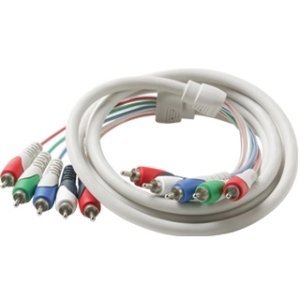
Image 1.1: Coiled STEREN Component Video Cables with Audio, showing the five color-coded RCA connectors on each end.
Key features include a soft and flexible PVC jacket for durability and protection, dual-shielded connectors to maximize signal strength, and 99.99% Pure Oxygen-Free Copper Wire for optimal performance. The color-coded molds facilitate easy and correct connection.
2. Setup Instructions
Follow these steps to connect your STEREN Component Video Cables:
- Identify Ports: Locate the component video (YPbPr) and stereo audio (L/R) output ports on your source device (e.g., DVD player, streaming device, game console) and the corresponding input ports on your display device (e.g., TV, projector, monitor). These ports are typically color-coded: green (Y), blue (Pb), red (Pr) for video, and white (Left), red (Right) for audio.
- Connect Source Device: Plug one end of the STEREN cable's five RCA connectors into the matching color-coded output ports on your source device. Ensure each connector is firmly seated.
- Connect Display Device: Plug the other end of the STEREN cable's five RCA connectors into the matching color-coded input ports on your display device. Again, ensure a secure connection for each plug.
- Select Input: On your display device, select the correct input source (e.g., "Component 1," "AV Input") that corresponds to where you connected the cables.
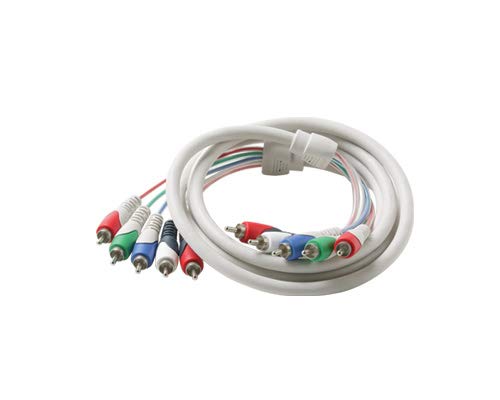
Image 2.1: Close-up view of the color-coded RCA connectors on the STEREN cable, illustrating the red, green, blue for video and red, white for audio connections.
Note: For optimal performance, ensure all connections are tight and that the color coding is matched correctly on both the source and display devices.
3. Operating Instructions
Once the STEREN Component Video Cables are correctly connected and the appropriate input is selected on your display device, the cable will transmit the audio and video signals automatically. No additional configuration is required for the cable itself.
- Signal Transmission: The cable facilitates the transfer of analog component video (YPbPr) and stereo analog audio signals.
- Supported Resolution: This cable supports video resolutions up to 1080i. The actual resolution displayed will depend on the capabilities of your source device and display device.
- Audio Channels: The red and white RCA connectors transmit left and right stereo audio channels, respectively.
Ensure that your source device is set to output component video and stereo audio, and that your display device is configured to receive these signals on the selected input.
4. Maintenance
Proper care of your STEREN Component Video Cables will ensure longevity and consistent performance:
- Storage: When not in use, store the cable in a cool, dry place, away from direct sunlight and extreme temperatures. Avoid tightly coiling or bending the cable sharply, as this can damage the internal wiring.
- Cleaning: If connectors become dirty, gently wipe them with a clean, dry, lint-free cloth. Do not use liquid cleaners or solvents.
- Handling: Always grasp the connector housing when plugging or unplugging the cable, rather than pulling on the cable itself. This prevents strain on the connections.
- Protection: Avoid placing heavy objects on the cable or exposing it to situations where it might be stepped on or pinched.
5. Troubleshooting
If you experience issues with your STEREN Component Video Cables, consider the following troubleshooting steps:
- No Picture or Sound:
- Verify that all five RCA connectors are securely plugged into the correct color-coded ports on both the source and display devices.
- Ensure the correct input source is selected on your display device.
- Check that both the source and display devices are powered on and functioning correctly.
- Test with another known-working component cable if available, to rule out issues with the devices themselves.
- Poor Picture Quality (e.g., distorted colors, blurry image):
- Confirm that the red, green, and blue video connectors are matched correctly on both ends. Incorrect connections can lead to color distortion.
- Ensure the connectors are clean and free of debris.
- Check for any kinks or damage along the cable length.
- Poor Sound Quality (e.g., static, no audio on one channel):
- Verify that the red and white audio connectors are securely plugged into the correct ports on both ends.
- Check the audio settings on your source and display devices.
- Ensure the volume is not muted or set too low on your display device or amplifier.
If problems persist after performing these checks, contact STEREN customer support or consult the manuals for your source and display devices.
6. Specifications
| Feature | Specification |
|---|---|
| Brand | STEREN |
| Model Number | 257-606IV |
| Cable Type | Component Video with Audio |
| Connector Type | RCA (5-RCA to 5-RCA) |
| Connector Gender | Male-to-Male |
| Cable Length | 6 Feet (1.83 Meters) |
| Supported Resolution | Up to 1080i |
| Conductor Material | 99.99% Pure Oxygen-Free Copper |
| Jacket Material | PVC |
| Color | Ivory (cable), Blue, Green, Red (video connectors), Red, White (audio connectors) |
| Product Dimensions | 72 x 3 x 1 inches (approximate) |
| Item Weight | 12 ounces |
| Compatible Devices | Satellite receivers, DVD players, Streaming devices, Audio/Video components, Blu-Ray players, Game consoles, DVRs, Projectors, Cable boxes, Monitors |
7. Warranty and Support
For specific warranty information regarding your STEREN Component Video Cables, please refer to the documentation provided at the time of purchase or contact your retailer. Warranty terms may vary depending on the region and point of purchase.
For technical support or further assistance, please visit the official STEREN website or contact their customer service department. Keep your purchase receipt or proof of purchase handy when seeking support.


