
Introduction
This manual provides essential information for the proper installation, operation, and maintenance of your Genuine Ford 7L2Z-19G364-AA Remote Start System. This system is designed to provide convenient remote starting capabilities for compatible Ford, Lincoln, and Mercury vehicles, specifically for 2007-2009 Ford Focus +Electric models. Please read this manual thoroughly before attempting any installation or operation.
Package Contents
Verify that all components are present in the package:
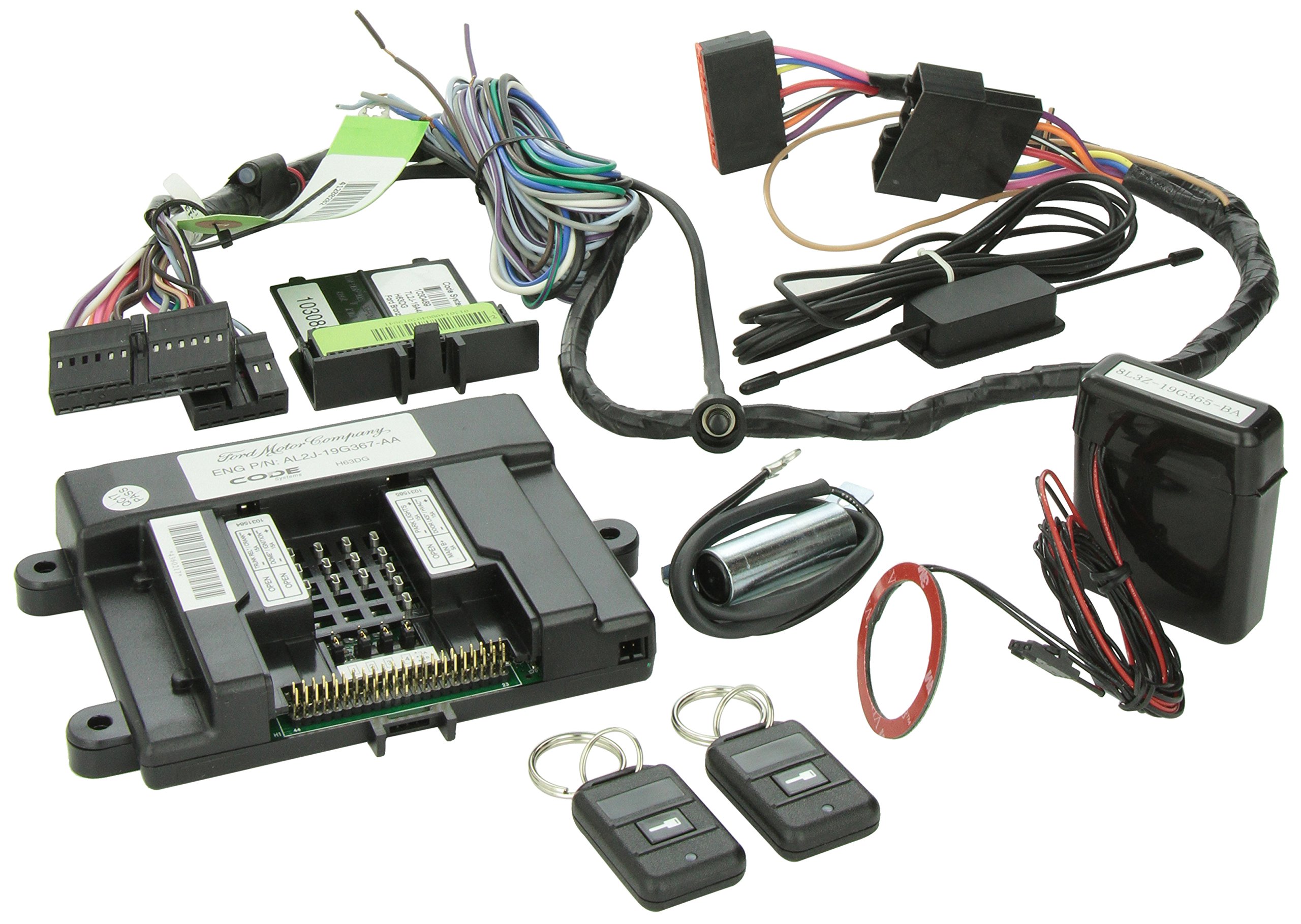
Image: Overview of the Genuine Ford Remote Start System components. This includes the main control module, various wiring harnesses with connectors, an antenna, a cylindrical component (possibly a siren or sensor), a red ring-shaped component (likely an immobilizer bypass coil), and two remote key fobs.
- Main Control Module (Ford P/N: AL2J-19G367-AA)
- Wiring Harnesses (various types, including those with multi-pin connectors and antenna cable)
- Antenna Module (8L3Z-19G365-BA)
- Two Remote Key Fobs
- Immobilizer Bypass Module/Coil (red ring component)
- Additional components as per specific vehicle application.
Safety Information
- Installation should only be performed by a qualified technician.
- Ensure the vehicle is parked on a level surface with the parking brake engaged before installation or testing.
- Disconnect the vehicle's battery before beginning installation to prevent electrical shorts.
- Do not operate the remote start system in enclosed spaces without proper ventilation.
- Keep remote key fobs out of reach of children.
Setup and Installation
Note: Professional installation is highly recommended for this Genuine Ford Remote Start System due to the complexity of vehicle electrical systems and security features. Incorrect installation can lead to vehicle damage or system malfunction.
Pre-Installation Steps:
- Verify vehicle compatibility (2007-2009 Ford Focus +Electric).
- Gather necessary tools (wire cutters, strippers, crimpers, multimeter, soldering iron, heat shrink tubing, electrical tape, vehicle-specific trim removal tools).
- Locate the vehicle's wiring diagrams for the specific model year.
- Disconnect the negative terminal of the vehicle's battery.
Installation Procedure (General Guidelines):
- Mount the Control Module: Select a secure, dry location within the vehicle's dashboard or under-dash area, away from excessive heat or moisture. Ensure the module is mounted firmly to prevent rattling.
- Connect Main Power and Ground: Identify the vehicle's constant 12V power source and a reliable chassis ground point. Connect the main power and ground wires from the remote start module harness.
- Ignition and Accessory Connections: Connect the ignition, accessory, and starter wires from the module harness to the corresponding wires in the vehicle's ignition harness. Use a multimeter to verify correct wire identification.
- Door Lock/Unlock Connections: Connect the door lock and unlock wires from the module to the vehicle's central locking system.
- Brake and Hood Pin Connections: Install and connect the brake pedal switch input and hood pin switch. These are crucial safety features that prevent remote starting if the brake is pressed or the hood is open.
- Antenna Installation: Mount the antenna module (8L3Z-19G365-BA) on the windshield, high up and away from metal obstructions, for optimal range. Route the antenna cable neatly to the control module.
- Immobilizer Bypass: Install the immobilizer bypass module/coil as per the vehicle-specific instructions. This component allows the remote start system to temporarily bypass the vehicle's factory immobilizer during remote start.
- Wiring Management: Secure all wiring harnesses with zip ties or electrical tape to prevent chafing or interference.
- Reconnect Battery: Once all connections are secure and verified, reconnect the vehicle's negative battery terminal.
Programming Key Fobs:
Refer to the specific programming instructions included with your remote start system or consult a Ford service manual. Typically, this involves a sequence of ignition key turns and button presses on the remote fobs to link them to the control module.
Operating Instructions
Remote Starting the Vehicle:
- Ensure the vehicle is in Park (P) and the parking brake is engaged.
- Press the remote start button on your key fob (usually indicated by a circular arrow or a specific icon) two times within 3 seconds.
- The vehicle's parking lights will flash, and the engine will start.
- The engine will run for a pre-set duration (e.g., 10 or 15 minutes) and then shut off automatically.
Entering the Vehicle After Remote Start:
- Unlock the vehicle using the remote key fob or the vehicle's door key.
- Enter the vehicle.
- Insert the ignition key into the ignition and turn it to the ON/RUN position (do not turn to START).
- Press the brake pedal. The remote start system will disengage, and the vehicle will transfer to normal key operation.
Shutting Down the Vehicle Remotely:
To turn off the vehicle remotely after it has been remote started, press the remote start button on your key fob two times within 3 seconds again.
Door Lock/Unlock:
Use the lock and unlock buttons on the remote key fob to secure or open your vehicle's doors.
Maintenance
- Key Fob Battery Replacement: If the range of your remote key fob decreases significantly, the battery may need replacement. Refer to the key fob's specific instructions for battery type and replacement procedure.
- System Inspection: Periodically check the wiring connections to the remote start module to ensure they are secure and free from corrosion.
- Keep Clean: Keep the remote key fobs clean and dry. Avoid exposing them to extreme temperatures or direct sunlight for prolonged periods.
Troubleshooting
| Problem | Possible Cause | Solution |
|---|---|---|
| Vehicle does not remote start. | Vehicle not in Park; parking brake not engaged; hood open; low battery in key fob; system not armed; wiring issue. | Ensure vehicle is in Park and parking brake is engaged. Close hood. Replace key fob battery. Check system status. Inspect wiring connections. |
| Reduced remote range. | Low key fob battery; antenna obstruction or poor placement; radio interference. | Replace key fob battery. Ensure antenna is clear of metal and properly mounted. Move away from sources of strong radio interference. |
| Vehicle shuts off immediately after remote start. | Brake pedal pressed; hood opened; vehicle security system interference; immobilizer bypass issue. | Ensure no accidental brake pedal press. Check hood pin switch. Consult a professional for security system or immobilizer bypass diagnosis. |
| Key fob buttons unresponsive. | Dead key fob battery; key fob out of range; key fob unprogrammed. | Replace key fob battery. Move closer to the vehicle. Re-program key fob if necessary (refer to programming section). |
If troubleshooting steps do not resolve the issue, contact a certified Ford service technician.
Specifications
- Model Number: 7L2Z-19G364-AA
- OEM Part Number: 7L2Z19G364AA
- Manufacturer Part Number: 7L2Z-19G364-AA
- Compatible Vehicles: 2007-2009 Ford Focus +Electric (and other compatible Ford, Lincoln, Mercury models as specified by Ford)
- Product Dimensions: Approximately 20.32 x 20.32 x 20.32 cm (8 x 8 x 8 inches)
- Item Weight: Approximately 953 g (2.1 lbs)
- Special Features: Electric remote start functionality
- Manufacturer: Ford
Warranty and Support
This Genuine Ford Remote Start System is covered by Ford's standard warranty for genuine parts. Please retain your proof of purchase for warranty claims. For specific warranty terms and conditions, refer to the documentation provided at the time of purchase or contact your authorized Ford dealer.
For technical support or service, please contact your authorized Ford dealership or a certified automotive technician specializing in Ford vehicle systems.